Entering GPS coordinates into the Navigation system

TeaMan

New member
I have a 2020 Offroad Premium 4Runner and would like to enter gps coordinates into the nav system. My coordinates are in latitude and longitude. example: N34d45'56.7", W98d34'43.9". I tried entering 34.45.567, 98.34.439 and it said couldn't be found. I tried dropping the last number and it said the same thing. I tried just the latitude coordinate with the same result. The d in my hypothetical example represents the degrees symbol.

I read that you are supposed to be able to enter coordinates, but the manual doesn't show it, and it doesn't seem to work. Anyone have any luck with this or know how to do it?

I'm doing it from the search screen where you'd enter an address. I couldn't find a special search type for GPS coordinates.

Thanks
TeaMan
 
Register to hide this ad
My 2013 only uses Degrees, minutes and seconds format. I use a converter app to get other formats into this format. Example below from decimal to degrees minutes seconds.

43.2378 N
120.6709 W

becomes

43 14 11.0 N
120 38 8.99 W

It's a pain but it works. Check my numbers and post where this is.

Our 2018 Sienna does not allow the use of coordinates, but you can move the map around to any location then mark it to save. That works for the Sienna, but if you are looking for an off road area for a 4Runner it may not be close enough although I have taken the AWD Sienna places that should have been for the 4Runner with the above method.
 
Last edited:
My 2013 only uses Degrees, minutes and seconds format. I use a converter app to get other formats into this format. Example below from decimal to degrees minutes seconds.

43.2378 N
120.6709 W

becomes

43 14 11.0 N
120 38 8.99 W

It's a pain but it works. Check my numbers and post where this is.

Our 2018 Sienna does not allow the use of coordinates, but you can move the map around to any location then mark it to save. That works for the Sienna, but if you are looking for an off road area for a 4Runner it may not be close enough although I have taken the AWD Sienna places that should have been for the 4Runner with the above method.

With the degrees, minutes and seconds above, how do you actually enter it into the search? Do you put the degrees number then a space, then the minutes a space then seconds then space followed by N or W just like you have it above? Then how do you separate them, using a comma? Would it look like 43 14 11.0 N, 120 38 8.99 W?
 
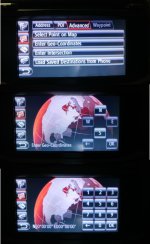
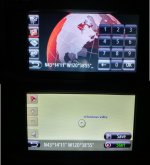
Your system is newer and may look different, hope this helps - screenshots from mine follow. The last number - seconds, would not enter 8.99, just put in something it will accept and it will be close. You can see from the locator on the final map page. If it was zoomed in, it would show the roads too. You will need to hit N and W before entering the numbers.
 

Attachments

  • GPS1.jpg
    GPS1.jpg
    102 KB · Views: 3,420
  • GPS2.jpg
    GPS2.jpg
    58.6 KB · Views: 3,431
2020 is different

Thanks BobsTrail. It appears that the 2020 is very different. I don’t have a separate area that allows me to enter GPS coordinates like you do. There are 4 options, two have to do with an address, the first is search which brings a keyboard up that you can type pretty much anything you need from POI to address, the other is favorites that you already saved. One strange thing is, it doesn’t appear to allow you to name the favorite or saved address. It gives it the address as the name. It almost appears that they removed the ability to enter GPS coordinates all together. I may have to try to contact Toyota directly and ask. I was hoping that I could simply have the right format and be able to type it into the search from the keyboard, but it doesn’t apprear so.

Thanks
TeaMan
 
If you have AirPlay, you can now have GaiaGPS app show up as an AirPlay app in the console screen.


Sent from my iPad using Tapatalk
 
TeaMan, I'm wrestling with the same issue. I use the nav system to get me to the start of a trail where I use Gaia GPS routing and tracks, and to do that with my 2014 T4R I could enter the geo coordinates. But can't seem to do that with my 2020 TRD ORP. I did find that if I move the map on the display I can enter a destination by touching the map. but it's a PITA to have to search around for a location and not be able to enter coordinates. Somewhere there must be a solution . . .
 
When I don't want to mess with the GPS conversion and entry on my 2013 I use a tablet with Google maps with offline maps. I save a marker on the screen and have my co driver watch the map and let me know when we are approaching the marker. I sometimes use a series of markers if more than 1 point is needed. It works but -----
 
I’ve found that I can make a patchwork system using Android Auto and Google Maps. I set up an interim destination using coordinates on GMaps, using Android Auto in my 4Runner, and the system gets me to that interim destination. For my overland route, I set up my detailed route and waypoints on Gaia, with a starting point of that interim destination, and switch over from GMaps/AA to Gaia on my phone when I get to the interim destination. But since Gaia doesn’t work with Android Auto, I have to mount my phone on the dashboard and navigate the Gaia route from its display. It’s a cumbersome PITA, but it works. Another solution is to switch from my Android phone to an iPhone and CarPlay, but that’s a whole other level of fun . . .
 
If you have AirPlay, you can now have GaiaGPS app show up as an AirPlay app in the console screen.


Sent from my iPad using Tapatalk

Don't have my 4runner (yet!) but are you saying that... you could also use this+google maps, airplay wireless? Or does your phone still have to be plugged in to see anything on the 8" screen?
 
When I don't want to mess with the GPS conversion and entry on my 2013 I use a tablet with Google maps with offline maps. I save a marker on the screen and have my co driver watch the map and let me know when we are approaching the marker. I sometimes use a series of markers if more than 1 point is needed. It works but -----

Ditto. Just on my phone for now.

Pre download the maps for the area and use offline. Works well.
 
Here is how I got it to work.

You can enter GPS coordinates in Decimal Degrees format.. Separate the pair with a comma. So something like 31.0000, -91.0000 should result in the location of those GPS coordinates.

To place a name on a favorite. I'm doing this from memory so hopefully I remembered it right.

First search for a place and save it. Then enter the Menu and under Settings look for Navigation. In the settings for Navigation there should be a selection for Favorites. If you pull that up it should list your Favorites. If you tap on one it should pull up a panel where you can change the Name of the Favorite. The default name seems to be the address.

Steve
 
You can enter GPS coordinates in Decimal Degrees format.. Separate the pair with a comma. So something like 31.0000, -91.0000 should result in the location of those GPS coordinates.

To place a name on a favorite. I'm doing this from memory so hopefully I remembered it right.

First search for a place and save it. Then enter the Menu and under Settings look for Navigation. In the settings for Navigation there should be a selection for Favorites. If you pull that up it should list your Favorites. If you tap on one it should pull up a panel where you can change the Name of the Favorite. The default name seems to be the address.

Steve

Can confirm the Decimal Degrees format works on the 2020. Thanks Steve
 
Can confirm the Decimal Degrees format works on the 2020. Thanks Steve

It does work! Thanks much to RunTheJoules for the help!
Here is a detailed explanation of how to make it happen, starting from the "Home" screen:
- Hit "Menu"
- Select "Destination", then "Search"
- Change "Type" to "123"
- Enter coordinates in format nn.nnnn,-nn.nnnn (only 4 digits after decimal!)
- Hit "search"
- "Save" the search result
- Press the "Menu" button
- Hit "Setup"
- Scroll down to "Navigation" and select it
- Select "Favorites", and select the destination just saved from above.
- Clear the name by backspacing
- Enter the name you want for the new destination
- Hit "OK"
- Hit "OK" again

That process should result in the location of the geographic coordinates being saved as a new destination. The only problem I had, other than being cumbersome, is that you have to enter only four digits after the decimal. When I entered five digits it didn't work.
 
I tried it on my 2022 T4R Nav and it didn't work. I guess they changed something, did anybody find out to to enter coordinates on 2022 version of Navigation system?
 
I tried it on my 2022 T4R Nav and it didn't work. I guess they changed something, did anybody find out to to enter coordinates on 2022 version of Navigation system?
I also tried on my 2022 without success. I tried many variations of syntax: 4 decimal places, 3 decimal places, with and without a space after the comma, all with no joy.

Download Gaia GPS to your phone or tablet and save yourself alot of frustration!
I think people who want to use the infotainment nav system are doing so to save frustration. The iPhone screen is frustratingly small, and the iPad is frustratingly clumsy to mount.
 
I also tried on my 2022 without success. I tried many variations of syntax: 4 decimal places, 3 decimal places, with and without a space after the comma, all with no joy.


I think people who want to use the infotainment nav system are doing so to save frustration. The iPhone screen is frustratingly small, and the iPad is frustratingly clumsy to mount.

Well I really had no choice, Canadian TRD Offroad comes with NAV but default. And since Nav system is there I would prefer to use it instead of mounting back my old Garmin GPS or a phone. I have maybe 25 or more GPS coordinates in my Garmin and I even prepared to enter them manually to my Toyota Nav, but I can't find a way to do so...
 
What are the coordinates? Are they places with addresses? Are they places in the wilderness next to a fire road or off road trail?

My GPS coordinates are places with no address - camp sites, trail heads, lake access points, points of interest on logging roads and so on.
 
My GPS coordinates are places with no address - camp sites, trail heads, lake access points, points of interest on logging roads and so on.
I thought it might be something of that nature. Here’s a possible workaround (it works on my 2022 anyway): from the map screen, put the map into 2D mode. If you swipe to move the visible part of the map off of your current location a crosshairs will appear, along with buttons across the bottom: Go Directly, Add to Route, and Save. Zoom and scroll the map to center your intended destination beneath the crosshairs and tap the save button. Rename your saved destination by going to Menu->Setup->Navigation->Favorites. Not as precise as coordinates, but given the types of destinations you’re saving I think it's close enough.
 
Last edited:

Members online

Forum statistics

Threads
278,307
Messages
3,554,054
Members
248,016
Latest member
Advally Service

Trending content

Back
Top