Entune problems....replace or fix?

holcombr48

Junior Member
Good Morning....recently bought a 2012 "limited" . I did not buy the extra warranty. Now I am experiencing problems with the radio. Bluetooth freezes up and sometimes the ipod streaming quits. It only has 24,000 miles , but, the 3 year warranty is gone.

Question 1 Is it worth fixing and how much?
Question 2 What Has been the recommended replacement?
It has Navigation...but that is an app that uses verizon time and space. I could live with a stand alone Garmin.
I am loving the rig except for the stereo (am & fm works fine)
 
Register to hide this ad
Good Morning....recently bought a 2012 "limited" . I did not buy the extra warranty. Now I am experiencing problems with the radio. Bluetooth freezes up and sometimes the ipod streaming quits. It only has 24,000 miles , but, the 3 year warranty is gone.

Question 1 Is it worth fixing and how much?
Question 2 What Has been the recommended replacement?
It has Navigation...but that is an app that uses verizon time and space. I could live with a stand alone Garmin.
I am loving the rig except for the stereo (am & fm works fine)

Hi holcombr48,

First off we both have the very same truck e.g., 2012 limited w-entune/navi. When I got the truck I had nothing but trouble with entune 'pairing' issues each day; I'd have to pair (cycle) BT everyday before starting the truck or another entune 'failure' would be inevitable. The first version of entune was v-178 N/G. The version that replaced it was ver 3.2. but that ver had it's own troubles. Then back in Sept of 2015 the vers 5.1 was the big fix! It was offered free on Toyota's website and could be loaded in an 2-G (min size) Thumb-drive: "see link": >> https://securedp.toyota.com/download-app/toyotaHeadUnits ...and the file that you want to load says, swdl.isso https://securedp.toyota.com/download-app/toyotaHeadUnits )

The only problem was that it worked in my 2012 limited 4Runner (NON JBL) HD by using an 8-g flashdrive, loading the software onto it via laptop and then loading it through the 2.0-USB in the glovebox... but some members (sadly) still had to get the download from the dealership! Please let us all know your results so we can help direct you to get this resolved; many of us have had success here, why not you(?)!

rigtec
 
Last edited:
Had the exact same issue in my 14 Trail Premium. Fixing it was a simple as a software update at the dealership. Mine was under warranty, so I'm not sure how much (if anything) they would charge for this service.
 
Honest opinion: if the update doesn't work I would chuck it. For the cost of the unit I'm sure you could install a full stereo(I'm assuming). Decent brand speakers from Best Buy(it's not hard to find better speakers than even the jbl) pick a head unit, and a shallow mount sub with amp will sound better than the stock equipment. I have the base stereo. The jbl is pretty terrible to me as well. I wouldn't spend the money on the oem receiver. At all. Unless it's the worlds cheapest oem piece you could have all that installed and have car play/ whatever android uses.
 
Hi holcombr48,

"...Then back in Sept of 2015 the vers 5.1 was the big fix! It was offered free on Toyota's website and could be loaded in an 2-G (min size) Thumb-drive: "see link": >>

Hi folks (to those to whom this may concern),

I'm very sorry... the links that I posted yesterday; which were used to perform the ENTUNE 5.1 UPDATE for my 2012 4Runner proved to be inoperative e.g., dead links. So I searched for the proper web-links for a FREE Entune O.S. (Operating System) download; it has been moved around a bit but still appeares to be a valid download from Toyota so try this! Here's what I found>>>: http://download.naviextras.com/content/!application/Toyota/OS/EU_Low/2011_12_08/swdl.iso IIRC, you only need a fresh 2gb Flash drive. Create a new folder on your desktop using a FAT-32 format. Download the swdl.isso file; which I do believe is complete **no additional components needed for this update**. Just Drag-n-Drop the swdl file into the new folder, name it "FAT-32 swdl.isso". Insert your new flash drive into the computer's usb 2.0 port, hover the arrow over the swdl file (now right click) and choose "Send to" F-drive... you should see the "load graphics indicator"! Once that's done take the flash-drive out to the truck... the complete set of directions will be there to guide you.

CAUTION: Once communication between the F-drive and the truck's processor have begun communicating DO NOT 'for any reason' (shut the truck off, check to see if it's actually loading,...etc ) interrupt this file load process or your fresh downloaded file will likely be damaged! If anyone's still interested in seeing that process in operation, here's what should happen:

"Last night (Sept 18, 2015) I downloaded the 5.1 link into a Fresh 8GB flash-drive and it seemed to load the way it did in the instructions on the Toyota Entune support page. Today (with fingers crossed), I got in the truck and started it, plugged the flash-drive into the usb portal and watched: Completely user friendly"
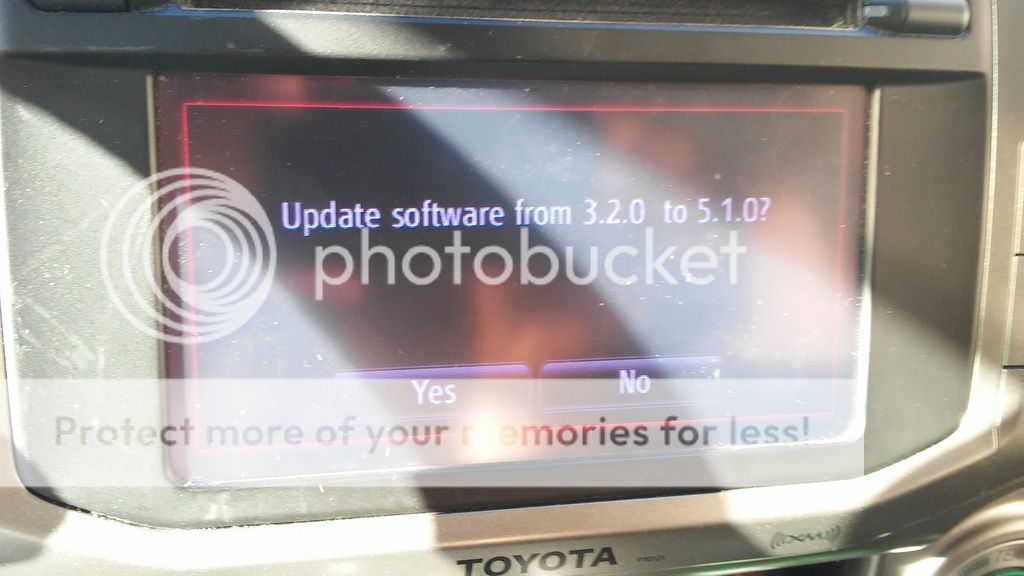


Here's a link to a thread that I started back in September, but there are quite a few tutorials around here with favorable results! Hope this helps each and everyone of you who's been struggling to get some A-Z assistance! http://www.toyota-4runner.org/5th-gen-t4rs/206008-new-version-entune-available.html

Best regards!

 
So, do you have the 5.1 version available or know where to get it? I can find 5.2 but don't want to try that yet, as one user bricked his unit installing 5.2.
 
Is that file from Dec 2011 - as it suggests in the link? If so, then it's too old for 5.1.

But, if you say it's legit, I'm willing to try it.
 
Hmm... well actually I was only going by what Rigtec said, I downloaded it, but I haven't tried it yet.... so, I'm not positive
 

Members online

No members online now.

Forum statistics

Threads
278,304
Messages
3,554,041
Members
248,016
Latest member
Advally Service

Trending content

Back
Top