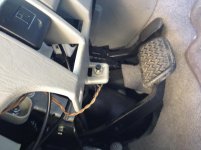
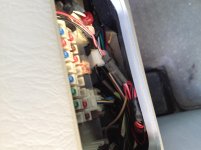
Found a button. What does it do?

zerge916

New member
I found a button under my steering column but it doesn't seem to do anything.

It looks like its connected to the little light by the diff lock button. The light doesn't seem to do anything either. The wiring from both the light and the button go to the wiring harness that's by the fuse box under the steering wheel.

I was thinking it could be an alarm system but I don't know where to looks next to tell for sure.

Any ideas?
thanks
 

Attachments

  • IMG_1166.jpg
    IMG_1166.jpg
    139.2 KB · Views: 9,449
  • IMG_1168.jpg
    IMG_1168.jpg
    133.3 KB · Views: 9,804
  • IMG_1169.jpg
    IMG_1169.jpg
    129.9 KB · Views: 6,338
Last edited:
Register to hide this ad
I don't know for certain, but I think that's the trigger for an aftermarket smoke screen. When you're being chased by the cops, press the button and a small amount of oil is squirted into the hot exhaust pipe and that makes thick white smoke billow out behind you.
Check the oil reservoir, it might be empty which is why it doesn't seem to do anything.
 
On a previous car I had a PB switch. If not pushed before starting, it would shut down the fuel pump one minute after start.
 
I had one just like that in my Tacoma, worthless as it was, you would use it to set it at the current pressure. 6lbs under that and the light would come on

My tpms is on currently on my dash but the light under the steering wheel isn't on though. hmm
 
maybe this....?

Probably that is the button to enable valet mode on an aftermarket alarm system, and the light in the dash would blink when armed as a theft deterrent. :yawn:
If the alarm isnt working, you could remove the button and get a new dummy plate to replace where they drilled for the light. Note to just be careful if there is a start kill relay that you reconnect those wires properly but if the alarm works, and you think you might want to use Valet mode, just google for possible methods to learn how to enable it for your alarm.

Found this:

What is Valet Mode?
We all need to let other people operate our vehicle at some point or another. Whether it's a valet at a restaurant or a mechanic at your local garage. With valet mode, you can disarm your alarm and hand the keys over without the worries of handing over your alarm system.


Enable Valet Mode

To enable valet mode, follow the quick instructions below:
You will first need to locate your system’s "valet switch". It is a small, black, momentary button that is usually mounted in an accessible, but not obvious location towards the bottom of the driver’s side dash. A common location would be on the driver’s kick panel cover, or on the side of the center console (if the vehicle has one).

Once this switch is located you will need to put your key into the ignition cylinder and turn it to the "ON" or "RUN" position. The alarm will trigger again at this point.

Immediately after turning the key to this position you will need to press and release the valet switch one time. Make sure it is a quick tap. Holding the valet switch too long will not work.

About one second later the alarm should turn off.

**Note: During installation the installer can program this button for anywhere between 1 to 5 presses, however most installers leave it at the factory default of one press. If one press does not work, repeat the process and try pressing the valet switch two times instead. Repeat the process up to five presses or until the system disarms.

If you are unable to locate the valet switch, or it seems to be inoperative, you will need to contact the shop that installed the system

 
Probably that is the button to enable valet mode on an aftermarket alarm system, and the light in the dash would blink when armed as a theft deterrent. :yawn:
If the alarm isnt working, you could remove the button and get a new dummy plate to replace where they drilled for the light. Note to just be careful if there is a start kill relay that you reconnect those wires properly but if the alarm works, and you think you might want to use Valet mode, just google for possible methods to learn how to enable it for your alarm.

Found this:

What is Valet Mode?
We all need to let other people operate our vehicle at some point or another. Whether it's a valet at a restaurant or a mechanic at your local garage. With valet mode, you can disarm your alarm and hand the keys over without the worries of handing over your alarm system.


Enable Valet Mode

To enable valet mode, follow the quick instructions below:
You will first need to locate your system’s "valet switch". It is a small, black, momentary button that is usually mounted in an accessible, but not obvious location towards the bottom of the driver’s side dash. A common location would be on the driver’s kick panel cover, or on the side of the center console (if the vehicle has one).

Once this switch is located you will need to put your key into the ignition cylinder and turn it to the "ON" or "RUN" position. The alarm will trigger again at this point.

Immediately after turning the key to this position you will need to press and release the valet switch one time. Make sure it is a quick tap. Holding the valet switch too long will not work.

About one second later the alarm should turn off.

**Note: During installation the installer can program this button for anywhere between 1 to 5 presses, however most installers leave it at the factory default of one press. If one press does not work, repeat the process and try pressing the valet switch two times instead. Repeat the process up to five presses or until the system disarms.

If you are unable to locate the valet switch, or it seems to be inoperative, you will need to contact the shop that installed the system

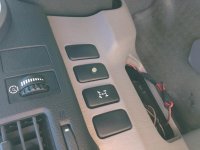
if I remember the truck had to be on but not started, you would push the button until the tpms light flashed, worth a shot?

I'll give both of these a try once I get the chance. If I still can't figure it out I'll try to find the contact info of the previous owner, he probably knows. Thanks for your help.
 
Do a google search for CSI alarm. I have it on my truck. The button looks just like yours. There is a pdf online with instructions.
 

Members online

Forum statistics

Threads
278,305
Messages
3,554,042
Members
248,016
Latest member
Advally Service

Trending content

Back
Top