Hard Wiring Problems

atalarico

Senior Member
Hey all,

I'm having an issue trying to hard-wire my new dashcam. A few days ago I hooked it up using a add-a-fuse plug. It worked for maybe a day and then I noticed the power goes out randomly while the camera is on. I confirmed that it's not the camera by simply plugging it in to a cigarette lighter adapter. No issue.

I have swapped add-a-fuse plugs without luck. I have tried every fuse slot under 10 amps. I've tried a different Garmin hard-wiring kit. What the heck am I doing wrong here?

I was using the radio/cigarette lighter fuse slot. With a fuse plugged in the A-slot of the add-a-fuse the radio and cigarette power adapters work. With just a fuse plugged in to B-slot, the camera doesn't work.

I'm at a loss here. I tried looking at my map lights to see if I could do that but I'm not sure what I'm looking at there either.

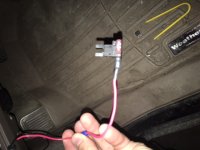
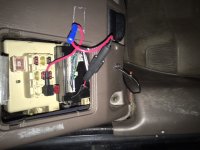
Picture one shows it plugged in. I didn't crimp the new add-a-fuse because I wanted to be able to test it before I crimp it. The original one was crimped for the record. The ground wire is hooked into this really weird screw that was down there from the previous owner. I think the alarm ground wire was hooked up to it at one point or something. Is there a better place to ground this? EDITED TO ADD: I just saw on another video that yes, this is not a great grounding location. There's not really any connection to any metal with that screw as far as I can tell. I'll be changing that around tomorrow. Is there any reason that would prevent it from working now though?

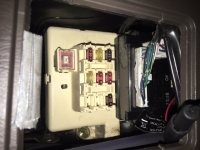
Picture two shows the add-a-fuse with just the B-slot fuse installed. No joy when I plug it in to the fuse slots (right side up or upside down).

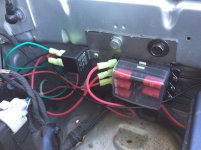
Picture three is just my fuse box, with the radio/cig lighter fuse out. It's the middle one on the far left.
 

Attachments
  • IMG_1164.JPG
    IMG_1164.JPG
    100.9 KB · Views: 288
  • IMG_1163.JPG
    IMG_1163.JPG
    93.4 KB · Views: 273
  • IMG_1162.JPG
    IMG_1162.JPG
    103.4 KB · Views: 338
Last edited:
Register to hide this ad
Try tapping into your radio ground. It is were I had mine grounded to when I had it installed. Never an issue had it for 2yrs maybe more.
 
So I had a few minutes before work to try a different ground bolt. I just went for lower left dash panel bolt (the big long dash panel piece that is below the steering wheel). It screws into metal as far as I could tell, so I wrapped the bare ground cable around that and it works now.

Should I get one of those round ring kind of cable ends to attach to the ground cable, or is it fine as is?

Turns out grounding is important, eh!? For someone that used to know how to solder and mess with electronics way more, I sure don't know squat!

Thanks for the help all!
 
Behind the left kick panel you'll find some ground points

Yeah, I was looking for those, but I didn't see any bolts jumping out at me down there. There are a lot of other wires and in-line fuses/relays down there though. Also, some old red push-button panic switch from the old alarm system.

I'll take a pic later because I want to know where specifically I should replace some grounding bolts. I'll be installing a hardline for a radar detector at some point too, but I hear that's much easier through the map-lights. I opened that cover up last night but couldn't tell where I should be cutting and splicing so I left it alone.
 
Look for bolts with factory wiring already grounded and use solderless terminals and definitely not the bare wire under the screw
 
Conflicting advice! Haha. I appreciate it. I'm going to go back and get a solderless terminal from Radioshack tomorrow then. Yes, we still have a Radioshack a few blocks from me, and thank god they didn't sell of their little electronics section in favor of making room for more crap cell phones and RC choppers.
 
Add-a-fuses need 2 fuses in place to work. You should be running two 10a fuses in the add-a-fuse. I learned the hard way as well, and asked questions. Someone pointed it out to me, added another fuse, and it worked. This would be the reason you're not getting power coming through the fuse.
 
Add-a-fuses need 2 fuses in place to work. You should be running two 10a fuses in the add-a-fuse. I learned the hard way as well, and asked questions. Someone pointed it out to me, added another fuse, and it worked. This would be the reason you're not getting power coming through the fuse.

Yeah, I figured that part out too. The picture from last night was me trying to follow the directions included with the Add-A-Circuit. It says to plug in a fuse in the "B" slot first (the rear slot) and plug it in with your new accessory connected, and see if it works. Once you have the new accessory confirmed to be working you're supposed to add the original fuse you pulled to the "A" slot.

The original fuse for the radio/cig lighter was 15amps, and that one is plugged into the "A" slot. I have a 7.5 amp plugged in to the "B" slot for Garmin Dashcam, which can't be more than 1 amp. Should I really go up to 10?!
 
Yeah, I figured that part out too. The picture from last night was me trying to follow the directions included with the Add-A-Circuit. It says to plug in a fuse in the "B" slot first (the rear slot) and plug it in with your new accessory connected, and see if it works. Then add a fuse to the "A" slot once you've figured out any issues that are preventing your accessory from getting power.

The original fuse for the radio/cig lighter was 15amps, and that one is plugged into the "A" slot. I have a 7.5 amp plugged in to the "B" slot for Garmin Dashcam, which can't be more than 1 amp. Should I really go up to 10?!

You don't have to go up to 10 amp fuses. I was just using it as an example since you already had one in place (maybe since the picture is blurry).
 
You don't have to go up to 10 amp fuses. I was just using it as an example since you already had one in place (maybe since the picture is blurry).

Got it! Thanks for that.

I'm excited to have this thing now. When it was working for my commute the other day I kept thinking of how hilarious it's going to be to grab particularly clips of particularly ridiculous things people do here and add the Yakety Sax song over it (the Benny Hill theme).

PS I've said this before, and I'll say it again...I love your Don Hertzfeldt gif avatar.
 
Thanks for the advice all.

JFYI, the Garmin Dashcam 20 sucks. I should have listened to the reviews but took a chance. I really *wanted* to like this Dashcam, but Garmin can do so much better for this price.

1.) The video files aren't continuous. What I mean by that is if you take a 30 minute drive (your commute or off-road adventure) and you go to look at the video files as they've saved, they are saved in anywhere between 1 and 5 minute increments. I contacted Garmin customer support thinking this was a defect or firmware issue, but nope...that's how it was designed.

2.) While wide-angle is great for picking up what is going on to the left and right of the front of your vehicle, it makes it really difficult to read license plates unless the person is a few feet in front of your bumper. I can only imagine the disappointment of capturing video if you are involved in a hit and run only to see that you can't make out the license plate.

3.) The GPS speed data isn't in a useful format anywhere! You can't do a map overlay with it or get speed information out of the video data. Dumb.

I'm going to try and return mine and going to try something else that is also a mini-usb wire because I don't want to have to re-wire my car for a different cam. Any recommendations?
 
Oh, so after more research on my own, I found that you can actually edit and combine these tiny video clips into one long video with mapping and speed data! You have to load them in the Garmin Dash Cam Video Player software on your computer, but it looks like it should do the trick. Dash Cam Player | Garmin | United States

It still amazes me that the Garmin Customer Service Rep didn't even mention this though and I had to figure it out on my own. Duhhhh.
 
Thanks for the advice all.

JFYI, the Garmin Dashcam 20 sucks. I should have listened to the reviews but took a chance. I really *wanted* to like this Dashcam, but Garmin can do so much better for this price.

1.) The video files aren't continuous. What I mean by that is if you take a 30 minute drive (your commute or off-road adventure) and you go to look at the video files as they've saved, they are saved in anywhere between 1 and 5 minute increments. I contacted Garmin customer support thinking this was a defect or firmware issue, but nope...that's how it was designed.

2.) While wide-angle is great for picking up what is going on to the left and right of the front of your vehicle, it makes it really difficult to read license plates unless the person is a few feet in front of your bumper. I can only imagine the disappointment of capturing video if you are involved in a hit and run only to see that you can't make out the license plate.

3.) The GPS speed data isn't in a useful format anywhere! You can't do a map overlay with it or get speed information out of the video data. Dumb.

I'm going to try and return mine and going to try something else that is also a mini-usb wire because I don't want to have to re-wire my car for a different cam. Any recommendations?


I have the street guardian in my 99 4runner and a Blackvue 650 in my 2012 LE. I love both of them. They are
Both low profile and record in HD. The Blackvue is a dual camera...front and rear.
Just like yours, they only record in 1, 3 or 5 minute segments. That allows the camera to over write older files when it runs out of memory. I use the software that came with them to edit files, combine videos and input GPS stuff when needed.
I love both of mine. That are watching my vehicles even when the truck is turned off.
I used the add a fuse on the street guardian without issues. I purchased the power controller for the Blackvue. Both work very well.

Hope you find something that you like.
W
 

Members online

Forum statistics

Threads
278,304
Messages
3,554,041
Members
248,016
Latest member
Advally Service

Trending content

Back
Top