Help Fixing my JBL Nav / Radio -- need wiring info

pjbrownva

New member
*** WHAT I HAVE --
I picked up a new 2008 Limited V8 this Friday, and the factory JBL Radio w/ Navigation (Model E7008) died on the drive home.

*** WHAT I NEED --
I need info on the wiring connections, the fuses, a link or login to download the 2008 FSM, and help trouble shooting.

(If someone can PM me a link or login for the FSM, I'll only use it once to download the info.
For example, if the FSM is spread across multiple pages on a website, I'll use wget to download the whole site,
and then be done. I won't need or use your login again).

---------------------------------------------------
HERE'S MORE INFO (Photos to come)


*** THE UNIT---

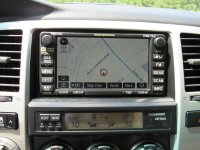
2008 4Runner Limited V8 with option package. Includes Model E7008 JBL Radio with Touch Screen Navigation.
Photo attached of the unit working... before it died.


*** THE PROBLEM --

Driving the car home, it went dead.

I had stopped at a Walmart, and bought Febreeze & paper towels the car had a faint smell of cigarettes. I sprayed the whole interior down with Febreeze, but I avoided the radio (electronics don't like water!). After I was done, I restarted the truck, and the radio was dead. No power, no lights, nothing!


*** MY TROUBLE SHOOTING --

1) I visually inspected the Radio1 & Radio2 fuses in the engine compartment. Both appeared good. I haven't tested them with a Multimeter... yet.

2) I disconnected the battery, waited 15 minutes, and reconnected it. Still nothing.


*** SWAPPING RADIOS FAILED --

I have a Toyota JBL synthesis head unit from my old 2004 4Runner (I went aftermarket in that truck).

So I disassembled the dash in my new truck, pulled the JBL Nav unit out of my 2008, and plugged in the connectors that fit into my old 2004 JBL Synthesis CD / Cassette unit and To my surprise....

NOTHING! No power. No lights... nothing.

So maybe it's as simple as a fuse... maybe one that I haven't checked yet. (Note: the power mirrors also don't work).


So, at this point, I feel that my cleaning of the interior had nothing to do with the radio dying... at least that it didn't break the factory unit, because when I swapped in a different, good radio, that one didn't work either.

I'll add another post with what concerns me, and why I'm looking for info on fuses and the pinouts for the factory connectors.
 

Attachments
  • hw_800.jpg
    hw_800.jpg
    115.3 KB · Views: 6,012
Last edited:
Register to hide this ad
More info... What Concerns Me...

WHAT CONCERNS ME --

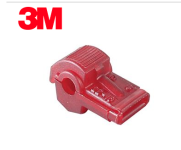
When I opened up the dash, there were many, many taps into the factory wires using those pinkish-red colored taps that provide a 90 degree plug in spade connection. (see attached photo).

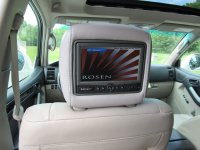
The car has two Rosen aftermarket DVD players in the Rear Headrests.
(Photo also attached).

Many of those taps are no doubt to integrate the back seat DVD players in with the factory system.

My concern is that some of those taps may have created a small break in one of the important factory wires. I know that they pierce and squeeze the wire they connect to, so it may be possible that one of the wires is broken at the location of the tap, and that could be the cause of the problem.

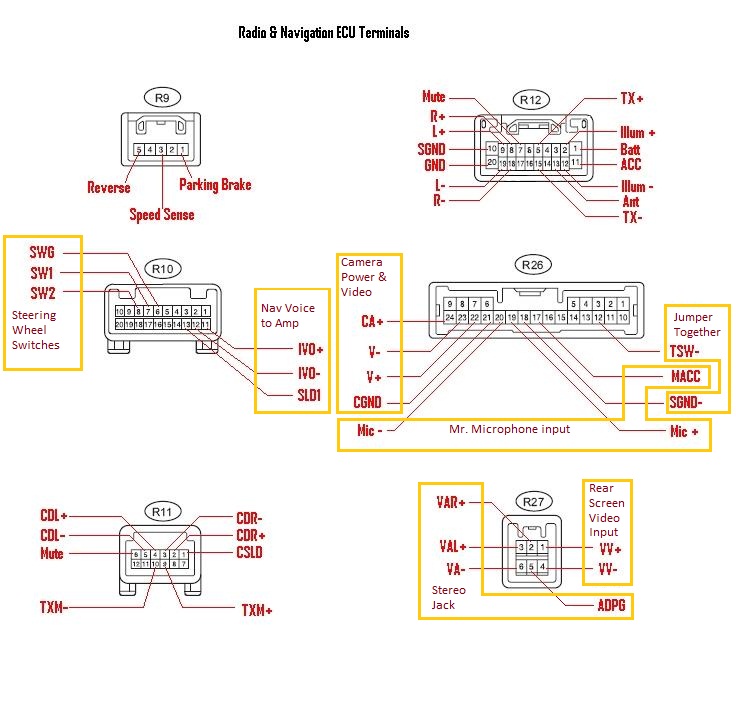
With pin-outs and wiring diagrams, and a little help, I can use my multi-meter to check for power at the important locations of the factory connectors.


*** ADDITIONAL EQUIPMENT --

There were other wires, so I followed some, and under the dash I also discovered that separate GPS Tracking device (with cellular data support) was also installed in this vehicle. I looked up the model, and includes a service where you can set up geofencing, track the location of the truck, remotely unlock the doors if you are locked out, or even remotely disable the vehicle. I guess, for example, if were stolen. I don't know how many of these features are wired in and enabled, but, I'm fairly certain that this gizmo is a source of addition wire taps into the factory wiring.

*** TOGGLE SWITCH -- Lastly, there is a toggle switch that was added near the glove box.

it connects to two of the factory wires, and allows you to make or break a connection between them.

I'll get info on which two wires the switch connects to, and maybe someone can help me figure out its purpose. I don't recall if the switch was in the on or off position, so I don't know how to leave it, but neither radio works, or shows ANY signs of power regardless of the position.
 

Attachments

  • wireTaps.png
    wireTaps.png
    81 KB · Views: 2,861
  • Lg_800(1).jpg
    Lg_800(1).jpg
    104.7 KB · Views: 2,855
Say no more:

33602d1285706975-5th-gen-navigation-wiring-info-nav-radio-connector-pinouts-002.jpg


I also have an OEM NAV and rear headrest DVD monitors (Rosen too, but a different model).

I would suspect the wire taps as well. I never use those, I like to solder everything.

Good luck!

EDIT:

another thread about wiring diagrams throughout the 4th Gen 4Runner (there is a link that will download a zip file. Good stuff to have in case).
http://www.toyota120.com/forum/showthread.php?t=2772
 
Last edited:
Say no more:

33602d1285706975-5th-gen-navigation-wiring-info-nav-radio-connector-pinouts-002.jpg


I also have an OEM NAV and rear headrest DVD monitors (Rosen too, but a different model).

I would suspect the wire taps as well. I never use those, I like to solder everything.

Good luck!

Thanks, Cookie. I'm on it now! :reddance:

If anyone can get my the 2008 FSM, I'd be grateful. PM's work fine!

TIA,

-Phil
 
WHAT CONCERNS ME --

When I opened up the dash, there were many, many taps into the factory wires using those pinkish-red colored taps that provide a 90 degree plug in spade connection

........

*** TOGGLE SWITCH -- Lastly, there is a toggle switch that was added near the glove box.

YIKES i had no idea the nav would be THIS interesting. considering this info, dollars to donuts the unit is fine and it is indeed some butchered wiring. and that toggle switch..........i'm really interested to see what you find here or if you lose your mind trying to fix pinched wires :lasercannon:

also, WTH with that GPS tracking device?
 
*** ADDITIONAL EQUIPMENT --

There were other wires, so I followed some, and under the dash I also discovered that separate GPS Tracking device (with cellular data support) was also installed in this vehicle. I looked up the model, and includes a service where you can set up geofencing, track the location of the truck, remotely unlock the doors if you are locked out, or even remotely disable the vehicle. I guess, for example, if were stolen. I don't know how many of these features are wired in and enabled, but, I'm fairly certain that this gizmo is a source of addition wire taps into the factory wiring.

.


also, WTH with that GPS tracking device?

those types of GPS tracking devices are quite common. It's not uncommon for a car lot install them to protect their investment till the contact is paid in full. It helps with doing a repo when people don't pay. Some lots actually make the customers pay for them.
 
YIKES i had no idea the nav would be THIS interesting. considering this info, dollars to donuts the unit is fine and it is indeed some butchered wiring.

You're right snowboard. The ACC fuse was blown... so that killed the radio and the power mirrors. However, that's not the ROOT cause of the problem.

The root cause was one of the taps was loose. It was connected to two relays, and because it was loose it caused the relays to cycle on and off intermitently and frequently. The relays also didn't have a diode attached to them. For those who don't know, when a relay is disconnected, it can cause a huge voltage spike. You can and should wire in a diode between two of the terminals to allow this spike to safely discharge.

So the short cycling of the relays caused by the loose wire tap caused the ACC fuse to blow.

If fixed the problem for now... I'll probably ditch the mechanical realys ,and go with a transistor based solution instead. It's more durable, and less prone to wear out.


and that toggle switch..........i'm really interested to see what you find here or if you lose your mind trying to fix wires :lasercannon:

The toggle switch is to allow me to operate all of the radio and GPS features even while I'm cruising down the highway at full throttle.

I think I'll create a label that says "distracted driving mode", and add an indicator light that comes on when it's enabled. :biggrin1: :biggrin1:

also, WTH with that GPS tracking device?

those types of GPS tracking devices are quite common. It's not uncommon for a car lot install them to protect their investment till the contact is paid in full. It helps with doing a repo when people don't pay. Some lots actually make the customers pay for them.

I'll ask the used car deal who sold it to me. I put half down, and financed the other half through a respectable credit union at 3.6% interest, so it doesn't seem to me that I should warrant having one of those trackers in my car.... but you never know. Maybe the dealer or the credit union views it as cheap insurance and an easy way to repo the car if necessary.

I'm hoping that it's left over from the previous owner. I plan to look into having it put in an account under my name so that I can use it.

Last wiring issue.

The wiring is anything but clean, and there are several ground loops.
This shows up when you pop a DVD into one of the back seat players, and bring up the movie on the Nav's head unit. If the engine is off, the picture is perfect and the sound comes out of the JBL system and sounds AWESOME!

Start the motor and you get humming and wining with the audio, and the picture gets lines in it.

When I have time I plan to straighten out the wiring, and fix the grounding so that there is one common ground.

[MENTION=50507]CookieRoe[/MENTION], thanks for the schematics. They were a life saver!
 

Attachments

  • IMG_20150907_220451.jpg
    IMG_20150907_220451.jpg
    128 KB · Views: 2,839
  • IMG_20150908_020338.jpg
    IMG_20150908_020338.jpg
    132 KB · Views: 2,859
[MENTION=50507]CookieRoe[/MENTION], thanks for the schematics. They were a life saver!


Glad to be of help!

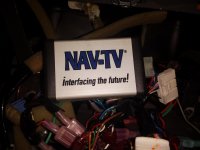
So you have a NAV/TV?? NICE!! Did you install it or did it come like that from a previous owner? Sorry for the questions, as I'm looking for a similar item for mine.

My Rx when I saw your picture of your SAT/TV:
cfc465b81108_sf_7.jpg


Good to hear you solved your problem!
 
Glad to be of help!

So you have a NAV/TV?? NICE!! Did you install it or did it come like that from a previous owner? Sorry for the questions, as I'm looking for a similar item for mine.

My Rx when I saw your picture of your SAT/TV:
cfc465b81108_sf_7.jpg


Good to hear you solved your problem!


It came with the truck. I'm still trying to figure out exactly what it does.
IIRC, it has two power wires, and two signal wires. I would have to look to see if it has anything else.

Can you tell me what it does? I found that I can play a DVD in the headrest and watch the movie on my Nav unit and hear the sound through my factory JBL system. The picture and sound are awesome... while the engine isn't running.

When the engine runs, there is lots of noise, but that's the fault of the the installer. When I have a chance, I'll clean up the wiring and especially the grounding, and maybe add some shielding, and everything should be fine.

-Phil
 
those types of GPS tracking devices are quite common. It's not uncommon for a car lot install them to protect their investment till the contact is paid in full. It helps with doing a repo when people don't pay. Some lots actually make the customers pay for them.

i hear you, just surprised it wasn't mentioned upon purchase, or removed upon proper financing. thats a huge violation for me. i dont even like riding around with my EZpass (toll deely) in the car as there are readers everywhere in the city.
 
i hear you, just surprised it wasn't mentioned upon purchase, or removed upon proper financing. thats a huge violation for me. i dont even like riding around with my EZpass (toll deely) in the car as there are readers everywhere in the city.

Yeah. I'll ask the dealer about it. If he put it in, I'm actually fine with it. I'll just insist that I get a login to the system, that way *I* can use it if I'm locked out our it's stolen.

If the dealer says he didn't put it in, I plan to tell him that I'll remove it then and sell it on ebay... unless, maybe someone else at his dealership put it in, in which case we can talk. :)

If it's left-over from the previous owner's purchase, then I'll see if I can have it activated. I actually view it as a plus. As long as you drive around with a cell phone turned on, you have no privacy anyway. You're voluntarily carrying a beacon that regularly checks in and basically tells the towers where you are (the towers can figure it out easily).

Looks like you have the info you need but I came across these pages on crutchfield which were pretty useful. It's basically the same info CookieRoe provided already.

Crutchfield 2006-2006 with Nav

That's AWESOME, Blu. Thanks! The link you provided actually has a listing for every pin, plus it includes the wire color codes. That's more useful than what I had (no disrespect meant to anyone else, of course).


YIKES i had no idea the nav would be THIS interesting.... that toggle switch..........i'm really interested to see what you find here...

So, it turns out the toggle switch controls two relays. When the switch is off, everything is factory. When the switch is on, both the parking brake wire and the Speed Sensor wire are disconnected from the factory harness and instead connected to (not sure if it's + or ground)... but the point is, it fools the system into thinking that you are standing still with the parking break on, and this lets you watch movies while you're driving! For the record, I **DON'T** plan to use it. I find TV and movies very distracting, even when I'm at home.

Watching a Movie while I'm driving is a sure-fire way to bang up my truck, kill myself, or --even worse-- kill someone else. But, that's what the toggle switch does.

I'd rather have an over-ride that enables some of the OTHER features that are turned off when you're driving. For example, I tried to do a re-dial using the bluetooth, but because I was driving the call history was disabled. I know, texting, watching movies, etc... that's asking for trouble. But redialing a busy number that I called while standing still. That's something I believe I can handle while on the go.
 
Last edited:

Members online

Forum statistics

Threads
278,316
Messages
3,554,120
Members
248,016
Latest member
Advally Service

Trending content

Back
Top