HELP with Windows memory

BOFFROAD

New member
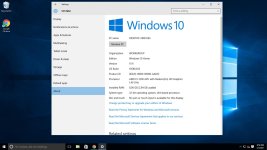
I just got this Windows 10 desktop off a friend. It works okay but it has 8Gb of Ram and it says that only 2.84 Gb is usable. Does that mean that it's only using 2.84 Gb of the ram and can't use any more for some reason? The computer has nothing on it and seems a bit slow.
 

Attachments

  • Screenshot (3).jpg
    Screenshot (3).jpg
    90 KB · Views: 189
Last edited:
Register to hide this ad
you need to install a 64 bit operating system. you have 32 bit.

only 4GB are addressable with a 32 bit operating system including video ram. 2^32 is 4GB...

Looks like you did a fresh install, just install windows 10 64 bit using the same key. If its an OEM pc like (Dell HP etc) it will read the key off the bios. Google windows 10 usb installer, it will make a USB flash drive that is bootable from windows

Also that AMD E1 cpu is pure crap (just telling you to save you some frustration), did you just get the machine? No amount of ram will make it faster. CPU and motherboards are dirt cheap these days. Do you have a microcenter near you?
 
you need to install a 64 bit operating system. you have 32 bit.

only 4GB are addressable with a 32 bit operating system including video ram. 2^32 is 4GB...

Looks like you did a fresh install, just install windows 10 64 bit using the same key. If its an OEM pc like (Dell HP etc) it will read the key off the bios. Google windows 10 usb installer, it will make a USB flash drive that is bootable from windows

Also that AMD E1 cpu is pure crap (just telling you to save you some frustration), did you just get the machine? No amount of ram will make it faster. CPU and motherboards are dirt cheap these days. Do you have a microcenter near you?

Looks like I can't install the 64 bit OS because the Prcessor instructions do not contain EM64T and VT-X. I got this computer for free and do not want to put much money in it, if any. I have a macbook but would like to use this PC mainly for surfing the Web and playing the game Spin tires. Are there any good processors for less than $40 that would be good to put in?
 
Do you really even need the 8GB of RAM for use?

Sure 8GB is nice but what are you planning to use this for. If it is just to surf the internet and use Office then 2.84GB usable is plenty. I say this because your CPU is a 1.4GHz AMD. You won't get much out of such a low end CPU. I doubt memory will be an issue.

Also while you probably can change the CPU it really isn't advised for the non technical and I could see some risk. For one, assuming that CPU is old it may not be easy to find an alternative matching one on the cheap. And you would still have the same socket type which has to match the CPU.

Did you personally try installing the 64bit version? If it works then it works. Done.

Lastly what type of drive is C:\ ? Is it a hard drive or SSD? You would be better off spending $50 on a used SSD and just keeping the 2.84GB vs 8GB RAM on a slow hard drive and 1.4Ghz CPU.
 
Last edited:
The CPU will definitely be the bottleneck here, not the RAM, with what you're wanting to to with it.

The AMD E1 IS a $40 processor.

I have nothing against AMD, but the bottom of the barrel CPU (that's only sold with bottom of the barrel WalMart systems) from the lesser of the 2 mainstream companies is where you're going to see the most issues.

You may want to try the x64 installation again. I don't think that solely x86 (32bit) CPUs are even made anymore. That'll get you most of that 8gb.

Note, unless you put a discrete GPU (separate graphics card) you will never use the full amount of RAM, as the onboard graphics will steal some for itself. It'll read '7.6 of 8 GB useable' or something to that effect.
 
Last edited:
I haven't had much time over the past 10 months to deal with this issue and play spin tires but now I'm wanting to solve this again and get to playing the game.
 
Do you really even need the 8GB of RAM for use?

Sure 8GB is nice but what are you planning to use this for. If it is just to surf the internet and use Office then 2.84GB usable is plenty. I say this because your CPU is a 1.4GHz AMD. You won't get much out of such a low end CPU. I doubt memory will be an issue.

Also while you probably can change the CPU it really isn't advised for the non technical and I could see some risk. For one, assuming that CPU is old it may not be easy to find an alternative matching one on the cheap. And you would still have the same socket type which has to match the CPU.

Did you personally try installing the 64bit version? If it works then it works. Done.

Lastly what type of drive is C:\ ? Is it a hard drive or SSD? You would be better off spending $50 on a used SSD and just keeping the 2.84GB vs 8GB RAM on a slow hard drive and 1.4Ghz CPU.

The CPU will definitely be the bottleneck here, not the RAM, with what you're wanting to to with it.

The AMD E1 IS a $40 processor.

I have nothing against AMD, but the bottom of the barrel CPU (that's only sold with bottom of the barrel WalMart systems) from the lesser of the 2 mainstream companies is where you're going to see the most issues.

You may want to try the x64 installation again. I don't think that solely x86 (32bit) CPUs are even made anymore. That'll get you most of that 8gb.

Note, unless you put a discrete GPU (separate graphics card) you will never use the full amount of RAM, as the onboard graphics will steal some for itself. It'll read '7.6 of 8 GB useable' or something to that effect.

So it sounds like from what you guys were saying is that I should replace the CPU. My question is, how do I know what CPU is compatible with the computer and which one I should get? A 2.5 GHz Dual Core is recommended to run the game Spin Tires. Also, are some CPU's soldered in? I found 2 things that could be the CBU I think. One has a small heat sink on top of it and the other has a large heat sink.
 
I don't think you can actually upgrade the CPU/GPU combo (usually called an APU)

The E-series APUs are usually soldered to the motherboard.

The weird part is that you're saying it doesn't support a 64 bit windows but it should - https://www.notebookcheck.net/AMD-E-Series-E1-1200-Notebook-Processor.73569.0.html

PS The reason you're not seeing 4 gigs is that part of the RAM is used by the APUs graphics core, since it's a 2 in 1.

PS2 Even if you find an appropriate CPU replacement and are willing to do the soldering - I'd bet my a$$ that the motherboard power delivery (VRMs) aren't up for the task of powering a higher performance CPU.

Pre-built systems are usually a dead-end especially the budget ones.


I'd recommend you look into building a cheap Celeron build with a cheap 1050 in it for example - that would give you a usable platform to play some lower spec titles and you could even upgrade it down the line if you get into it.
 
Also, are some CPU's soldered in?

What I think is you should (seriously) throw that machine away and spend $500 on a PC or laptop from Costco.

Upgrading an old AMD 1.4ghz CPU????? And you clearly know very very little about this topic so fixing up the machine will be a pain.

I mean no offense by that, there are like a million things I know jack about. But this is one that I do and I wouldn't recommend any friend or relative fix up and old machine like this themselves.

You've got a built 4Runner rig so I assume not broke. Wait for Black Friday and buy a machine from Costco. You won't be disappointed!

If you insist on fixing that machine:
* Install Win x64 not 32. This costs $$$.
* Find a comparable higher amd cpu and swap it. This is probably cheap but requires tech research.
* Throw away the hard drive and buy an SSD then install Win x64 on it.

Edit: don't mean for this to sound mean, I just don't wish for anyone to waste a bunch of time.
:)
 
Last edited:
Edit: don't mean for this to sound mean, I just don't wish for anyone to waste a bunch of time.
:)


It's didn't come across as mean to me and it's VERY solid advice. It's one thing to tinker with tech when you've done it and have parts just laying around. It's another to try and upgrade a machine you've got no idea about. A new cheap modern tower would be the perfect thing in this case.
 
What I think is you should (seriously) throw that machine away and spend $500 on a PC or laptop from Costco.

Upgrading an old AMD 1.4ghz CPU????? And you clearly know very very little about this topic so fixing up the machine will be a pain.

I mean no offense by that, there are like a million things I know jack about. But this is one that I do and I wouldn't recommend any friend or relative fix up and old machine like this themselves.

You've got a built 4Runner rig so I assume not broke. Wait for Black Friday and buy a machine from Costco. You won't be disappointed!

If you insist on fixing that machine:
* Install Win x64 not 32. This costs $$$.
* Find a comparable higher amd cpu and swap it. This is probably cheap but requires tech research.
* Throw away the hard drive and buy an SSD then install Win x64 on it.

Edit: don't mean for this to sound mean, I just don't wish for anyone to waste a bunch of time.

:)

Agree 100%. Best advice in the entire thread. Don't spend money lipsticking the pig.
 

Members online

Forum statistics

Threads
278,305
Messages
3,554,042
Members
248,016
Latest member
Advally Service

Trending content

Back
Top