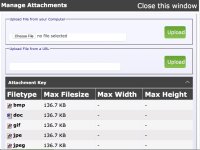
In your post or reply, at the bottom is a button called 'Manage Attachments'.
Push that, and a box comes up that allows you to drag your photo into a box or navigate to a file (photo) your computer.
Then push 'Upload' to get the photo (or graphic) into the system.
Beware that there is a rather stingy file size limit on this forum. Photos taken with a recent smartphone may need to be reduced in size before posting.
Posting photos directly to the forum is superior to using an image hosting service, because image hosting services eventually all fail.