

Ricomondo
New member
Last week I took delivery of a '16 TRD-P. This is my 1st Runner after having a couple of Jeeps and a couple of Hummer H2's over the years.
I started stockpiling some parts for the Pro while I awaited delivery and one of the items I got was the Prestigious Society brand nav override and rear camera module. I had an aftermarket Kenwood Excelon in my H2 I just sold and liked the features it provided including the in motion address input - (once the proper wire was grounded to the E brake) phone dialing, and anytime rear camera usage. After pricing out a comparable HU, after adding extras like the XM box, steering wheel ctrls, scoche faceplate, and then having it painted to match the TRD-P dash, I was looking at around $1,100 not including install.
So, after looking around, I decided to go with the PS systems. I know there are a few threads on this, but most aren't too recent, so I decided to post.
The first module is the nav unlock module-
This module; once activated (via steering wheel volume buttons) allows for in motion inputting of addresses, POI, and any other "grayed out" icon on your nav system once in motion; also includes unlocking the phone pad.
Once activated, the GPS is suspended, while you input your address, or POI, after pressing "GO", deactivate it, and the GPS will pick up where you are at and start your route. Now, it does come with AV cables (R,Y,W) and in theory you could hook up a 3rd party player to play video, (PS3, DVD player, etc).
I thought maybe this would unlock any video the stock Entune could play, but I don't believe this is the case. When inserting a DVD I get a "check disc" message and I even tried with the truck in Park and the parking brake on. Unless I didn't do something correct, I don't believe DVD playback is possible as configured; even with this module, although on other Toyota models, it is.
The second is the anytime rear camera module-
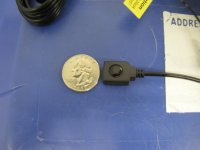
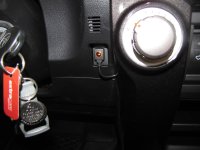
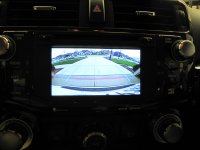
I know there are currently mods to do this for the Entune, but I did not want to cut,splice,tap anything. I wanted a true plug/play, so I went with the additional module. The two "daisy chain together" and plug into the ear of the Entune. This module does need to be activated via a small button. Once activated, the button glows orange and your factory backup camera is activated. It'll come in handy for me as I tow once in awhile and will hauling bikes on a bike rack once the weather warms back up.
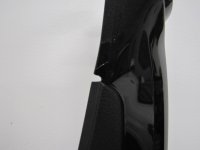
After using this on city streets and the highway last week and this week, I'm very pleased with the system. I found a nice blank spot next to the driver's side trim (slight modification needed with a dremel) to make a notch for the wire in the side trim.
This saved me $$$ over replacing the HU, which I spent on a lift and some other things. My wife wasn't thrilled either at the prospect of replacing a HU on a brand new truck, so this fit the bill. The stock Entune still leaves a lot to be desired, but these modules, make some aspects of it a lot easier.
Let me know if anyone has questions-
Here is their website: Prestigious Society » Products » Prestigious Society
I started stockpiling some parts for the Pro while I awaited delivery and one of the items I got was the Prestigious Society brand nav override and rear camera module. I had an aftermarket Kenwood Excelon in my H2 I just sold and liked the features it provided including the in motion address input - (once the proper wire was grounded to the E brake) phone dialing, and anytime rear camera usage. After pricing out a comparable HU, after adding extras like the XM box, steering wheel ctrls, scoche faceplate, and then having it painted to match the TRD-P dash, I was looking at around $1,100 not including install.
So, after looking around, I decided to go with the PS systems. I know there are a few threads on this, but most aren't too recent, so I decided to post.
The first module is the nav unlock module-
This module; once activated (via steering wheel volume buttons) allows for in motion inputting of addresses, POI, and any other "grayed out" icon on your nav system once in motion; also includes unlocking the phone pad.
Once activated, the GPS is suspended, while you input your address, or POI, after pressing "GO", deactivate it, and the GPS will pick up where you are at and start your route. Now, it does come with AV cables (R,Y,W) and in theory you could hook up a 3rd party player to play video, (PS3, DVD player, etc).
I thought maybe this would unlock any video the stock Entune could play, but I don't believe this is the case. When inserting a DVD I get a "check disc" message and I even tried with the truck in Park and the parking brake on. Unless I didn't do something correct, I don't believe DVD playback is possible as configured; even with this module, although on other Toyota models, it is.
The second is the anytime rear camera module-
I know there are currently mods to do this for the Entune, but I did not want to cut,splice,tap anything. I wanted a true plug/play, so I went with the additional module. The two "daisy chain together" and plug into the ear of the Entune. This module does need to be activated via a small button. Once activated, the button glows orange and your factory backup camera is activated. It'll come in handy for me as I tow once in awhile and will hauling bikes on a bike rack once the weather warms back up.
After using this on city streets and the highway last week and this week, I'm very pleased with the system. I found a nice blank spot next to the driver's side trim (slight modification needed with a dremel) to make a notch for the wire in the side trim.
This saved me $$$ over replacing the HU, which I spent on a lift and some other things. My wife wasn't thrilled either at the prospect of replacing a HU on a brand new truck, so this fit the bill. The stock Entune still leaves a lot to be desired, but these modules, make some aspects of it a lot easier.
Let me know if anyone has questions-
Here is their website: Prestigious Society » Products » Prestigious Society
Attachments
Last edited:


