
You are using an out of date browser. It may not display this or other websites correctly.
You should upgrade or use an alternative browser.
You should upgrade or use an alternative browser.
iPhone 4 dock
- Thread starter CA4Runnin
- Start date
Register to hide this ad
Hi All,
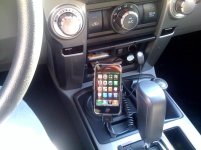
looking for a nice way to dock my iphone 4 in the 4runner. Anyone have pics of how they mounted theirs? I saw harpers custom mount, but looking for a decent mount I can just buy and install....ideally can run the USB to the mount.
Any ideas?
Thanks!
Here is my wife's iPhone 4 with bumper. It really is pretty secure sitting there. I almost exclusively use Bluetooth streaming in my SR5 and iPhone 4.


Titanpat57
Senior Member
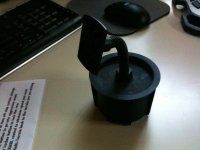
I used the drivers side cupholder. I use an old iPhone AC clip on mount I had and poured in a product called Rocktite. It set up after about an hour, so I painted the top black and that was it.
I use the charger cord when I'm using Motion-X for the Nav.
I use the charger cord when I'm using Motion-X for the Nav.
Attachments
Last edited:
I just drop mine in the pouch area of the 4 wheel drive lever, fits great and cushioned. I run BT for calls.
Can you run music via BT with the phone? How do you do it?
When you set up the phone the first time, it will ask you if you want to set it up as an audio player as well. I really, really like the bluetooth streaming. Basically, you turn the 4Runner on, bluetooth links, and it automatically starts playing the ipod function. You can also stream pandora over the bluetooth. It kills the battery, but really nice.
You'll need to remove the iphone from the bluetooth (available under bluetooth settings), and just set it up again paying close attention to the options the lady is asking you.

WFO_Racer
New member
When you set up the phone the first time, it will ask you if you want to set it up as an audio player as well. I really, really like the bluetooth streaming. Basically, you turn the 4Runner on, bluetooth links, and it automatically starts playing the ipod function. You can also stream pandora over the bluetooth. It kills the battery, but really nice.
You'll need to remove the iphone from the bluetooth (available under bluetooth settings), and just set it up again paying close attention to the options the lady is asking you.
Thanks I just got my Runner a couple of weeks ago , I will try it again.
WFO_Racer
New member
When you set up the phone the first time, it will ask you if you want to set it up as an audio player as well. I really, really like the bluetooth streaming. Basically, you turn the 4Runner on, bluetooth links, and it automatically starts playing the ipod function. You can also stream pandora over the bluetooth. It kills the battery, but really nice.
You'll need to remove the iphone from the bluetooth (available under bluetooth settings), and just set it up again paying close attention to the options the lady is asking you.
I got it to play music over BT and Pandora, but then I lost the phone BT. What am I doing wrong? Will it not toggle between BT phone calls and when the call is over pick up playing music ?

Ryan_S
New member
I got it to play music over BT and Pandora, but then I lost the phone BT. What am I doing wrong? Will it not toggle between BT phone calls and when the call is over pick up playing music ?
It usually does. I have intermittent luck with the iPhone BT in general. Some days it won't connect as a music player, some days it works fine. If it doesn't work I usually restart the truck, and then it connects fine.
I have found it helps to not have BT Audio selected on the radio when you turn it on, so I try to switch it to Radio or USB before I turn the truck off.
Nice setup Titanpat! I like the location and way you mounted it.
Does anyone have one of those docks that mounts to an airvent?
Does anyone have one of those docks that mounts to an airvent?
I used the drivers side cupholder. I use an old iPhone AC clip on mount I had and poured in a product called Rocktite. It set up after about an hour, so I painted the top black and that was it.
I use the charger cord when I'm using Motion-X for the Nav.
I got it to play music over BT and Pandora, but then I lost the phone BT. What am I doing wrong? Will it not toggle between BT phone calls and when the call is over pick up playing music ?
Did you completely remove the phone pairing before you added it as an audio player? As you are pairing it as a phone, it will say "would you like to pair as an audio player", there you say confirm or whatever and it continues the pairing process. Mine picks up calls and goes back to ipod after the call perfectly. As the apple saying goes, it just works. haha I actually set mine up at a rest stop in VA waiting for my passengers to use the restroom on our way to the beach, haha. It took like 4 minutes to set up.
Maybe I'll set my wife's iphone 4 up and record the process this evening. She just got hers and we still haven't paired it to the 4Runner yet.
Titanpat57
Senior Member
Nice setup Titanpat! I like the location and way you mounted it.
Does anyone have one of those docks that mounts to an airvent?
Thank you...I left an important peice of the puzzle out...that was actually a mount that screwed into a cigarette lighter (non charging) that never worked that well, but I did really like the way it held the phone (the back slides off the adjustable holder). That flexible neck is nice to adjust according to glare.
I had an AC holder for my 1st gen iPhone...but it was considerably larger, and not really very sleek.
YouTube - Pairing iphone 4 to 2010 Toyota 4Runner SR5
The key is to hit the "off hook" button to trigger the setup, not the "voice command" button.
The key is to hit the "off hook" button to trigger the setup, not the "voice command" button.
Last edited:

harper7
Senior Member
YouTube - Pairing iphone 4 to 2010 Toyota 4Runner SR5
The key is to hit the "off hook" button during the setup, not the "voice command" button.
REALLY good job on the video Quentin!!
You should get a job working for Toyota.......lol :jump:
Probably should put that in the Video section.It will be used alot. To embed a video,just click EMBED and then copy and paste the highlighted text into the post so it can be watched from within forum instead of going to youtube.
REALLY good job on the video Quentin!!
You should get a job working for Toyota.......lol :jump:
Probably should put that in the Video section.It will be used alot. To embed a video,just click EMBED and then copy and paste the highlighted text into the post so it can be watched from within forum instead of going to youtube.
Haha, the shirt didn't give it away?
 I actually sat my iphone 4 in the housing for the speedometer... fit pretty perfect, haha. I'm not a very good actor, not that good at ad lib.
I'll post it up there. I was really worried as to how the iphone 4 was going to link up w/ the 4Runner but it turned out simple to install and functioning perfectly. I'll post it up in the video thread.
edit: I can't seem to get the embedding code to work. It just shows up as blank space in the other thread.
Last edited:
WFO_Racer
New member
YouTube - Pairing iphone 4 to 2010 Toyota 4Runner SR5
The key is to hit the "off hook" button to trigger the setup, not the "voice command" button.
Awesome thanks, I did not remove the phone at first. Blew everything out and then followed your video and it's good to go.
Could have used your tech skills today as I got a flat (left rear) as we left the desert this afternoon. The owners manual does not say to insert the spare tire tool at a angle to lower the spare tire. What should have been a 20 minute job became a 40 minute job till we made the connection. The truck has a whole 600 miles on it 2 weeks old.
iPhone pairing questions
Sorry old thread question.
Thanks for that video Quentin. I haven't bought a 4runner yet so I had some questions on this bluetooth paring.
Does hitting the steering wheel controls for track skipping work? And are there any other steering controls that conotrol the iPod/iPhone?
Can you still control the tracks playing on the iPod or do you have to use the headunit to change tracks? (Some audio systems lock the iPod/iPhone controls out when hooked up)
If you have a navigation app, like the TomTom app, will the apps audio be used over the loudspeakers and is their any functionality in the cars controls for it?
Just trying to figure out the best way to setup my car.
Thanks,
Nick
YouTube - Pairing iphone 4 to 2010 Toyota 4Runner SR5
The key is to hit the "off hook" button to trigger the setup, not the "voice command" button.
Sorry old thread question.
Thanks for that video Quentin. I haven't bought a 4runner yet so I had some questions on this bluetooth paring.
Does hitting the steering wheel controls for track skipping work? And are there any other steering controls that conotrol the iPod/iPhone?
Can you still control the tracks playing on the iPod or do you have to use the headunit to change tracks? (Some audio systems lock the iPod/iPhone controls out when hooked up)
If you have a navigation app, like the TomTom app, will the apps audio be used over the loudspeakers and is their any functionality in the cars controls for it?
Just trying to figure out the best way to setup my car.
Thanks,
Nick
Sorry old thread question.
Thanks for that video Quentin. I haven't bought a 4runner yet so I had some questions on this bluetooth paring.
Does hitting the steering wheel controls for track skipping work? And are there any other steering controls that conotrol the iPod/iPhone?
As of iOS4.2 (I think..), next and previous track do work for changing track when paired to your iphone via bluetooth. Volume controls the head unit volume, not the iphone volume, though I've never had a time where I wished the volume buttons controled the phone instead of the head unit. The Voice button on the steering wheel does not trigger voice command in the iphone. If it did, this would be the perfect bluetooth system.
Can you still control the tracks playing on the iPod or do you have to use the headunit to change tracks? (Some audio systems lock the iPod/iPhone controls out when hooked up)
If you are connected via bluetooth, you can use either the steering wheel buttons or the actual phone to change track. IIRC, the head unit seek buttons do not control the iphone.
Now, if you are connected via USB, the head unit and steering wheel seek buttons will control track. The ipod app, though, on the phone, is now locked out. Even if I plug in to the USB to charge, I still stream via bluetooth because it just works better unless you are looking for a particular song.
If you have a navigation app, like the TomTom app, will the apps audio be used over the loudspeakers and is their any functionality in the cars controls for it?
Just trying to figure out the best way to setup my car.
Thanks,
Nick
I have a MapQuest nav app (free) that I don't use often. I'm more of a map guy, so google maps is what I typically use. Anyway, it does work with the streaming. It will turn the volume down on your ipod app, say the turn, and bring the volume right back up. Very slick. Youtube and Pandora will stream via bluetooth as well. I haven't tried much else. Hope this helps!
-QB
Perfect, thanks for the thorough answers.
It looks like this will be the ideal iPhone setup for my car, since I like to use the multi touch iPhone interface for choosing music but I want to at least skip tracks with my car controls.
One other question I just thought of- When paired with bluetooth, if you shut the car key off and open the doors, does the phone stop playing music or do you have to hit stop. I had a setup in my old car that had this functionality with a regular iPod and it was kind of nice if I left my iPod hooked up. Just a small little feature I would like but not a big deal of course. Plus most the time I get out I will take my phone with me.
It looks like this will be the ideal iPhone setup for my car, since I like to use the multi touch iPhone interface for choosing music but I want to at least skip tracks with my car controls.
One other question I just thought of- When paired with bluetooth, if you shut the car key off and open the doors, does the phone stop playing music or do you have to hit stop. I had a setup in my old car that had this functionality with a regular iPod and it was kind of nice if I left my iPod hooked up. Just a small little feature I would like but not a big deal of course. Plus most the time I get out I will take my phone with me.
Perfect, thanks for the thorough answers.
It looks like this will be the ideal iPhone setup for my car, since I like to use the multi touch iPhone interface for choosing music but I want to at least skip tracks with my car controls.
One other question I just thought of- When paired with bluetooth, if you shut the car key off and open the doors, does the phone stop playing music or do you have to hit stop. I had a setup in my old car that had this functionality with a regular iPod and it was kind of nice if I left my iPod hooked up. Just a small little feature I would like but not a big deal of course. Plus most the time I get out I will take my phone with me.
It pauses the music when you shut the car off and turn the key all the way back.

Johnny Utah
New member
I just drop mine in the pouch area of the 4 wheel drive lever, fits great and cushioned. I run BT for calls.
Can you run music via BT with the phone? How do you do it?
i do the exact same thing. HAHA. ANd yeah, it does BT calls, and music via BT