Issue with USB Interface from Phone to Kenwood DDX575BT

camp332

New member
Hi Team,
So I recently installed a Kenwood, and it's great. Minus the fact that the USB cable is not long enough to reach the ports in front of the center console. So based on T4R.org member suggestion, I purchased the extension pictured below from Amazon. Unfortunately, when I connect my phone via the new port/extension the Kenwood briefly recognizes the connection, then it displays a usb error. Have any of you had this problem? If so, did you resolve it? Please explain.
61m4lyQ6v3L._SL1481_.jpg
 
Register to hide this ad
I actually did have that problem with my head unit and that same USB plate. Long story short, I had to get out of the passenger side and broke it by sitting on the cables plugged into it when climbing over the center console. When I tried to see if it was still usable, I got that error.

So in my experience, that error from the head unit is because of a physical issue somewhere in the connection. Might want to try just returning it.
 
I'm shopping for options myself after my stereo upgrade. There was one posted on a thread but I can't find the exact post, I'm still searching.
 
I had such high hopes for this amazon device! It is definitely the weak link here, and was curious if anyone found a way to make it work with that magic T4R.org ingenuity.
 
I had such high hopes for this amazon device! It is definitely the weak link here, and was curious if anyone found a way to make it work with that magic T4R.org ingenuity.

After seeing how fragile it was, I just ran a female USB cable out. I ended up liking it more this way anyway. I didn't like having USB plugs sticking up out of my center console just asking to get bumped or bent.
 
After seeing how fragile it was, I just ran a female USB cable out. I ended up liking it more this way anyway. I didn't like having USB plugs sticking up out of my center console just asking to get bumped or bent.

This doesn't stick out of the center console. It fits into the spare ports in front of the console. Here is a pic of mine still installed because I know somebody here is going to give me the magic fix!:biggrin2:
original_USBport.jpg
 
i tried the same setup. That USB port will NOT work. Something inside is incompatible with the deck.
 
Hi Team,
So I recently installed a Kenwood, and it's great. Minus the fact that the USB cable is not long enough to reach the ports in front of the center console. So based on T4R.org member suggestion, I purchased the extension pictured below from Amazon. Unfortunately, when I connect my phone via the new port/extension the Kenwood briefly recognizes the connection, then it displays a usb error. Have any of you had this problem? If so, did you resolve it? Please explain.
61m4lyQ6v3L._SL1481_.jpg

Mine is having the same issue pretty much from day one. Sometimes it would work and other times not so much. I think I'm going to eliminate some of the usb connections by soldering wires and see if that resolves anything.
 
Definitely disappointed in the feedback from all your personal experiences. You would think something like this would be plug & play?
 
[MENTION=149774]camp332[/MENTION] I've heard multiple issues with amazon devices like that bc of the multitude of sellers, 90% are low quality connections. Something like only charging, the connections could be adequate but will not be optimal... for something like Carplay/Android Auto/or any other sort of data transfer requires more solid connections. Alot of the amazon reviews say that the part you ordered (and those alike) will work at first, but go out after an amount of time.

My recommendation is to find a new part, read the reviews (normally the most recent ones as the seller can change the manufacturer of the part they use), and check the specs to make sure it supports USB 3.0, and possibly even gold plated. The one I used supports USB 3.0 but isn't gold plated, and I've been running it for a month and seems to be working fine still. I don't have the Toyota fit one like you pictured, mine is a circular end, which I drilled into my center console and have my apple cord connected in there and running out.

I would also make sure you're using a high quality cord. I prefer Apple cords (I know expensive) or ones made by Anker. It sucks to pay more, but it's not an arm and a leg, and its worth having something that will last instead of having to keep buying new ones.

Here's the one I used: BATIGE USB 3.0
 
Hi Team,
So I recently installed a Kenwood, and it's great. Minus the fact that the USB cable is not long enough to reach the ports in front of the center console. So based on T4R.org member suggestion, I purchased the extension pictured below from Amazon. Unfortunately, when I connect my phone via the new port/extension the Kenwood briefly recognizes the connection, then it displays a usb error. Have any of you had this problem? If so, did you resolve it? Please explain.
61m4lyQ6v3L._SL1481_.jpg

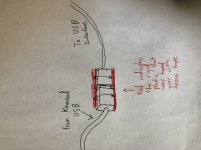
I believe I was able to solve the issue today. My issue originated where the connector from the radio was connected to the usb interface. Any slight movement of the usb caused it to fail. I was able to use some rigid plastic cut to the length of both usbs for each side and then taped over these pieces to form a strong spot. Now neither of them move and my Apple CarPlay has yet to fail
 
I believe I was able to solve the issue today. My issue originated where the connector from the radio was connected to the usb interface. Any slight movement of the usb caused it to fail. I was able to use some rigid plastic cut to the length of both usbs for each side and then taped over these pieces to form a strong spot. Now neither of them move and my Apple CarPlay has yet to fail

Cool! I'm a visual learner. You didn't happen to take any pics of this, did you?

It's so close to working! Like you are saying, the connection of this interface to the radio USB is where the problem lies. Snugging up that connection is where I will head next. Thanks!
 
Cool! I'm a visual learner. You didn't happen to take any pics of this, did you?

It's so close to working! Like you are saying, the connection of this interface to the radio USB is where the problem lies. Snugging up that connection is where I will head next. Thanks!

Your radio looks really good! and unfortunately not. I did make a drawing in hopes that it could help you
 

Attachments

  • IMG_3939.jpg
    IMG_3939.jpg
    131.3 KB · Views: 95
Your radio looks really good! and unfortunately not. I did make a drawing in hopes that it could help you

Thanks Brother! A picture is worth a thousand words. I'll get in there one of these nights this week, and see about fabbing up one of these "Johns06Yota" solutions!

I'll check back into this thread when I get the chance to do the work. Thanks again.
 

Members online

No members online now.

Forum statistics

Threads
278,316
Messages
3,554,120
Members
248,016
Latest member
Advally Service

Trending content

Back
Top