
JVC KW-XR810 install post mortem on a 2004 SE w/JBL

SnydersWeb

New member
I've been lurking, occasionally posting, and mostly working with Asmara for tips on best tactics on this.

After some research on various head units, I opted for the JVC KW-XR810 since I already have a Garmin 255W and I really don't need/want video of any sort. An added bonus on this head unit is it also was able to match the color of the rest of the truck - I wasn't interested in having some big colorful thing sticking out in my sea of amber dash lights.

The only real complication I had was getting the bluethooth microphone wire run. When I removed the lower dash, I still couldn't easily get the underside of the A-Pillar. I had one more complication: I live in Colorado. Meaning that my windshield has been replaced at least once. I didn't have a "clean" path on the windshield side of the A-Pillar all the way.

Two things helped me solve that - first the cover over the front of the instrument cluster just snaps on.. so once your dash is torn apart it only takes a gentle but firm tug to pop it loose. The other thing was I found out that the A-Pillar mostly comes loose by unbolting the handle on it. That allowed me to get that cable inside the A-pillar and down to the left side vent hole. From there I ran it across the top of my instruments over to the radio bay.
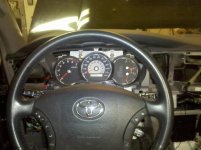
instrument.jpg

Everything snapped back in beautifully. Here is the final position of my microphone:
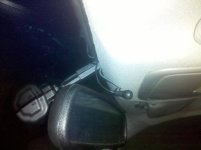
bluetooth.jpg

After that it was just a matter of getting the PAC TATO and SWI in where I could shove the radio in. Really the PAC TATO made installing the SWI a literal "snap" as all that was needed was to snap the connectors together. No resistor needed since the TATO's SWI harness already includes it. The only soldering that had to be done was to connect the head unit's wiring harness to the TATO's - and that was just 4 connections. Dead simple.

Finished product:
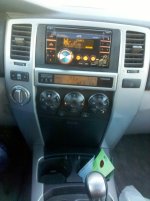
finished.jpg

Definitely want to thank Asmara for his detailed posts and patient responses to me regarding the TATO, SWI, and bluetooth mic installation.

There was only one problem - I had purchased the right-side bluetooth buttons for my steering wheel (you can see them in my first picture). Having an '04, it was a little bit of a gamble and it didn't pay off unless I missed something. It also meant I had to invest in the more expensive SWI-RC since the SWI-JACK didn't support the extra I needed for Bluetooth buttons.

Physically the buttons installed nice and clean, everything hooked up perfectly. When it came to the final process of programming my SWI-RC, the left side buttons worked perfectly but the right side buttons I ran into issues - the SWI-RC would "see" my button pushes however the Voice dial button ended up always turning the head unit down. I tried several times and even mapped that button to a different function and it always just turned the radio down. The phone pick-up and hang-up buttons didn't seem to work at all.

Has anyone else tried installing those buttons in an '04 and have any insights?

If not, I'll simply return the buttons. Still, would be very nice to have that ability.
 

Attachments

  • instrument.jpg
    instrument.jpg
    81.3 KB · Views: 1,673
  • finished.jpg
    finished.jpg
    70.4 KB · Views: 1,686
  • bluetooth.jpg
    bluetooth.jpg
    44.6 KB · Views: 1,582
Last edited:
Register to hide this ad
I've been lurking, occasionally posting, and mostly working with Asmara for tips on best tactics on this.

Definitely want to thank Asmara for his detailed posts and patient responses to me regarding the TATO, SWI, and bluetooth mic installation.

There was only one problem - I had purchased the right-side bluetooth buttons for my steering wheel (you can see them in my first picture). Having an '04, it was a little bit of a gamble and it didn't pay off unless I missed something. It also meant I had to invest in the more expensive SWI-RC since the SWI-JACK didn't support the extra I needed for Bluetooth buttons.

Physically the buttons installed nice and clean, everything hooked up perfectly. When it came to the final process of programming my SWI-RC, the left side buttons worked perfectly but the right side buttons I ran into issues - the SWI-RC would "see" my button pushes however the Voice dial button ended up always turning the head unit down. I tried several times and even mapped that button to a different function and it always just turned the radio down. The phone pick-up and hang-up buttons didn't seem to work at all.

Has anyone else tried installing those buttons in an '04 and have any insights?

If not, I'll simply return the buttons. Still, would be very nice to have that ability.

I was happy to help. The install looks great. I think I mentioned once that I was thinking about putting in the blue tooth switches but ended up not doing it because of price. Anyway I when I was doing research I saved a link to this thread on the Tacoma site which has the same system. You might find some help in there.
 
I was happy to help. The install looks great. I think I mentioned once that I was thinking about putting in the blue tooth switches but ended up not doing it because of price. Anyway I when I was doing research I saved a link to this thread on the Tacoma site which has the same system. You might find some help in there.

Yeah, I remember reading that exact post. I haven't (yet) sent those buttons back and am hoping I can find a way to get them working.

I guess the key on that could be one of two things: maybe both..
1. Is there a different in pints/pinouts between an '04 4Runner and the '06 when it comes to the interface at the back of the radio to accommodate those buttons?
2. Maybe PAC might know something - does the setup Version 8 really do all that is needed or is it not getting the correct event data thanks to #1?

I'm not sure where to get this. This information is a bit "in the weeds" as it is since it's focused on some pretty minute parts that a typical user would never see.
 
That looks great, I am leaning towards the Clarion CX501 since the Mic is built-in to the units face. Great job on the install!
 
OK.. educational night.

On a whim I opted to take ONLY my left side buttons and map them purely to bluetooth related functions. Oof.. bad news. Yes, the buttons work, the SWI-RC works however it doesn't appear my XR810 supports that.

Guess I'll be sending the buttons back. I could swap to a different head unit but I'm seriously not feeling that masochistic.

Oh well..was worth a try.
 
OK.. educational night.

On a whim I opted to take ONLY my left side buttons and map them purely to bluetooth related functions. Oof.. bad news. Yes, the buttons work, the SWI-RC works however it doesn't appear my XR810 supports that.

Guess I'll be sending the buttons back. I could swap to a different head unit but I'm seriously not feeling that masochistic.

Oh well..was worth a try.
I was looking at the PAC Audio page to see if I could help you and noticed that the Toyota 4Runner is not on the compatibility list for the SWI-RC. If you do a search for compatible products for the 04 Runner there are other SWI products like the JVC compatible SWI-JACK. Maybe there is something about the 4Runner SWI that is a little different. They do have 05+ Tacomas listed as compatible.

You might want to give PAC Audio a call and see what they say. I've read good reports on their customer service in the past.
Technical Support:
Phone:800 854 3133 Option 5 (Mon-Fri 9am-8pm est)
 
I was looking at the PAC Audio page to see if I could help you and noticed that the Toyota 4Runner is not on the compatibility list for the SWI-RC. If you do a search for compatible products for the 04 Runner there are other SWI products like the JVC compatible SWI-JACK. Maybe there is something about the 4Runner SWI that is a little different. They do have 05+ Tacomas listed as compatible.

True, but if it were incompatible then the left side controls would not work at all. In this case, all the SWI-* does is to take an input and then map it to X manufacturer's code. I would more/less equate this to a universal remote. Technically there isn't anything stopping you from mapping your volume up button to mode and so on.

So my latest questions have been directed at JVC. From which I received an answer that was just a bit of a BS "runaround" answer:
I understand you are in needs of knowing what functions can be accessed on your KW-XR810 with your steering wheel interface adapter. This information is not available from our end, the information though can be provided to you from the manufacturer of the steering wheel adapter in this case PAC. The reason why we do not have this information is because it really depends on the make and model of the vehicle that you are using and how the interface works with it and since the adapter is made by a third party (PAC) then the information is not available from our end. I apologize if this is not of much help but if you would like you can contact PAC to see what steering wheel functions will be available with your vehicle and the adapter.

Um, they made the head unit, they should be able to at least provide detailed technical data I can pass onto PAC about what codes/signals would trigger what since in essence the function of the PAC device is to give the head unit expected inputs. Right?

If that is the case, then the problem is with PAC since their data on JVC could be incorrect.
 
Looks good, quick question.
Did you use the metal OEM brackets from the stock unit? I used the plastic brackets that came w/ my dash kit thinking I would need the "adjustablility" of them. Not that it really makes a difference, but I like the idea of metal better than plastic. Just curious if the metal brackets pull the face out far enough on yours. Thanks!
 
Looks good, quick question.
Did you use the metal OEM brackets from the stock unit? I used the plastic brackets that came w/ my dash kit thinking I would need the "adjustablility" of them. Not that it really makes a difference, but I like the idea of metal better than plastic. Just curious if the metal brackets pull the face out far enough on yours. Thanks!

On the Scosche mounting kit you have to use theirs instead just because they have those tabs that stick out and hook onto the faceplate. I too would've preferred metal.

Onto the remote thing.. I did get some useful data from PAC:
We tested the SWI-RC at JVC prior to releasing the interface with the new features. The control data was provided to us by JVC. The features were to be available to 2011 JVC radios but they are the ones that know what radios they put it into.

Our unit just sends the command. If the radio does not support the feature the SWI will still send it but the radio just doesn't know what to do with it. Find out what model year radio you have. Maybe its an older model. I will help you with anything I can but I don't know what else I can do in this situation.

Based on that evidence is pointing back to JVC. Hoping I can get a straight answer from them. Frankly the radio manufacturers should not only listing 1. That you can control the radio from this (which they do) but 2. ADD WHAT YOU CAN CONTROL.
 
OK.. after patiently waiting a week to hear back from JVC I finally got PO'ed and called them.

Turns out that particular head unit doesn't respond to bluetooth commands via steering wheel remote. They essentially said that the steering wheel controls mirror the little handheld remote controls.

I might just keep them and map them to other things and if/when I feel the need upgrade to a nav headunit that does support those controls.

I wish that they would clearly document those things. Getting answers shouldn't be like pulling teeth!
 
looks good

I ordered the XR610 ... should be shipping from Crutchfield as we speak (it was on backorder)
 
Well, it just goes to show that doing your research upfront certain does pay off. As it happens, I bought the same radio, with a PAC Tato and Pac SWI-Jack just this afternoon from Crutchfield. Love those guys. Anyway, I had the same idea as you, purchase phone buttons for my '06 Tundra DC and program them via the SWI-Jack. I called Crutchfield and PAC and neither could give me a definitive answer. Crutchfield doesn't sell the SWI-RC so I had to educate them on that. The PAC tech said that the SWI-RC would control the JVC radio and told me that the bluetooth should work. He went on to explain the difference between the SWI-Jack and the SWI-RC. Basically the SWI-Jack is an older model that doesn't have the bluetooth capability that the RC model does. Well...I suppose you already knew that. So.....when I read your post all the way through, I was dismayed to learn that issue is with the JVC....not reading the signal. So I suppose that only leaves me with the option of using the button on the front of the radio. What a huge let down. On the other hand, you did all the trial and error work only to find out it wouldn't, so on the plus side of things I didn't waste any of my time, didn't have to tear my dash apart and didn't experience the frustration that surely comes with taking projects like these on. So let me just say...THANKS!!! I owe you a beer. :beer:

I'd be interested in any other solutions you may have come up with in the meantime.
I've been lurking, occasionally posting, and mostly working with Asmara for tips on best tactics on this.

After some research on various head units, I opted for the JVC KW-XR810 since I already have a Garmin 255W and I really don't need/want video of any sort. An added bonus on this head unit is it also was able to match the color of the rest of the truck - I wasn't interested in having some big colorful thing sticking out in my sea of amber dash lights.

The only real complication I had was getting the bluethooth microphone wire run. When I removed the lower dash, I still couldn't easily get the underside of the A-Pillar. I had one more complication: I live in Colorado. Meaning that my windshield has been replaced at least once. I didn't have a "clean" path on the windshield side of the A-Pillar all the way.

Two things helped me solve that - first the cover over the front of the instrument cluster just snaps on.. so once your dash is torn apart it only takes a gentle but firm tug to pop it loose. The other thing was I found out that the A-Pillar mostly comes loose by unbolting the handle on it. That allowed me to get that cable inside the A-pillar and down to the left side vent hole. From there I ran it across the top of my instruments over to the radio bay.

View attachment 40220

Everything snapped back in beautifully. Here is the final position of my microphone:
View attachment 40222

After that it was just a matter of getting the PAC TATO and SWI in where I could shove the radio in. Really the PAC TATO made installing the SWI a literal "snap" as all that was needed was to snap the connectors together. No resistor needed since the TATO's SWI harness already includes it. The only soldering that had to be done was to connect the head unit's wiring harness to the TATO's - and that was just 4 connections. Dead simple.

Finished product:
View attachment 40221

Definitely want to thank Asmara for his detailed posts and patient responses to me regarding the TATO, SWI, and bluetooth mic installation.

There was only one problem - I had purchased the right-side bluetooth buttons for my steering wheel (you can see them in my first picture). Having an '04, it was a little bit of a gamble and it didn't pay off unless I missed something. It also meant I had to invest in the more expensive SWI-RC since the SWI-JACK didn't support the extra I needed for Bluetooth buttons.

Physically the buttons installed nice and clean, everything hooked up perfectly. When it came to the final process of programming my SWI-RC, the left side buttons worked perfectly but the right side buttons I ran into issues - the SWI-RC would "see" my button pushes however the Voice dial button ended up always turning the head unit down. I tried several times and even mapped that button to a different function and it always just turned the radio down. The phone pick-up and hang-up buttons didn't seem to work at all.

Has anyone else tried installing those buttons in an '04 and have any insights?

If not, I'll simply return the buttons. Still, would be very nice to have that ability.
 
Thanks everyone for the postings. These look great and were very helpful. I just installed the xr810 JVC unit in my 2003 SR5. However, I'm noticing a few issues with it that I'm hoping you all will be able to help with.

The first issue is that the AM tuner has a very weak signal. I live in a fairly good size city (Madison, WI) with plenty of AM stations and now, I can hardly tune into any of them. My FM signal is also weaker but I'm still able to get most of my channels, except my favorite station to listen while driving in to work. This might be related to my second issue.

I used the "Metra 70-1761 Radio Wiring Harness For Toyota" when installing it (Best Buy said this was the one to use) but I had a few questions about the wiring. There was a blue wire from the harness that did not match up with the wires from the JVC unit. The unit had a blue wire with a black stripe and was tagged indicating something special. I believe there was also an orange? wire that didn't match up either. Lastly, there were to larger plugs, one was the antennae and another one that was similar in shape but smaller. I was able to plug the antennae into the JVC unit but I wasn't sure where to go with the other plug. That part wasn't clear to me.

I'm not sure if these are related or not. I have to tear the whole thing apart again to get the right kit installed (Best Buy ordered me the wrong one) so while I'm in there, I'd like to get it straightened out.

The last issue I'm seeing is with the USB to iPhone. I'm using the rear USB cable (I have the bluetooth plugged in the front one) for my iPhone. If I plug in the phone prior to starting the car. It will play about 5 seconds worth of music and then no sound (but the time advances). However, if I unplug and replug in my phone, it plays fine. It also plays fine if I start the car first, and then plug in the iPhone. Might be a phone problem as I haven't had a chance to try someone else s but just wondering if anyone else hit that problem.

So to recap my issues:
1) Very weak AM signal and weaker FM signal than with factory radio
2) Mismatching wires from the harness and car to the JVC unit
3) iPhone reading problems when plugged in prior to starting up the car

Hope you all can help. Thanks for the great posts and pictures!
 
How well does this unit navigate through iPod and/or USB music files? Does it scroll quickly? Anyone care to put a short video clip together?
 
I just put one of these in my other car and it is pretty nice. They are discontinued, but I found on on Amazon cheaper than the Clarion 510. The selling point for me was the rear USB, I wanted all the cables hidden.

The iPod navigation is really fast. you can use the knob and it is almost too sensitive if you are driving the car. The interface itself is really quick. I am very happy with the iPod integration.

You can also use the up and down arrows on the lower left to jump to a letter of the alphabet, and that is what I usually do.
 
Last edited:
Would you recommend another head unit that does support this, OR, is there another way to have convenient BT call buttons?

Thanks for all your input, I am one click away from getting myself the same system, but need to know if I need the PAC-SWI-RC controller, and wheel switches, OR another head unit altogether.
 
How well does this unit navigate through iPod and/or USB music files? Does it scroll quickly? Anyone care to put a short video clip together?

It navigates through the iPod/iPhone very easily. However, the problem I'm having is that I plug it in, it plays for 4 seconds, and then i have to unplug and replug it in for it to work. Only happens with the hardwire, not the bluetooth.

Anyone have an idea on the two antennae jacks but only one fits on this unit. Is there something I need to do with the other one? Also, should the blue/black wire from the JVC unit be connected to the blue wire from the Metra harness?
 

Members online

Forum statistics

Threads
278,316
Messages
3,554,120
Members
248,016
Latest member
Advally Service

Trending content

Back
Top

