Jhalko
New member
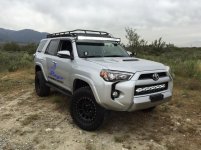
Can NEVER have enough light bars :lmao:
You get a roof bar yet? :lmao:
I have a 40" rigid radiance in the garage, should just about cover forward lighting, with the sr20 and pair of Amber D2's!
Can NEVER have enough light bars :lmao:
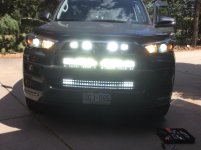
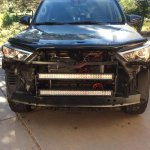
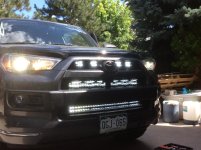
What size drill bit did you use for the bumper tap, and what size did you use for the new hole for the light mount. I noticed you didn't use the existing holes on the mount. I just purchased the exact same brackets which is why I ask.This was how I mounted my 32" light bar on 2016 Limited
I just used some L concrete bracket from lowe's.
The item is 17958 usp 2-in x 5-3/16-in cncr $3.15 x2 that's what's on the receipt.
I just drilled into the aluminum bumper near a existing hole an used a nut and washer to secure it.
If I wanted to add another light bar to the middle grill area, I would add extension to the bracket and secure it.
You get a roof bar yet? :lmao:
I have a 40" rigid radiance in the garage, should just about cover forward lighting, with the sr20 and pair of Amber D2's!
I noticed the brackets that you have on your light bar face inward and upside down. Where the teeth to adjust the light bar are lined up to the bar. My mounts are facing outwards, so I won't be able to use the mounts. I'm gonna try to mount the light bar directly to the L-mounts. I'll be calling you soon for a little adviceI just used the appropriate for the nuts and bolts That I had. Make sure you don't drill to large of a hole. The bumper is aluminium so very easy to drill. Use washers and preferably locking washer ( I think that's what they're called)
I didn't use the existing hole on the bracket because title was too big. Plus it wasn't in the correct position. Brackets are easy to drill also.. just measure the distance and angle to make sure everything is straight. I used the supplied mount for the light bar and attached it to the brackets. This will help it from moving or tilting.
I drilled 2 holed to mount the bracket to the bumper. Use the existing hole on the front of the bumper to help with the install the nuts and bolts . Check the height of the light to make sure it is centered in the lower grill..
Sorry for any grammatical errors. Writing has never been my strong point

Can't figure out how to load more then one picture at a time
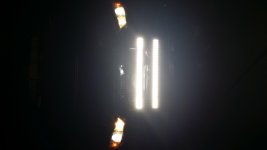
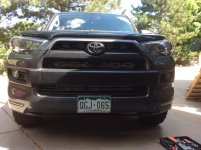
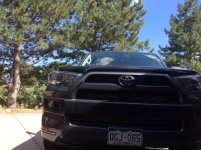
Looks great. Any pics with them installed but not on? Curious how noticeable they are when not in use.
Another picture
Can't figure out how to load more then one picture at a time
Hi kuh,
There's more than way to upload multiple photos simultaneously:
(1) go to your photo albums and click on the one that you want to add to. Next: "See the Upload Pictures button at the very top of the album of choice". Now click on that button; it'll take you to the Upload pictures page. See the three "Choose File"/no file chosen buttons; here you can upload as many as three images at once. Click one of those buttons at a time and it'll bring up your "Files" folders where your pictures, documents, downloads... are stored.
Chose the file where your desired photos are stored and click the one that you want to post and it'll take you back to the "Choose File"/no file chosen buttons; you'll see the file number/address that you chose. Now chose a second "Choose File" button and you'll do the same thing that you did on the first file download! Once you've chosen all three files you'll just hit the "Upload pictures" button and they'll appear in your photo album.
(2) If you haven't already, create an account on Photo bucket. There you'll upload your pictures much the same way that you would described above but... once you've uploaded there you can click on the photo of choice and you'll see it enlarge. From there you can edit it if you need to e.g. crop, rotate, add text to the image, arrows...etc. When you're done editing, you just click on the image "URL" on the right-hand side and you'll see a notification that says: "Copied".
Now you can Paste the photo's url in the text field on your post... do this as many times as you need to, to create a post with as many photos as you want! Hope this helps,
Best!
BTW: "Great job on the light-bar mod!"