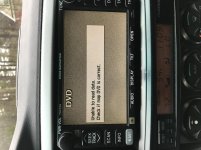
B Buckaroo93 New member Mar 31, 2018 #1 What does this message mean? And how do I correct it? Sorry for the rotation. It's correct in my photos. Attachments A6F3B86A-87D3-4B79-B6A6-264871C0AB60.jpg 135.7 KB · Views: 185 Last edited: Mar 31, 2018
What does this message mean? And how do I correct it? Sorry for the rotation. It's correct in my photos.
AuSeeker Elite Member Apr 1, 2018 #3 Buckaroo93 said: Nevermind...I fixed it. Click to expand... It would be nice if you explained the "fix" so it may help someone who may have the same issue in the future!
Buckaroo93 said: Nevermind...I fixed it. Click to expand... It would be nice if you explained the "fix" so it may help someone who may have the same issue in the future!
B Buckaroo93 New member Apr 7, 2018 #5 Today I updated to the v13.1 dvd. I thought doing this would, among other things, get rid of the annoying "I agree" start-up screen but no. I still get it. Is it supposed to be there regardless?
Today I updated to the v13.1 dvd. I thought doing this would, among other things, get rid of the annoying "I agree" start-up screen but no. I still get it. Is it supposed to be there regardless?