Need battery/power advice for Starlink

formerly

New member
Hello!

My wife and I are doing some traveling this summer. We do still have to work much of the time, but have the luxury of working remotely.

We have the option of getting Starlink internet, and I'm trying to figure out the optimal route to get it powered.

Requirements:
1. Power Starlink ~100 watts for 8+ hours a day. We won't always need it that much, but need the option.
2. Power ARB Zero 73QT, 0.8Ah 12v
2. I'd like to avoid solar for the time being.
3. Room for added accessories in the future (lights, compressor, etc).

I can do any wiring/upgrades needed, but I'm trying to avoid doing things twice. I put in a group 31 battery last year, but other than that the electrical system is stock. No other accessories yet.

Is this as simple as:
1. Upgrading altenator
2. Installing 2nd identical battery
3. Isolator + fuse block setup
4. Wiring new 12v ports in the rear for fridge
5. Wiring 500w-1000w inverter to 2nd battery (or just plugging it into one of my new 12v sockets in the rear?)

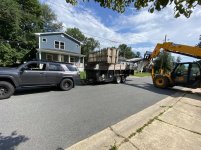
Picture for attention:
 

Attachments

  • unnamed (1).jpg
    unnamed (1).jpg
    139.8 KB · Views: 2,157
Register to hide this ad
Or, is this as simple as buying a Jackery 1000wh (or similar) setup and calling it a day? I could charge it from the 12v socket while the engine is running.
 
A Wi-Fi Hotspot with an unlimited data plan may be a less expensive option and easier to manage than taking a Starlink system.
 
Kind of. You can change your address as often as you'd like. You just can't use it while mobile (even though people are doing that, too).

Yeah, I'd test this all out. The official FAQ says it won't work with travel, and they purposefully will disable it.

This Youtube video has someone trying, and it not working after the second stop, though it is a year old.

To power it, you could do two deep cycle AGMs, hooked to a 2000W inverter, and some solar. then hook that to your 4runner a number of ways to help charging, etc. That would also be able to charge your computer, and other goodies for a bit.

edit: Watt not Amp
 
Last edited:
A Wi-Fi Hotspot with an unlimited data plan may be a less expensive option and easier to manage than taking a Starlink system.

This is what I run.

dedicated wifi hotspot from my carrier (verizon), a 4g/5g cell booster, and a ecoflow expanded electric battery/generator, with the solar. Gets me all the power, and I can get pretty far out sometimes, and still get enough 4g to boost for work stuff. Though I do have my camera off a lot in meetings for that bandwidth saving.
 
I have a similar setup right now in my rig except running a lifepo4 battery inside the rig and solar. I run 2 panels for total of 300 watts paired with a Redarc 40amp charger which fully recharges the house battery in about 3hrs with the alternator.

I have a 4G/5G router that runs 24/7 that gets me enough speeds working at most places but will bust out the Starlink as necessary in most remote places or if TMobile decides the throttle.

I have the rectangular dish with the POE mod and router delete which runs around 40-45 watts average (Round dish see a little bit more power usage depending on version). I would recommend doing that so you run DC power straight to dishy rather inverting DC to AC then back to DC.
 
A Wi-Fi Hotspot with an unlimited data plan may be a less expensive option and easier to manage than taking a Starlink system.

The reason people are mounting starlink on their trucks is that they are going into areas where cell coverage is non existent or awful.

You CAN use starlink on vehicles Starlink Portability/Roaming Mode Explained - Starlink Hardware - so ~$135/m which is not great but not bad either..

The downsides of starlink of course is that you are still mounting a giant ****ing sail on your car and I can't imagine the further MPG hit for it and technically are not allowed to use it in motion, how that is enforced if it even is remains up in the air - but I wouldn't want to be driving around with a giant dish up on my truck either...

The "money is no object" setup would be both an LTE hotspot and a starlink setup...
 
Last edited:
The reason people are mounting starlink on their trucks is that they are going into areas where cell coverage is non existent or awful.

You CAN use starlink on vehicles Starlink Portability/Roaming Mode Explained - Starlink Hardware - so ~$135/m which is not great but not bad either..

The downsides of starlink of course is that you are still mounting a giant ****ing sail on your car and I can't imagine the further MPG hit for it and technically are not allowed to use it in motion, how that is enforced if it even is remains up in the air - but I wouldn't want to be driving around with a giant dish up on my truck either...

The "money is no object" setup would be both an LTE hotspot and a starlink setup...

Im guessing you’d probably want to just stow the dish away until stationary and then deploy at your destination as needed. Otherwise, these are very valid concerns.
 
Hello!

My wife and I are doing some traveling this summer. We do still have to work much of the time, but have the luxury of working remotely.

We have the option of getting Starlink internet, and I'm trying to figure out the optimal route to get it powered.

Requirements:
1. Power Starlink ~100 watts for 8+ hours a day. We won't always need it that much, but need the option.
2. Power ARB Zero 73QT, 0.8Ah 12v
2. I'd like to avoid solar for the time being.
3. Room for added accessories in the future (lights, compressor, etc).

I can do any wiring/upgrades needed, but I'm trying to avoid doing things twice. I put in a group 31 battery last year, but other than that the electrical system is stock. No other accessories yet.

Is this as simple as:
1. Upgrading altenator
2. Installing 2nd identical battery
3. Isolator + fuse block setup
4. Wiring new 12v ports in the rear for fridge
5. Wiring 500w-1000w inverter to 2nd battery (or just plugging it into one of my new 12v sockets in the rear?)

Picture for attention:


Alright, I reviewed Starlinks new RV specs, and first, I am getting one. Holy moly.

Secondly, This is getting into "Van building" territory and that's what I am keen in.

So, I reviewed the 4runner owners manual and specs (i have a 2016 Trail Preem for comparison):

Steps, in order:

1: Upgrade Alternator to 250a or 270a (270a is an OEM upgrade)
2: Upgrade first battery, install second battery (anything with more WH than stock. lots of options, I'd choose one with least amount of changes to your battery box as some batts can be...hefty)
3: Wire (do not plug in), inverter of your size, at least 1000w, better with 2k
4: Wire in inverter controls (this is a couple of buttons, usually near your inverter, or front dash
5: wire in the 2nd battery changeover
6: wire in extra outlets to 4runner from inverter as needed (lots of oem usbs, or extra outlets, just have to customize placement)

In a van, the above is fairly straightforward, I have built a few. But the 4runner will pose the challenge of blending in the new wires/electrical with the existing. Be sure to gather all the upgrades/mods (sound dampening, etc), that way when you take off the door panels, ceiling fabric, etc, get it all done at once.

Electrical specs minimum based on Starlink:

Operating normal stuff, and only starlink (no fridge, etc) based on some back of napkin math:

40-65w resting usage for Starlink, peaking at 175w on startup: 4 hours = ~260wh
stock battery is ~20hours at 65ah, if you simply double the stock: 43hours at 65ah
65ah/43h/260wh*electrical functions = 4.43

So a dual stock battery setup will probably get roughly ~16 Hours of straight starlink, plus other common usage. If you add in fridge, laptops, etc, that will only go down.


tldr: dual stock batts should get you ~16 hours of starlink usage before you have to stop and start the 4runner. up the alternator so you actually charge them, and get an inverter so you can plug in all of the things.

A better setup would be to create the above but stand alone from your system. Meaning, wire it up, and wire up the ability for it to charge off the alternator, but you can get 2 smaller batts, say ~35hours at 40ah, and that would power starlink, and everything else for 1+ days. then just have them strapped somewhere in the back like a van build.
 
Hello!

My wife and I are doing some traveling this summer. We do still have to work much of the time, but have the luxury of working remotely.

We have the option of getting Starlink internet, and I'm trying to figure out the optimal route to get it powered.

Requirements:
1. Power Starlink ~100 watts for 8+ hours a day. We won't always need it that much, but need the option.
2. Power ARB Zero 73QT, 0.8Ah 12v
2. I'd like to avoid solar for the time being.
3. Room for added accessories in the future (lights, compressor, etc).

I can do any wiring/upgrades needed, but I'm trying to avoid doing things twice. I put in a group 31 battery last year, but other than that the electrical system is stock. No other accessories yet.

Is this as simple as:
1. Upgrading altenator
2. Installing 2nd identical battery
3. Isolator + fuse block setup
4. Wiring new 12v ports in the rear for fridge
5. Wiring 500w-1000w inverter to 2nd battery (or just plugging it into one of my new 12v sockets in the rear?)

Picture for attention:

I've got a Starlink and have used it from my rig quite extensively over the past few months. 100W is a little conservative, mine usually pulls 60-80W the entire time it's on (it's the new style with the rectangular antenna, I believe the old style one used about twice that).

Without solar you're gonna be hurting unless you're on the move every single day, which from the sounds of it (working remotely like me), you aren't. If you and your wife are working you're probably going to need to charge a couple of laptops too which I don't see accounted for above. I'd put money on those laptops being your primary consumer.

Between my laptop, starlink, phone charging, fridge, etc, etc I typically use about 1 - 1.5 kWh in a 24h period. I've got 500W of solar blankets so on a sunny day I usually come in about even or just under, generally can sit still for 5-6 reasonably sunny days before I'm in danger of my fridge shutting down overnight. I run a 200Ah LiFePO and quite frankly, I wish I went a bit bigger. I'm likely going to get another 200W blanket at some point as well.
 
Last edited:
Im guessing you’d probably want to just stow the dish away until stationary and then deploy at your destination as needed. Otherwise, these are very valid concerns.

This is exactly what I do, it takes about 3 minutes to set up. I actually ran into a guy broken down on the side of the road a few weeks ago and helped him out (on pavement but no cel service and hours from the nearest town). Had him online, help on the way and packed back up within 10 minutes.
 
This is what I run.

dedicated wifi hotspot from my carrier (verizon), a 4g/5g cell booster, and a ecoflow expanded electric battery/generator, with the solar. Gets me all the power, and I can get pretty far out sometimes, and still get enough 4g to boost for work stuff. Though I do have my camera off a lot in meetings for that bandwidth saving.

I did this full time for three years and relied heavily on LTE until a few months ago. There's no comparison between the LTE network and Starlink. "Pretty far out" has nothing on "literally anywhere I can see the sky". Nevermind the lack of data caps, better latency, and additional bandwidth.
 
Yeah, I'd test this all out. The official FAQ says it won't work with travel, and they purposefully will disable it.

This isn't true. If I'm not at my "designated address" it still sort of works but it's pretty painful. You'll get blips of service but basically the only thing you can do is (patiently) update your designated address if you've gone too far. I don't use roaming mode because I've never had a cel be full when I'm somewhere I actually need the Starlink for connectivity but that would certainly be an option as well.
 
This isn't true. If I'm not at my "designated address" it still sort of works but it's pretty painful. You'll get blips of service but basically the only thing you can do is (patiently) update your designated address if you've gone too far. I don't use roaming mode because I've never had a cel be full when I'm somewhere I actually need the Starlink for connectivity but that would certainly be an option as well.

Yea I checked out their website and saw the newly released update to travel with! They even have a whole RV section listed off with the extra $25 fee.

I am definitely getting one, already ordered it, lol.

Now I have to start planning a power upgrade for the 4runner!
 
There is a guy on youtube that mounted the first gen dish mounted flat on his roof with magnets and was able to download while driving. This would be ideal for the work from home crowd. One person drives, the other works... I have my RV package coming in tomorrow.
 
There is a guy on youtube that mounted the first gen dish mounted flat on his roof with magnets and was able to download while driving. This would be ideal for the work from home crowd. One person drives, the other works... I have my RV package coming in tomorrow.

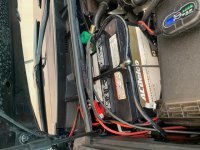
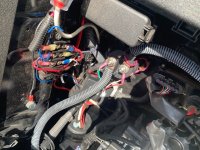
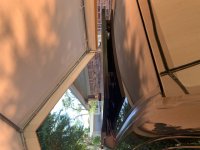
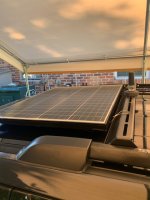
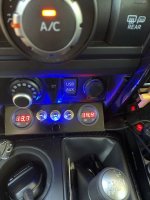
I'm NOT the guy on Youtube but he may have been the one that inspired me. First off, everyone has there own theories of what works and what doesn't based either on experience or science. With your electrical skills you could easily follow what I did on my 2019 even though I realize you stated early on you were not interested in solar. Due to my own experience with mechanical/electrical (30+ years) I don't see the need for upgrading your alternator - years ago absolutely but today's technology uses a fraction of current compared to the "old days". Having a second battery is a real plus especially if using a 2K+ pure sine-wave inverter (mine is 3K and does just about everything I request). I never would have considered solar due to mounting restrictions - I didn't want to use precious space on the o'head crossbars and I definitely was not going to drill holes in my roof. But then I came across the magnetic retention idea. Called mfg but was told product was on serious back-order. Looked at the pictures of the product and determined that it was relatively easy to duplicate - actually, really easy. So here's some pics and if you need more details feel free to pm me. Note: on edit, I inserted a (sideways, sorry) pic of my control panel - the gauge on the left is oem battery voltage - gauge on right is aux battery voltage which defaults to the solar panel. The far right toggle switch activates a relay which ties in the alternator and oem battery to the aux system. The specs on that relay (out of an electric vehicle) is 12 volts and 500 amps constant duty (over-kill). The gauges stay on constantly - they have such a minute current draw that it's never an issue. Vehicle recently returned from trip to TN - the magnetically mounted 100 watt solar panel never moved an iota from original position and the solar system worked flawlessly.
 

Attachments

  • Aux Batt.JPG
    Aux Batt.JPG
    123.8 KB · Views: 311
  • Battery Mgt Relay.JPG
    Battery Mgt Relay.JPG
    127.2 KB · Views: 290
  • IMG_3854.JPG
    IMG_3854.JPG
    79.1 KB · Views: 311
  • RT.JPG
    RT.JPG
    81.4 KB · Views: 300
  • Solar voltage.JPG
    Solar voltage.JPG
    84.1 KB · Views: 300
Last edited:
I did this full time for three years and relied heavily on LTE until a few months ago. There's no comparison between the LTE network and Starlink. "Pretty far out" has nothing on "literally anywhere I can see the sky". Nevermind the lack of data caps, better latency, and additional bandwidth.


I 100% agree. As a network admin / engineer I have had the opportunity to work with both technologies and can definitely see the pros and cons of both. 5G and Starlink are definitely technologies that serve different roles. Starlink is much better when it comes to working anywhere. 5G offers faster speeds if you can get ultrawideband / millimeter wave bands. Otherwise it is really not that much faster than 4G LTE.

Source: Starlink vs 5G - Which is a Better Home Internet Service -

I also find that Starlink is much more stable than 5G when it comes to ping / latency. Crowded cell towers make 5G ping spikes a harsh reality.
 
Last edited:

Members online

Forum statistics

Threads
278,316
Messages
3,554,112
Members
248,016
Latest member
Advally Service

Trending content

Back
Top