New Maestro Radio Solution

USB adapters: Crutchfield automatically added the Metra AX-TOYUSB2 to my cart, saying it was the correct part. It is NOT the correct part. It does not bridge the gap between the female end of the Kenwood plug and the factory proprietary plug on the backside of the center console USB plug. You need the Metra AX-TOYUSB (notice no "2" at the end of that part number). Luckily, the correct adapter is included with the Maestro TO2 wiring harness.

This is for your 2017 though right? Mine is 2013 and it's supposedly need the ax-toyusb2 but I don't see it fitting though. Or maybe they have used the newer connerctor on mine and will need post 2014?.. I already wired everything just need to figure out the scosche mouting bracket which is another PITA.:ybrick:
 
You need the one that is a brown plug, just like the picture on amazon in the link. If they sent you the wrong one. Look at the package then call them. Crutchfield has their fit guide wrong for 2014 and up.
2010 - 2013 Metra AX-TOYUSB-2
2014 and up Metra AX-TOYUSB

Taking apart the old vents is a PITA for the kit, just go slow.
 
I probably got sent the wrong one. I might have thrown the plastic it came with so im sol. I'm planning on using android auto with thumb/hd drives with flac. I'll just run couple of usb extender and be done with it for now . Got that vent down. Any tips on the bracket though? I see there's corresponding letters T N M on the holes on side of HU which one did you guys used? Is it mostly trial and error to get the right fit out of kit.
 
I have used both Android Auto and Carplay with OEM plug with no issues.

weird, couldnt get it to work with oem usb in my 2017.
had a kenwood dnx893s, and now a alpine x208u
worked on neither.

had a google nexus 6p and a google pixel xl. neither of those worked either, until i replaced the usb with the one i linked
 
I've somewhat finished it as I was running out of light and plugged everything to be able to drive it to work today.

HU seemed to detect the maestro fine as the maestro connection check looks good and guage display works fine and the OEM custom options are actually available to change.

I still need to recheck everything tomorrow as my steering wheel control is not working and is not even lightning up. Is there a separate connection for this? Also my sub is not working and I'm pretty sure I plugged it a the sub rca output.

Video bypass seem to didn't work yesterday as it was not even showing video at all but this morning it is working fine.

Android auto is not working as well. I used a different 6ft USB cable are these hu picky with how long the cable is? I'll try to switch with the provided USB tomorrow as well.


Sent from my LG-D851 using Tapatalk
 
Solved some issues. My amp was set to 2 chan input instead of 4ch thus giving me a crappy sound with no proper sub output. Android auto is picky with cheap usb wires just used that came with the phone and it worked fine.

Still stumped with steering wheel control.

Here's a thread I started on idatalink. Anybody has any idea what might be the problem with the controls?
 
Maestro RR mounting location

I haven't seen any details about where folks are physically mounting the Maestro unit. Would like to be able to easily access it for firmware updates etc. Was thinking glove box, but not sure how difficult it will be to bet it in there...

Suggestions?
 
The harnesses are too short, you would have to extend it all. Not really advisable.

You could just plug a USB cable in and extend that. It's a standard mini connector.
 
The harnesses are too short, you would have to extend it all. Not really advisable.

You could just plug a USB cable in and extend that. It's a standard mini connector.

That's a good idea - but not having a windows laptop (Mac family here) I'll need to find a friend with one to flash updates.

Where do people physically mount the box? Directly behind the double din radios?
 
With the ilx-007 I would just double stick tape it right on top of the chassis.

g500iLX107-i.jpg
 
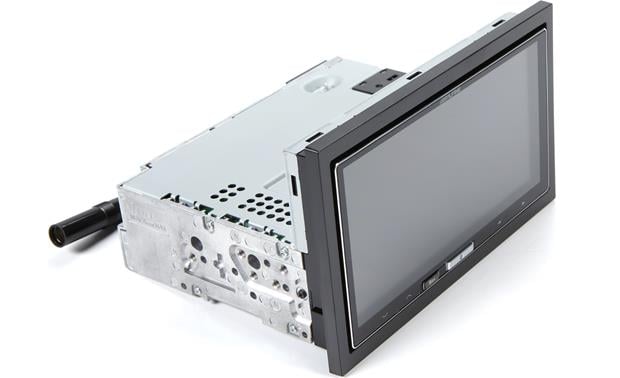
Kenwood Excelon DNX994S installed.

Ok, I had it installed in my 2017 Off-Road.
The installed cost was only $175.00 above all the stuff from Crutchfield. Money well spent!

The only hitch was the adapter for the shark fin satellite antenna. Apparently the connector on it’s cable has changed for 2017. It’s not the square one in previous posts. So we’re sorting that out. But I discovered it’s an SMB connector in a new weird connector housing.

This Nav/Multimedia unit is awesome!!!

Edit:
After having this a week I wish i had gotten another brand.

1. Has obnoxious screen glare. The screen is pretty but very reflective. Even on a bright overcast day, I took a turn and the screen washed out. The screen tilt and backlight adjustments are nifty but you shouldn’t have to play with them just to see the screen.
2. Confirmed with Kenwood that the built in navigation does NOT have any voice control of any navigation features. So to find destinations on-the-fly you have to type on screen.
Hello Kenwood? It’s 2017!!!
3. Does not play any text messages unless you connect via USB (I’m iPhone 6S and don’t know about Android). This feature doesn’t work connected by Bluetooth like my rather lame OEM non-nav unit.

It’d also be nice to create a route on another device then sent it to this unit. It is Garmin, and my Garmin stand-alone has an app to do just that.

So, only a week into ownership and I have huge buyers remorse.

 

Attachments

  • 6C08B29C-549A-42E9-BE57-8A12692D1B39.jpg
    6C08B29C-549A-42E9-BE57-8A12692D1B39.jpg
    130 KB · Views: 1,263
Last edited:
Edit:
After having this a week I wish i had gotten another brand.

1. Has obnoxious screen glare. The screen is pretty but very reflective. Even on a bright overcast day, I took a turn and the screen washed out. The screen tilt and backlight adjustments are nifty but you shouldn’t have to play with them just to see the screen.
2. Confirmed with Kenwood that the built in navigation does NOT have any voice control of any navigation features. So to find destinations on-the-fly you have to type on screen.
Hello Kenwood? It’s 2017!!!
3. Does not play any text messages unless you connect via USB (I’m iPhone 6S and don’t know about Android). This feature doesn’t work connected by Bluetooth like my rather lame OEM non-nav unit.

It’d also be nice to create a route on another device then sent it to this unit. It is Garmin, and my Garmin stand-alone has an app to do just that.

So, only a week into ownership and I have huge buyers remorse.

Dang..that sucks! I was considering the Kenwood, but based on your review here, I'm thinking I'd be disappointed too.

I've been waiting to see what came out of CES 2018 - and so far, the wireless Android Auto integration is probably something I'm going to wait for...and will more than likely go with the Pioneer.
 

Members online

Forum statistics

Threads
278,310
Messages
3,554,080
Members
248,016
Latest member
Advally Service

Trending content

Back
Top