OEM Entune Head Unit - can't turn it off?

SurfToy

Member
I did a couple searches and didn't see this addressed. Is it true that the Power button on our stereo can't actually turn the unit off completely? The manual seems to say it does, but I can't get mine to turn off, and the (shitty) service advisor said "nope, you can't turn it off completely." If I press and hold the Power button, it goes dark temporarily, then comes back on. Is this normal behavior? Why in the hell would they make it impossible to turn off the stereo unit?
 
Register to hide this ad
I believe your observations are correct and think there were some other threads on this subject.

From memory since I’m taking a slight break from a fishing trip, you can upload a black screen and use that to simulate turning it off completely. It’s a bit cumbersome but you get used to it. Otherwise you have to get a new unit! I’ll do that at some point because I don’t care for the OEM Panasonic. We need a guru hack to alter firmware for Apple CarPlay as well!

I’ll look for a thread that I used to modify my screen saver.


Sent from my iPad using Tapatalk
 
Found it:
 

Attachments

  • Enderp.jpg
    Enderp.jpg
    87.2 KB · Views: 1,135
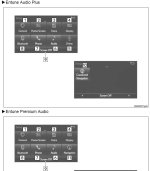
What do you mean "turn off"? If you just want the screen to be off, hit the home button, then the settings icon on the screen and "screen off" will be an option at the bottom. I have to do that at night since the screen is so bright and can't be adjusted.

If you want to power the whole thing down, I don't think that is an option since it is so integrated with other electronics.
 
What do you mean "turn off"? If you just want the screen to be off, hit the home button, then the settings icon on the screen and "screen off" will be an option at the bottom. I have to do that at night since the screen is so bright and can't be adjusted.

If you want to power the whole thing down, I don't think that is an option since it is so integrated with other electronics.

you can adjust the screen brightness in the settings
 
What do you mean "turn off"? If you just want the screen to be off, hit the home button, then the settings icon on the screen and "screen off" will be an option at the bottom. I have to do that at night since the screen is so bright and can't be adjusted...

The Entune screen day and night (when headlights are On) brightness can be adjusted in Settings like this:

Turn your headlights or parking lights On. To set up your Entune screen hit the Home button, hit the gear symbol in the upper right corner, (should now be in Setup menu), hit Display. As long as your headlights are still ON you’ll see the “Adjust Contrast/Brightness” menu with a “Day Mode” and checkbox. Deselect the checkbox.

Now hit the General button and with headlights (or parking lights) still ON adjust the brightness and contrast to how you like the Entune screen to look at night. Hit the OK button to save the settings.

Now you’re back at the Adust Contrast/Brightness menu again. Turn OFF the headlights and everything get bright. You are now in “Day Mode”. Hit the General button and adjust contrast and brightness to your favorite daylight settings. Hit OK to Save.

Back out of the menu and get to the Navigation screen (showing a map). With headlights OFF your dash and navigation screen are bright in Day Mode. Turn the headlights ON and everything dims to Night Mode and the nav screen goes to the dark background with white text.

These directions are for a premium unit, but it should be similar for the other packages.
 
I found this thread while doing a search on this forum about how to turn off the Entune system. I have an ‘18 SR5 w/NAV.

I don’t like the way the navigation is relegated to a third of the screen when in the home screen mode. If I could make it a default to show the map full screen and it stayed that way, I’d just keep the map showing. But after cycling the ignition off and on, it just goes to default showing the map in its small space. I don’t need to see what song I’m playing (I play music from my phone via Bluetooth) nor do I need the phone buttons. So I decided to turn the screen off.

I tried turning the screen off while in the car waiting for my wife to come out of the store. I like that it is completely black, only coming on for the backup camera. When I turn on the audio I get a brief song title then it goes dark again. I didn’t have any phone calls or texts come in, I assume it will give me some indication who’s calling. And I like that the screen stays off for good even through multiple ignition cycles today. If I want the screen to come back on, I just simply hit the home button.

Thanks for the answer on how to turn the screen off.

 
I found this thread while doing a search on this forum about how to turn off the Entune system. I have an ‘18 SR5 w/NAV.

I don’t like the way the navigation is relegated to a third of the screen when in the home screen mode. If I could make it a default to show the map full screen and it stayed that way, I’d just keep the map showing. But after cycling the ignition off and on, it just goes to default showing the map in its small space. I don’t need to see what song I’m playing (I play music from my phone via Bluetooth) nor do I need the phone buttons. So I decided to turn the screen off.

I tried turning the screen off while in the car waiting for my wife to come out of the store. I like that it is completely black, only coming on for the backup camera. When I turn on the audio I get a brief song title then it goes dark again. I didn’t have any phone calls or texts come in, I assume it will give me some indication who’s calling. And I like that the screen stays off for good even through multiple ignition cycles today. If I want the screen to come back on, I just simply hit the home button.

Thanks for the answer on how to turn the screen off.


You can adjust your settings and have navigation use 1/2 of the screen or the whole screen if that’s what you prefer.
 
You can adjust your settings and have navigation use 1/2 of the screen or the whole screen if that’s what you prefer.

I know I can just tap the navigation to open it full screen. But it always reverts back to the default half screen upon start up.
 
I know I can just tap the navigation to open it full screen. But it always reverts back to the default half screen upon start up.


After reading this, I had to go out and play with my truck because I was sure that the last selected screen came back up even after a restart. I typically have it on audio and that does comes back up full screen on restart but when I selected navigation, it started back up on the split Home Screen. I’ll have to play with my wife’s Sync system tomorrow. I think it may actually be set up the same way.
 

Members online

Forum statistics

Threads
278,312
Messages
3,554,085
Members
248,016
Latest member
Advally Service

Trending content

Back
Top