**Photography Talk**

now after uninstalling lightroom, i can not reinstall it, because adobe application manager tells my lightroom 4.3 is "up to date" wtf

go to your program manager under the control panel and click on the "uninstall a program" link. Look for anything that says lightroom. it may not have uninstalled everything. also uninstall the adobe app manager. reboot pc and reinstall lightroom. That should probably work. (yeah, I know)

[MENTION=56396]Hepar[/MENTION] no worries, that's the combination of a 3.2mp phone camera with crappy metering and my post-processing-via-laptop where my viewing angle changes everything. It is also a bit what I was going for, though I would have wanted the underexposed sections to not be that.

my normal camera needs batteries and I've been too cheap to buy them lately.
 
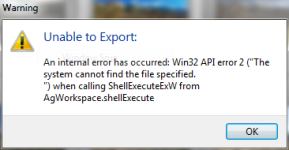
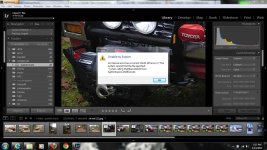
still not working... keep getting this bull shit

Capture II.PNG

Capture.jpg
 

Attachments

  • Capture II.PNG
    Capture II.PNG
    36.7 KB · Views: 481
  • Capture.jpg
    Capture.jpg
    138.8 KB · Views: 471
I love this thread. The pics Ive seen so far have far exceeded what I was expecting to see when the OP started. Wish I had some of that talent!
 
I wish you could "like" an entire thread. I bought a T2i before my trip to Ouray last year but should have taken a photography class before I went to learn about all the features...hell I need to take one now. You guys take some beautiful pictures!
 
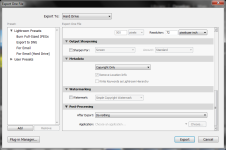
welp i gots it all figured out... once you chose to export, you have this window that opens up, letting you chose your destination for your exported file ect -you can also add watermarks or copyright stamps at this point if you so want... anyhow at the very bottom of the window(if you scroll down) you will see a "Post-Processing" option... you have to click the drop-down for that and chose the "do nothing" option... apparently this is a pretty common issue especially with new users. for some reason adobe defaluts get messed up after a few days of use and some how the program self changes or something -everything i have read states that this is an adobe issue, not a user error or user changed setting... anyhow yeah
Capture III.PNG
 

Attachments

  • Capture III.PNG
    Capture III.PNG
    85.4 KB · Views: 500
apparently this is a pretty common issue especially with new users. for some reason adobe defaluts get messed up after a few days of use and some how the program self changes or something -everything i have read states that this is an adobe issue, not a user error or user changed setting... anyhow yeah

Sure. Keep telling yourself that buddy. :behindsofa:


Just playin'. Glad you got it figured out.

Huh, been running LR since the initial release, always upgrade the day the new one comes out, never had that issue. I will say I've never had any issue with LR, love the program! Just upgraded from CS5 to CS6 the other day, have not had time to play with it just though. Glad you got it figured out as well, those little things can drive you insane!
 
Picked up a 35mm F1/8 lens last friday. Went on a little wheeling adventure today. Tell me what you guys think.

Messed around with it in LR2 a little bit. Don't really know what I am doing, just played with stuff until I thought it looked cool.

_DSC0013-1_1024x685_zpsd2b66495.jpg~original
 
I wish you could "like" an entire thread. I bought a T2i before my trip to Ouray last year but should have taken a photography class before I went to learn about all the features...hell I need to take one now. You guys take some beautiful pictures!


I started off taking everything in Auto mode, and just playing around in manual mode to see how things react. When I would go out to somewhere "important" I would shoot first in manual and then in auto. You will end up with a LOT of pictures but if your manual mode shot is horribly off: first you didn't lose the picture and second the auto modes settings will be recorded and you can get an idea of where you went wrong. Obviously you don't want to replicate auto mode exactly, but it helped point me in the right direction.
 
There is some nice stuff in here. :nicethread:


Still figuring out how to work this camera thing. I tend to learn important tips after big trips so most of these were shot with non-ideal settings.

Shot with a Nikon D60 and a cheapo 18-55mm f1/3.4. Edited with iPhoto (for now)

DSC_01883.jpg~original


DSC_02283.jpg~original


DSC_01313.jpg~original


DSC_00873.jpg~original


DSC_0337.jpg~original
 
[MENTION=79982]T4rman[/MENTION], is that a Shorts? where are you flying out of? DFW? Alliance? Love is closed down, isn't it?
[MENTION=90105]Loud Al[/MENTION], that dog is b-e-a-u-tiful.
 
Your photos are unreal.. Is that all camera settings or some software editing?
They are just the right amount of sharp! :artist2:

It is a combination of proper settings of the camera and software. I use DXO Optics and Lightroom 4 It helps to take interesting pictures from interesting angles as well. A sharp boring picture is still boring :D If you are trying to figure out the mechanics of photography I recommend this book
 
That's definitely a shorts. I am working at DTO for the mean time. Not flying though. Love is still going strong thanks to SWA.

oh cool. i used to live in rhome, tx. (off of 114). my father is based out of DFW and every now and then he'd have something to do at alliance. he's a pilot for AE now but he used to do aviation mechanical work.
 
IMG_3167x.jpg

IMG_8288.jpg

IMG_3556sm.jpg~original

_MG_6242.jpg

7025HDR.jpg

_MG_6854.jpg

_MG_6711.jpg

_MG_6539.jpg

_MG_6543.jpg


Horrible noise in this pic that I was unable to remedy without oversoftening the details, but I still like it due to the shape of the lightning.

7641HD.jpg
 

Members online

Forum statistics

Threads
278,310
Messages
3,554,080
Members
248,016
Latest member
Advally Service

Trending content

Back
Top