
Please? How to disable Safety Lock out on Gen 6 Nav

beamik

New member
ok, I know this has been discussed on here and other forums, so I'm really sorry for bringing it up again... It's just that after a few weeks of driving this truck, my only real complaint is the Nanny nav lockout... I just find it ridiculous that Toyota would not allow this safety "feature" to be disabled - just like they allow the disabling of the annoying seatbelt alarm sounder... There just has to be a way to use it just as you would any other aftermarket nav system (on demand). The system looks cool, sounds great (especially iPod usb), but damn it, I might still have to pull it out if I can't find a way around this!!! :shrug:

Just wondering if anyone has any contacts or suggestions to disable this lockout bull* from a software standpoint. I think that someone out there knows the answer.. There has to be a way to do this.. (hopefully). I don't really care for Prestigous, because I don't want another cord and switch dangling around the cabin, and apparently the lockpick 2 does not support the 2012 / Gen 6 nav yet (as per their generic email response to "check back later"). Plus, the fact that enabling these lockout units makes the gps navigation unusable (although only temporarily) makes it feel like a bandaid, and not a true solution.

Any super hardcore programmers out there??? Anyone?
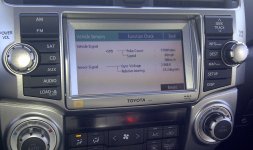
IMG-20120225-000682.jpg

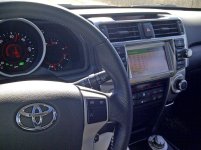
IMG-20120225-00069.jpg

I was wondering if there were any more top secret menus from within the service menu that would open up more settings???

Btw, I'm also shocked and appalled that toyota would allow me to opperate the service menu while driving 68 mph - not to mention take a photo of such an act - how dare they? Someone please call a lawyer!
 

Attachments

  • IMG-20120225-000682.jpg
    IMG-20120225-000682.jpg
    139.2 KB · Views: 9,390
  • IMG-20120225-00069.jpg
    IMG-20120225-00069.jpg
    134.2 KB · Views: 8,034
Register to hide this ad
Any super hardcore programmers out there??? Anyone?
I'm a Comp Sci guy, but I'm still waiting to take "Toyota Nav Hacking 101." I would love for there to be a way to do this. But it is much easier said than done. I am handy with electronics and hacking the odd piece of software here and there, but I have looked up how to access the back end of these systems and unfortunately there is absolutely no documentation at all. Until that becomes available, or someone with a lot more specific know-how regarding these units steps forward, it looks like we won't be hacking these things any time soon.

But if anyone can find a way in, I would love to hack the crap out of this thing. Just think, actual functional iPod interface...useable navigation...Oh the possibilities...
 
Fujitsu?

I'm not totally sure, but I was looking over the parts guy's shoulder at the dealership - they must have a top secret database somewhere in a sub-basment in Tokyo... and saw that the part for this nav had Fujitsu in the description... Maybe Toyota subs out to JBL, who in turn subs out to Fujitsu?

I think the p/n is 86120-35370, not totally sure though.

There has to be a Nav Hacking 101 class somewhere!

I will be in Japan next month, so maybe, if I can find an address for the top secret toyota facility that contains the database, we can find the source code for the gen 6 nav GUI... mission impossible style.:ak472:
 
Last edited:
I'm not totally sure, but I was looking over the parts guy's shoulder at the dealership - they must have a top secret database somewhere in a sub-basment in Tokyo... and saw that the part for this nav had Fujitsu in the description... Maybe Toyota subs out to JBL, who in turn subs out to Fujitsu?

I think the p/n is 86120-35370, not totally sure though.

There has to be a Nav Hacking 101 class somewhere!

I will be in Japan next month, so maybe, if I can find an address for the top secret toyota facility that contains the database, we can find the source code for the gen 6 nav GUI... mission impossible style.:ak472:

I'm in for the mission. I'll be the guy that stays behind in the nondescript van guiding you through endless air ducts. :keyboard:

But seriously, source code for this would be a huge step forward. Then I'm sure we could find a test unit on eBay and figure out a way to load our own version of software with updated GUI and whatnot.
 
Just think, actual functional iPod interface...useable navigation...Oh the possibilities...

Just think - some people may even pay 2k for such a system!!!


I have to think though that it really can't be very difficult, once you get through the door into the code... However, considering how cryptic the service menu is - I'm not too sure. To even get into the menu you have to hold down the info button, and click the headlights on/off 3 times... which means the headlight voltage (dimmer) must be tied in somehow... Next thing you know we'll all be holding down different buttons and clicking other things, including our heels (3 times), to try and bring up some other secret friggin menu... Hold down parking brake, press cruise control lever: up, down, up, down, left, right, left, right, B, A, Start!!!!

It's not right Toyota. Hope you are listening...
 
Last edited:
Just think - some people may even pay 2k for such a system!!!


I have to think though that it really can't be very difficult, once you get through the door into the code... However, considering how cryptic the service menu is - I'm not too sure. To even get into the menu you have to hold down the info button, and click the headlights on/off 3 times... which means the headlight voltage (dimmer) must be tied in somehow... Next thing you know we'll all be holding down different buttons and clicking other things, including our heels (3 times), to try and bring up some other secret friggin menu... Hold down parking brake, press cruise control lever: up, down, up, down, left, right, left, right, B, A, Start!!!!

It's not right Toyota. Hope you are listening...


Very true, it sounds like a cheat code for some game back in the day.

Ok check this out. The fact that some loading files and what not are stored on the DVD is intriguing. If I have time later I might take the one out of my truck and poke around a little...
 
Correct - 6th Gen Nav, 5th Gen Truck... don't ask me why :)

And also correct - the previous hack that was posted was for the old nav, does not apply to the new unit. Even at that, it was kind of a laughable bandaid solution, because it sounds like you had to do the hack every single time you started the vehicle...


I called the Toyota "Customer Experience Center" today, they have absolutely no information. It was not a good experience.
 
Fifth generation (2009–present)

The fifth generation 4Runner was unveiled at the Texas State Fair on September 24, 2009. It is available in 3 trim levels, 2 of which were available previously. The base SR5 trim as well as the top-of-the-line Limited trim are available as a 2WD or a 4WD. The new Trail Edition is only available as a 4WD. The SR5 and Trail Edition 4WD's will receive a part-time 4WD drive system, while the Limited will have full-time 4WD. All models will come with A-TRAC.[10] The new Trail Edition offers Toyota's Kinetic Dynamic Suspension System (KDSS) and Crawl Control which had previously only been available to premium Toyota vehicles, as well as a rear locking differential like the previous Trail Package.

The 4.0-liter V6 adds Dual VVT-i which improves horsepower, torque and fuel economy, and comes standard in all models. A 2.7-liter I4 was available on 2WD models, but was discontinued after the 2010 model year. The 4.7-liter V8 from the previous generation was not carried-over to the fifth generation 4Runner. [11] The 4Runner is built on the same platform as the FJ Cruiser.[12]

Although the fifth Generation 4Runner has had numerous safety improvements, there is a large percentage of U.S. customer base that is very disappointed in the navigation system. There have been numerous complaints made to Toyota due to the overly intrusive safety programming changes made to the upgraded 7" touch screen navigation system. This intrusive software actually disables most functionality when the vehicle is traveling over 5 MPH. All features related to finding a destination are disabled, phone functionality is disabled, most radio and audio functionality is also disabled.

All attempts to rectify this with Toyota Motor Company and the OEM Denso Electronics have been unsuccessful. Neither company will respond to customers complaining about this unnecessary and intrusive change, nor have they provided any options to customers who wish to disable the feature and allow use of the system while driving their vehicles.
 
More Information

some more info:

Denso part number:

86120-35530 part #

E7028 denso unit model #

These bas****s at Denso have been doing this for years. There have been very few effective hacks to date.

I really wish someone could figure this out.
 

this and the prestigious society nav mod have been used on the GX460. only bad thing is you can only do the bypass for so long before the nav unit goes bonkers on your location since your feeding it a false signal of roughly 5mph when you are doing xx mph.

or be like me and get a garmin and play with it at speed to your hearts content.

me I use the voice input on my garmin since its a hell of a lot better than the Toyota nav unit, but I am biased toward garmin units.

and my 7" garmin is way bigger than the 6.1" nav in the Toyota. but the side effect is that the bean bag mount shakes the unit since its way to big for it.
 

Members online

No members online now.

Forum statistics

Threads
278,316
Messages
3,554,120
Members
248,016
Latest member
Advally Service

Trending content

Back
Top

