Poor Bluetooth sound on E7008 JBL Navigation - 2008 Limited V8

pjbrownva

New member
I recently picked up a 2008 Limited V8.

It has the JBL factory Navigation with bluetooth (E7008).

When I use the bluetooth to make calls the other party has a hard time hearing me.

Is this a common complaint? Are there any good fixes? Would a repositioned and upgraded microphone help any?

I've been wondering if it is the Mic itself and/or the location of the Mic (in the middle by the sun glasses holder, I believe).

In my old 4Runner I had a Kenwood aftermarket head unit with bluetooth based on the Parrot chip set. I installed the mic so it poked out of the head liner right in front of my sun visor. So the mic was "front and center" to me as a driver, and only about 12" away from my mouth. It worked AWESOME!

So, I was wondering if I can buy a 3rd party mic, install it in a similar location, and wire it into the factory Navigation system. Has anyone tried this, or does anyone have any info or insights to add.

I don't know if there are different types of mic in terms of sensitivity or compatibility, but with all of the expertise on this forum, I figured that I would ask for advise, suggestions and help before I head off buying things and cutting wires! :blabla:

-Phil
 
Register to hide this ad
Correct on that mic location...and just in case you dont know the volume adjust is steering wheel controls only, I dont think that impacts outgoing volume just a side note.
 
Correct on that mic location...and just in case you dont know the volume adjust is steering wheel controls only, I dont think that impacts outgoing volume just a side note.

Thanks, rooost. I didn't know that about the volume control.

I'll use this thread to post back anything that I *do* discover.

I googled looking for "bluetooth call quality problems factory radio", and I found lots of hits. As I go through the info, I'll post back to this thread if I find anything useful.

My phone is currently an Android Samsung S4 on Sprint. I'm getting a new iPhone this week on AT&T, so I'll also post here if the iPhone on AT&T works any better.
 
Thanks, rooost. I didn't know that about the volume control.

I'll use this thread to post back anything that I *do* discover.

I googled looking for "bluetooth call quality problems factory radio", and I found lots of hits. As I go through the info, I'll post back to this thread if I find anything useful.

My phone is currently an Android Samsung S4 on Sprint. I'm getting a new iPhone this week on AT&T, so I'll also post here if the iPhone on AT&T works any better.

FWIW I've got an iPhone 6 and the same navigation and I have the same issue. I'd imagine it's a mic location issue.
 
FWIW I've got an iPhone 6 and the same navigation and I have the same issue. I'd imagine it's a mic location issue.

I suspect your right. More specifically, it could be a combination of the bluetooth hardware in the radio, plus the settings for the bluetooth, and the quality and location of the mic.

So here's my thoughts on approaching this issue:

1) The hardware... I think we're stuck with it. It's tightly integrated into the radio's interface, so I doubt we can we can wire in better quality hardware and still keep the factory integration (of course... if there is a hardware genius on the forum, maybe they can find a way to mod the radio).

2) The bluetooth settings -- I haven't been inside the secret factory / diagnostic menus so I don't know if there are any settings to tweak the bluetooth. I know on my aftermarket radio with bluetooth, you could adjust the gain and echo cancellation, and dialing it in correctly made a big different. For the factory radio, it's a TBD. If anyone knows more, maybe they can share.

3) Quality of mic -- I don't know enough about mics yet to know if a replacement is "plug and play". The radio diagrams show two wires on the back for the mic, so it would be easy enough to clip those and solder in a different one. I guess I have more research to do.

4) Location of mic -- this one is easy to fix (sort of)... If I can install an aftermarket mic, I can put it right in front of the visor, hanging out through a small cut that I make in the headliner. That puts the mic front and center, and right in my line of speech as I'm sitting up and looking forward at the road. That's my ultimate hope. To research the issue, and then try putting a 3rd party mic in a better location.

More to come... (as I get to it!)

-Phil
 
So I just had a thought... *IF* a company makes a noise canceling mic system, we might be able to wire that in, and significantly improve the mic signal sent into the factory GPS.

A higher quality mic would be good. A system that takes power and does some signal processing would be better. For example, a little logic box that takes TWO mics. One in front of you, and one placed elsewhere in the cabin, and the logic box's job would be to process the two signals, and put out a clean, clear voice signal without background noise.

I don't know if such an add-on exists, but I'll be searching for one, and reporting back on what I find.

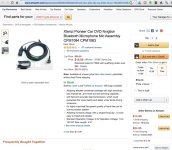
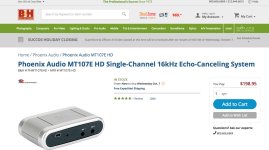
A quick google led me to some mics such as this one and this one. Not quite what I want, but maybe worth a try. Most interesting is that the second mic listed that it's 4.5volt operation, but works 1.0 to 10.0 volts.

I guess I have more to learn about mics!

(P.S. -- Images posted for convenience and also for if/when these links change or expire)
 

Attachments

  • Mic1.jpg
    Mic1.jpg
    121.6 KB · Views: 785
  • mic2.jpg
    mic2.jpg
    118.9 KB · Views: 757
So, I've found a few promising leads.

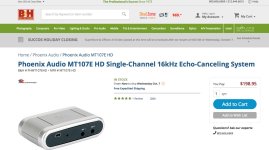
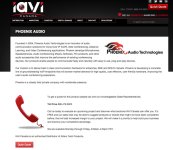
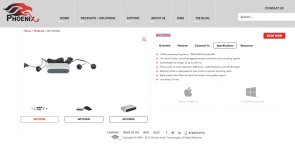
This is what I have so far.

I'll have to spend more time on the weekend, and then either buy one of these systems to try them, or see if I can get a sample (for example, a sample of the Phoenix OEM board).

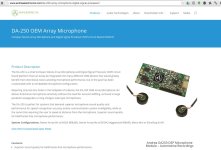
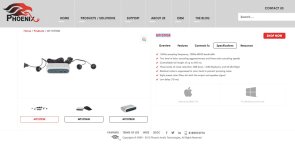
It's not a done deal yet, but it looks promising. It looks like I might be able to get a 1 mic, 2 mic, or 4 mic system with a logic board that filters out the noise, and provides a clean output of just my voice. The plan would be to feed this output in the factory's mic input wiring.

The solution isn't done... for example I need to see what level of input the factory mic is expecting. A good oscilloscope would come in handy right about now, so that I could tap in to the factory mic input while it's in use, and see what's going on signal wise.

Here's a link to a single mic product. The same company makes a 4 mic solution, and an OEM board.


More to come....

-Phil

:couch2:
 

Attachments

  • Phonex_soln.jpg
    Phonex_soln.jpg
    98 KB · Views: 788
  • phoenix_2.jpg
    phoenix_2.jpg
    107.5 KB · Views: 745
  • phoenix_3.jpg
    phoenix_3.jpg
    67.4 KB · Views: 747
So, I've found a few promising leads
More to come....

-Phil

:couch2:

So my monologue continues... :heh:

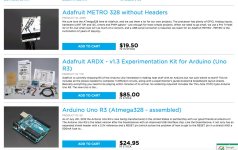
I found a bunch more options. One of them is to write my own algorithms in MATLAB, and then load them onto a FPGA board such as ones made by Xilinix.

The board could be easily reprogrammed, so I could tweak the algorithm as needed, and I found code examples of doing noise cancellation, including using two or more mics as an array to tune in on a specific position. Being a software guy in my previous career, it wouldn't be *that* hard, and I could program the array (for example) to only pick up noises within a 30 degree angle from the mic, and vertically, anywhere from 10 degrees below the mic to 45 degrees. This would (or should) do a good job of honing in on just my voice, and excluding other sounds... such as my wife correcting me! :dance::dance:

Of course, the concern is that this is too much of a time consuming venture. I *do* have to earn a living, after all -- and my wife will certainly remind me of this if prototype boards and programming cables start showing up, and I'm wiring mics to the boards, and writing code and running tests.

Too bad, I *know* that a MatLab solution could be awesome!

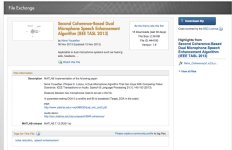
For example, this link, is to a 2012 research paper that implemented an algorithm to isolate a single person's voice from an array of mics in a noisy environment with other sounds and other people speaking... and it includes the MATLAB code!

I've found other companies that make signal processors to remove background noise. One of them seemed AWESOME (targeted at Police, Firefighters, military vehicles, etc...) until I saw that the unit costs $2,200 !!!


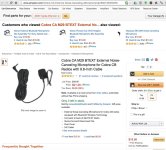
So meanwhile I've ordered a passive noise canceling mic that was available on Amazon for $26, but I found it on ebay for $10. It has slits on the sides behind the mic's diaphragm so the idea is that the background noise will enter from the sides and from the front, and thus cancel itself out.

If that works, the for 10 bucks and some wire cutting I'm done!

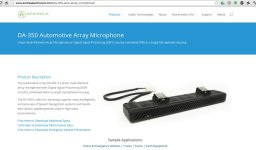
If not, then I'll need to look at fancier solutions, such as solutions from Andrea electronics.

More to come... :popcorn:
 

Attachments

  • ArduinoBoards_$25.jpg
    ArduinoBoards_$25.jpg
    137.5 KB · Views: 718
  • MatLab-dualMic.jpg
    MatLab-dualMic.jpg
    70.7 KB · Views: 753
  • NoiseCanceling_andrea_DA-350.jpg
    NoiseCanceling_andrea_DA-350.jpg
    77.3 KB · Views: 760
  • NoiseCanceling_andrea_DA-250.jpg
    NoiseCanceling_andrea_DA-250.jpg
    107 KB · Views: 750
  • Phonex_soln.jpg
    Phonex_soln.jpg
    98 KB · Views: 690
  • phoenix_3.jpg
    phoenix_3.jpg
    67.4 KB · Views: 683
  • phoenix_2.jpg
    phoenix_2.jpg
    107.5 KB · Views: 691
  • Mic1.jpg
    Mic1.jpg
    121.6 KB · Views: 682
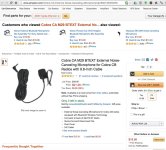
Got the Cobra external Mic via the mail. It looks very nice. Tested bluetooth with my new phone, and confirmed that the sound improves when I move closer to the factory Mic.

I'm gonna try to install the new mic this evening, and place it right in front of the driver's side visor. I have a good feeling about this. If it works well, I'll try to come back and post some info on the key aspects of the install.
 

Members online

Forum statistics

Threads
278,312
Messages
3,554,089
Members
248,016
Latest member
Advally Service

Trending content

Back
Top