Scion T1806, Sirius, iPod, and Peripheral controller in '07 SR5

the4Rdan

New member
I know there are a lot of posts on there with variations of Scion HU installs, but thought I'd share the combination I did.

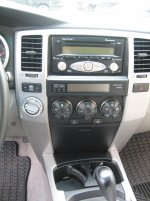
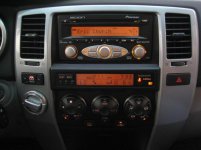
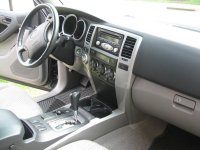
It started with an interest to add Sirius radio, and Scion HU's seemed to make the most sense. I'd had an xB loaner a few years back with the T1806, so I knew I liked that setup. Plus, the tangerine color is an identical match to our dashes. I considered the FJammer, but the word seemed to be that it wouldn't really be any better sound than the stock stereo.

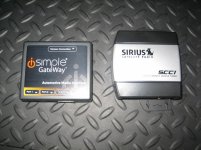
The Directed Electronics TOY-SC1 has been discontinued, and only one vendor on ebay still sells them. I'd read some reviews about plugs not locking into the Directed box real well, and also wanted something that would work with an iPhone for iPod controls. Crutchfield recommended the ISTY11 by Peripheral (iSimple), which also requires the Sirius SCC1 unit. HuskerZ also used this interface (thanks for your tips!). EDIT: you'll need the ISTY571, not the 11 if you want it to be compatible with (i.e., both play and charge) iPhones.

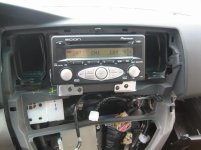
The directions posted elsewhere on this site on removing the dash setup to access the HU are so clear...takes about 30 minutes to get to the point of actually removing the old HU. If I'd only been installing the Scion HU, I would have been done in 1.5 hours tops.

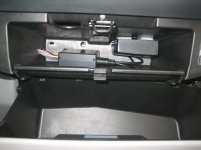
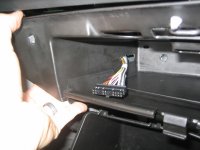
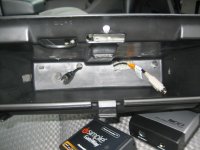
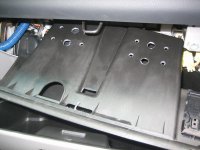
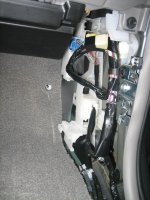
The ISTY11 and SCC1 mounted easily in the small glove box (above the main one). See pictures below- I added additional holes for ventilation and to run the cabling. I used 3M heavy duty velcro to mount the units in that box, to separate them, and keep from rattling around.

The Sirius antenna is the hardest part- figuring out where you want to route it. I was hoping to avoid putting it outside of the vehicle, and tried a few locations on the dash, as others suggested, but couldn't get decent reception, especially under heavily wooded roads. The sound quality is excellent!! No "tinny" sounds as some of the sportsters or other exterior-mount add-on units can have.

The iPhone connection works well, but didn't get a chance to try out the iPod yet (left at work). I'll try that tomorrow, and let you all know.

Overall, a great setup! All steering wheel controls work. The T1806 was ($50), ISTY11 ($120), SCC1 ($50), and iPod cable ($20). Couldn't be happier, especially for $240!
 

Attachments
  • IMG_4132.jpg
    IMG_4132.jpg
    78.6 KB · Views: 2,983
  • IMG_4147.jpg
    IMG_4147.jpg
    68.9 KB · Views: 3,347
  • IMG_4153.JPG
    IMG_4153.JPG
    133.6 KB · Views: 3,022
  • IMG_4157.JPG
    IMG_4157.JPG
    120.5 KB · Views: 2,973
  • IMG_4166.jpg
    IMG_4166.jpg
    65.3 KB · Views: 3,669
Last edited:
Register to hide this ad
Per several requests, attached are some additional photos...

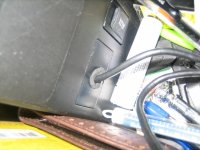
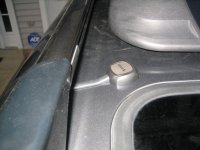
Pictures show wiring into the upper glove box, additional ventilation in upper glove box, iPod/iPhone wire routing into center console, and antenna location.

One thing I learned tonight, tried to connect my iPhone 3GS for the first time (had only used my iPod previously) is that the audio can be controlled, but won't charge the iPhone or play Pandora, Youtube, etc. If you want to charge and use an iPhone for the mp3 playback, you need to purchase the ISTY571 instead of the ISTY11.
 

Attachments

  • IMG_4143r.jpg
    IMG_4143r.jpg
    71.2 KB · Views: 2,978
  • IMG_4145r.jpg
    IMG_4145r.jpg
    79 KB · Views: 2,868
  • IMG_4146r.jpg
    IMG_4146r.jpg
    87.7 KB · Views: 2,838
  • IMG_4163r.jpg
    IMG_4163r.jpg
    101.7 KB · Views: 2,807
  • IMG_4149r.jpg
    IMG_4149r.jpg
    97.1 KB · Views: 2,798
  • IMG_4154r.jpg
    IMG_4154r.jpg
    99.4 KB · Views: 2,972
Last edited:
After talking on the side with the4Rdan, I'm probably going to pull my T1809 Scion Head Unit and do the exact same thing as he did.

If anyone sees a T1806 for sale for around +/- $30-50, please let me know. I see some at $90 and up on fleabay, don't plan to pay that much tho.

The 1809 will be up for sale soon too. I'd consider one of the Pioneer DVD DD units, but thats just overkill for my particular needs.

Thanks!
 
Update:

I purchased all the same parts as Dan here, and with his occasional input, was able to do the exact same install on my 2004 runner with the T1806. I want to thank Dan very much for all his help.

A couple of notes:
I had originally installed a T1809 only to discover it wasn't compatible with this particular gateway (thanks again Dan). I did try the Ipod specific cable that plugs to the back of the HU, but really did not like the way the head unit Ipod interface worked, I found those 4way knobs kinda clunky and easy to hit the wrong selection/playlist/etc within the time allowed. And I wasn't satisfied with getting only IPod music, occasionally I like youtube and other sound out of my Iphone4.

I mounted the gateway and sirius box inside the hidden glove compartment as well, and found I was able to remove the whole box after dropping the main glove compartment. There were four screws holding the hidden section, two on each side. There was also a harness/connector attached on the right side, simply held in place by a tab, note the orientation so you can easily attach it back later. Not sure what this is for, some expansion for something I don't have.

I drilled a series of large holes for air flow and cooling, a large wood spade drill bit made some nice holes.

IMG_1290.JPG


Once I installed the unit, I discovered the harness supplied with the Isimple gateway did not click-in to the rear of the HU. All the audio worked great, just needed some zipties to pin it to its neighbor harness, and so far all is well. I hope to maybe run a bead of hotglue or such on the edge next time, as it may still work itself loose in the future.

IMG_1292.JPG


Lastly, Dan helped me with the headphone jack cable from the gateway, as the HU selector process to use that input was slightly different.

Anyway, all is good, I'm happy, and my install looks and works perfect !

Thanks to 4runner forum and Dan !! :zoom:
 
Last edited:
Is this what I would need to do if I am wanting to listen to XM/Sirius directly through my t1809 HU by pushing on the "AM/SAT" button?
 
Is this what I would need to do if I am wanting to listen to XM/Sirius directly through my t1809 HU by pushing on the "AM/SAT" button?

Unfortunately, no. mnormand had hoped to do the same, and the interface that I used isn't compatible with the display on the T1809, so he switched to the T1806 also for this reason. It will work with T1804, T1805, T1806, T1807, and T1808 from what I recall.
 
Hey Dan, just a short update.

I'm pulling my Satradio unit soon, cancelled the service today. Was only using one channel, and that got mudane. There's so many other Iphone app tuner options these days.

That should give me inputs off the gateway for the Iphone, and a headphone jack as well.

Still having probs with that click-in from the harness, will see what the prob is when I get behind the dash.

Over and out,
Mark
 
If it's useful for anyone out there, I'm just realized I'm also able to play Pandora and other streaming audio from my iPhone through the "Aux" setting on the gateway device (i.e., not the 4Runner aux plug) when plugging the iPod controller cable into my iPhone. The steering wheel controls for track advancement also work with the Pandora app.
 
Hey Dan, how did you route the wiring for the sat antenna on the roof?

Also, if I'm only interested in running sat, do I only need the SCC1 or do I still need the ISTY11?
 
Last edited:
CAM24- I just got back into town, and will get some picture of the antenna routing I did. Should be able to do so over lunch today.

Also- you'll still need the ISTY11 (or ISTY571 if you want to use with iPhone) regardless of only using satellite or also using an Apple device. The ISTY converts the SCC1 signal into something useable for the Toyota (or Scion) headunit. Hope that helps. I've also figured out how to get Pandora to work with the steering controls and text to display on the head unit- let me know if you're interested.
 
Hey Dan, how did you route the wiring for the sat antenna on the roof?

Also, if I'm only interested in running sat, do I only need the SCC1 or do I still need the ISTY11?

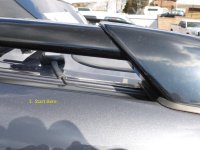
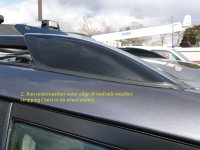
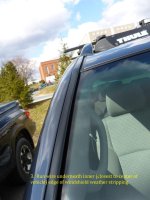
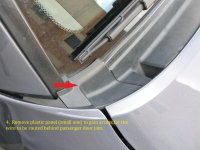
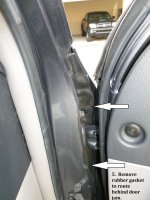
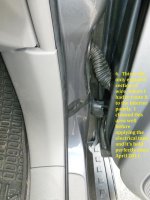
See the sequence below. I took pictures showing the routing from the outside of the vehicle to the back of the glove compartment. Any other questions, let me know!
 

Attachments

  • P1000035t.jpg
    P1000035t.jpg
    129.3 KB · Views: 2,442
  • P1000036t.jpg
    P1000036t.jpg
    131.2 KB · Views: 2,380
  • P1000037t.jpg
    P1000037t.jpg
    123.7 KB · Views: 2,285
  • P1000038t.jpg
    P1000038t.jpg
    134.8 KB · Views: 2,345
  • P1000039t.jpg
    P1000039t.jpg
    132.9 KB · Views: 2,351
  • P1000040t.jpg
    P1000040t.jpg
    131.1 KB · Views: 2,392
  • IMG_4142.jpg
    IMG_4142.jpg
    137.3 KB · Views: 2,479
Sorry for reviving an old thread, but I'm considering this upgrade and have a question. Dan, did you start with the JBL stereo, or no? I have the JBL system, and need to buy ANOTHER Sirius unit (the quality on these is pitiful) so I'm thinking of cleaning up my dashboard with a head unit with Sirius built in. d
Thanks a lot.
 
JD, since I was a part of this thread, I'll chime in.

I liked the Scion solution for a while but...

I changed to a $130 Pioneer DEH-6400BT and now have:
handsfree iphone
bluetooth
usb
aux in
wma cd's

I lost steerting controls, but might address that later.
And I dropped Sirius, removed that gear, and just stream all the music I need on my Iphone's unlimited data plan.
But it doesn't match my dash anymore like the Scion, oh well. LOL
 
JD- I had a non-JBL stock unit as my starting point.

Also, I don't have Bluetooth connection, but have no problem using the iPhone connector cable to stream pandora or iPhone music, and steering controls work for all.
 
Dan, glad to see all is working. Just want to say thanks very much for all your assists on duplicating your equip in my runner. I appreciated your help and your time very much.

I just had a change of heart almost overnight, and decided I was going to drop Sirius as ....wait for it.....


they only had ONE bluegrass channel :party: LOLOL
 
Right on, thanks for everybody's input. I might either just go with another Sirius unit (it miraculously started working again... for a while) or suck it up and get a whole new head unit.
 
hey guys i have a 03 toyota 4runner non jbl and i just bought a t1808 and got the ISTY571 with the scc1 tuner. i installed it all today and everything works but the sat radio. when it is all plugged in and the radio is on and i hit the sat button, and scroll through the radio it says ipod and aux 1 and aux 2. it doesnt say anything about sirius like the instructions says it should. every once in awhile it will say sat3 but wont play anything then it will go back to aux 2. i have it plugged in just like it says, the sat is plugged in next to the dip switch just like it says, i have left the ISTY571 unplugged for 30 mins to reset it a few times to try it again, but always get the same thing. any thoughts? thanks for the help?
 
hey guys i have a 03 toyota 4runner non jbl and i just bought a t1808 and got the ISTY571 with the scc1 tuner. i installed it all today and everything works but the sat radio. when it is all plugged in and the radio is on and i hit the sat button, and scroll through the radio it says ipod and aux 1 and aux 2. it doesnt say anything about sirius like the instructions says it should. every once in awhile it will say sat3 but wont play anything then it will go back to aux 2. i have it plugged in just like it says, the sat is plugged in next to the dip switch just like it says, i have left the ISTY571 unplugged for 30 mins to reset it a few times to try it again, but always get the same thing. any thoughts? thanks for the help?

Not sure the exact specifics with the T1808, but on the T1806, the preset #3 button works as a "select" or "OK" button; #4 is a back button. I remember reading somewhere in the ISTY manual that if you don't select anything, it sort of times out and goes back to what ever it was last selected to play. If you get it to go to SAT3, maybe try pressing the #3 button then. It should default and take you to the Sirius programming channel (183 or 184- don't remember exactly). From that point, you could then hit the am/sat button to cycle between AM-SAT1-SAT2-SAT3.

Just a guess, otherwise, not exactly sure.
 
i had tried that. i used the "3" button to select the ipod to lock that in. Good idea though. I think/hope i might have figured it out. when doing alot of reading yesterday, i found that i have to use the PAC ISSR11 cable when connecting the sirius box to the isimple box. when i bought ISTY571 it did not come with that cable, so i used the one that came with the scc1 unit. i read somewhere that the one that comes with the scc1 unit wont work with the ISTY571. after doing alot of reading and looking i realized that ISTY11 comes with the cable and the ISTY571 does not, didnt see that the first time. Hopefully that will fix my problem when the ISSR11 gets here. thanks for your help
Jon
 
i got the issr11 cable and it worked no problem, pulled sirius right in and i got it activated 123. my only question now, im not sure if anyone has experienced this but when i am in the sirius radio listening to channels, the screen on the radio always says acquiring. as soon as i go to a channel it will say for example 20 on 20 channel 2 and plays it no problem but then a second later it goes right to acquiring, and will say that until i change the channel again. anyone know why it might say that? thanks for your help
Jon
 

Members online

Forum statistics

Threads
278,316
Messages
3,554,105
Members
248,016
Latest member
Advally Service

Trending content

Back
Top