
You are using an out of date browser. It may not display this or other websites correctly.
You should upgrade or use an alternative browser.
You should upgrade or use an alternative browser.
Scion T1807 install in 3rd gen '99 Limited (pic heavy)
- Thread starter CO_FlyFisher
- Start date
vapor_trail
New member
Excellent write up--thank you
I wouldn't have even known it possible to add an aux input.
I thought I would provide some additional input:
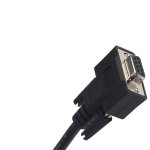
Cannon connectors proved difficult to find. I ended up cracking open an un-needed d-sub computer connector I had in the parts box. See attached photo for an example. I believe Radio Shack sells these connectors themselves [not the entire cable] if you don't have a spare cable.
Either I'm blind or you didn't mention the pin outs for left and right signal. The photo sure helped as I couldn't read the electrical diagrams in detail.
Right = Pin 15 Left = Pin 17. Ground = Pin 16 + 19 [with 2.2K ohm resistor in between]
I'm happy to report mine worked, first try. I'm using a cheap cable, and my soldering job wasn't up to par, but I will give it a try for a month or two and try again with a longer quality cable and an extra helping hand to solder with.
My only complaint: The aux level input seems low. The Scion deck compensates well, but I do have to turn it way up.
Anyone know how to adjust this?
Again--thanks for a great write up, I bought the T1807 based on this article and am very happy I did.
I wouldn't have even known it possible to add an aux input.
I thought I would provide some additional input:
Cannon connectors proved difficult to find. I ended up cracking open an un-needed d-sub computer connector I had in the parts box. See attached photo for an example. I believe Radio Shack sells these connectors themselves [not the entire cable] if you don't have a spare cable.
Either I'm blind or you didn't mention the pin outs for left and right signal. The photo sure helped as I couldn't read the electrical diagrams in detail.
Right = Pin 15 Left = Pin 17. Ground = Pin 16 + 19 [with 2.2K ohm resistor in between]
I'm happy to report mine worked, first try. I'm using a cheap cable, and my soldering job wasn't up to par, but I will give it a try for a month or two and try again with a longer quality cable and an extra helping hand to solder with.
My only complaint: The aux level input seems low. The Scion deck compensates well, but I do have to turn it way up.
Anyone know how to adjust this?
Again--thanks for a great write up, I bought the T1807 based on this article and am very happy I did.
Attachments
performance mp3
New member
can you tell me if this stereo has text display/rds text?
thanx!
thanx!
vapor_trail
New member
can you tell me if this stereo has text display/rds text?
thanx!
The T-1807 does display text for MP3's and I believe some regular CD's are encoded as well. I don't think it displays RDS information.

texas_runner
New member

CO_FlyFisher
New member
Hey guys, sorry for the no-show on replies here. It seems some of the forum upgrades have my e-mail notification settings still messed up.
Anyway, I have also noted that the Aux input level is low. I'm guessing that the head unit does this to prevent problems in it's amp. if too stong of a signal is applied. I turn my MP3 player up to about 80%, and then the head unit does the rest. However, the volume does need to be in the 30's to be reasonably loud (40's is very loud). I suppose the Cannon pins could be hard to find, as mine were sorced from rejected parts for F-16 wiring harnesses.
Also, yes, the R/L pinouts are 15 and 17. That is shown in the S9 part of the wiring diagram. Sorry I missed that part. Note that S9 also shows the cable for pins 15-17 should be sheilded, which on the cable I used they are.
I am not aware of another HU that works with the 4Runner external amplifier. Why would you want to use it when most newer HU's have better power output than that amp. does anyway?
Finally, I fixed my faulty info regarding the T1804 HU having Aux input capability since everyone agrees it does NOT.
Anyway, I have also noted that the Aux input level is low. I'm guessing that the head unit does this to prevent problems in it's amp. if too stong of a signal is applied. I turn my MP3 player up to about 80%, and then the head unit does the rest. However, the volume does need to be in the 30's to be reasonably loud (40's is very loud). I suppose the Cannon pins could be hard to find, as mine were sorced from rejected parts for F-16 wiring harnesses.
Also, yes, the R/L pinouts are 15 and 17. That is shown in the S9 part of the wiring diagram. Sorry I missed that part. Note that S9 also shows the cable for pins 15-17 should be sheilded, which on the cable I used they are.
I am not aware of another HU that works with the 4Runner external amplifier. Why would you want to use it when most newer HU's have better power output than that amp. does anyway?
Finally, I fixed my faulty info regarding the T1804 HU having Aux input capability since everyone agrees it does NOT.
Last edited:
texas_runner
New member
I was thinking that it would be easier if you had 1 wire harness instead of 2 and had less to change from the original setup. I was also hoping that toyota would use a similar design on multiple car models (more interchangeable parts= less expense). Maybe other scion/lexus/toyota model stereos use the same setup and someone could just drop in another headunit. Different look but simple installation.
CO_FlyFisher
New member
Not sure, but maybe you missed this. The harnesses that plug into the external amp ARE the same as MANY other Toy/Scion vehicles, and those are what you plug into the back of the Scion deck in this write-up. NO splicing! It really couldn't be much easier.
vapor_trail
New member
I was thinking that it would be easier if you had 1 wire harness instead of 2 and had less to change from the original setup. I was also hoping that toyota would use a similar design on multiple car models (more interchangeable parts= less expense). Maybe other scion/lexus/toyota model stereos use the same setup and someone could just drop in another headunit. Different look but simple installation.
This installation was plug and play in my 2000 Tundra (aux input being the exception), although I needed a dash bezel from a later 2003-up Tundra. And a little dremel work to make that new bezel fit.
The 00-01 Tundra had a differently shaped radio from the factory.
I cant tell you how much better the Scion Radio sounds, although I'd get a T1806 if I had another chance, I'm too cheap otherwise.
Is it just my browser, or there is a lot of info missing from the first few posts of this writeup?
same thing here

CO_FlyFisher
New member
It is fine right now. Maybe Photobucket was down??? :shrug:
Hey FlyFisher, maybe you have a suggestion for me.
I built the cable and went to do the install in my 04 4Runner.
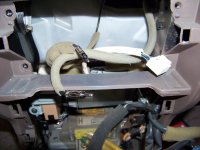
2006 Scion radio works and the aux cable works great. The problem is, it seems my 4runner steering wheel contols use the same jack as the aux cable would use. The controls jack has blank spaces in it, do you know if the small pin connectors are available so i could add the aux cable into the existing jack??
Thanks!!
I built the cable and went to do the install in my 04 4Runner.
2006 Scion radio works and the aux cable works great. The problem is, it seems my 4runner steering wheel contols use the same jack as the aux cable would use. The controls jack has blank spaces in it, do you know if the small pin connectors are available so i could add the aux cable into the existing jack??
Thanks!!
This really is wonderful. Looks great in the dash as well.
Nice write up. Time to upgrade to the scion navigation system though. It's an alpine and sounds better than the scion/pioneer deck IMO.
Nice pics too.

zcruiser
Senior Member
If you want a cable already fabbed, you can contact this guy:
I'm taking a different approach, and soldering the stereo audio jacks directly onto the back side of the circuit board and running them out through the extra porthole in the backplate. Pics to come!
Scion - AUX – Input cable
These cable types connects to the rear of the T 1806, T 1807, T 1808, and T 1809 Scion headunits along with many of the Navigation units extending 6' with a 3.5mm right angle male stereo connector.
This cable connects to the rear of the headunit extends 6' with a 3.5mm right angle male stereo connector that will connect to the Audio Out (earphone jack) of an iPod, zune, or other audio source, and allows it to be played through your headunit using this aux input cable.
This input is selected by pressing the “AUX” selector on the headunit.
If you have the Ipod interface, the input is toggled between both sources by using the “AUX” selector.
Song selection is done at the input device.
This cable does not allow charging of the device.
please contact me at [email protected] <mailto:[email protected]> with your *Scion headunit model number (located on the front faceplate, in the lower right hand corner) and weather you have the steering wheel audio controls after purchasing ( I cannot ship without this information).*
The cables sell for $29.00 via paypal to [email protected]
First Class Shipping included in price.
Priority shipping available for an additional $2.50.
Cable will be shipped same or next day after payment is received and the cable type is determined.
I'm taking a different approach, and soldering the stereo audio jacks directly onto the back side of the circuit board and running them out through the extra porthole in the backplate. Pics to come!
zcruiser
Senior Member
Aux input on T1807
Here's my solution... I added a stereo RCA aux input on the back of the unit (final solution first):

I started by looking at the back view of the connector that is being used for the aux input:

Detail of pins and traces for Pin 19 and Pin 16 that come out to surface mount components on the board. This is where I mounted the 2.2K ohm resistor:

But first, the stereo RCA connector. I removed the circuit board and flipped it over:

Modified a stereo female RCA cable:

Soldered the stereo RCA cable to the AUX_L and AUX_R input, and soldered the common shield to a ground point:

Mock-up of passthru to the unused rear panel opening:

Here's where the RCA plugs are going to be located in the cover:

Two notches in the cover to serve as "gates" for the RCA plugs:

Here's my solution... I added a stereo RCA aux input on the back of the unit (final solution first):
I started by looking at the back view of the connector that is being used for the aux input:
Detail of pins and traces for Pin 19 and Pin 16 that come out to surface mount components on the board. This is where I mounted the 2.2K ohm resistor:
But first, the stereo RCA connector. I removed the circuit board and flipped it over:
Modified a stereo female RCA cable:
Soldered the stereo RCA cable to the AUX_L and AUX_R input, and soldered the common shield to a ground point:
Mock-up of passthru to the unused rear panel opening:
Here's where the RCA plugs are going to be located in the cover:
Two notches in the cover to serve as "gates" for the RCA plugs:
zcruiser
Senior Member
Aux input on T1807, continued...
Painted the notched "gates":

Soldered the 2.2K ohm resistor to the top side of the board:

While I was at it, I added some thermal grease to the power transistor to improve the heat transfer to the rear panel (which is the heatsink):

All back together (and yes, one of the antenna inputs is covered over by the bottom cover):
Install complete. AUX works perfectly, forgot to select for this pic:

I actually put spacers behind the radio brackets to push the unit further through the opening for a better fit/look. Note how the radio mounting is biased to the passenger side for some reason.
Painted the notched "gates":
Soldered the 2.2K ohm resistor to the top side of the board:
While I was at it, I added some thermal grease to the power transistor to improve the heat transfer to the rear panel (which is the heatsink):
All back together (and yes, one of the antenna inputs is covered over by the bottom cover):
Install complete. AUX works perfectly, forgot to select for this pic:
I actually put spacers behind the radio brackets to push the unit further through the opening for a better fit/look. Note how the radio mounting is biased to the passenger side for some reason.
Last edited:
Some of you guys are blowing me away with your knowledge of stereo equipment! I'm seeing newer HU, from 2008 scions, etc. on ebay. Are those compatable, or do I need to hunt down the T1807. Naturally, many of the auctions don't post any part numbers that remotely resemble the T-numbers being tossed around, so I'm not sure what will work and what won't.
zcruiser
Senior Member
Some of you guys are blowing me away with your knowledge of stereo equipment! I'm seeing newer HU, from 2008 scions, etc. on ebay. Are those compatable, or do I need to hunt down the T1807. Naturally, many of the auctions don't post any part numbers that remotely resemble the T-numbers being tossed around, so I'm not sure what will work and what won't.
Here's a T4R thread on using 2008 Scion unit in a 4th gen.
http://www.toyota-4runner.org/audio-electronics/27180-2008-scion-radio.html
It should also work in a 3rd gen, but you'll have to trim the radio bezel and the dash opening for it to fit as the newer Scion units are about 1/2" wider than stock 3rd gen.

4'running'26
New member
So, I'm bringing this thread back from the dead, but looking to do something similar, just with A LOT less work and probably a little more money, unfortunately.
Quick question: do they make any iPhone compatible cables for the Scion Headunits which fit the new iPhone with the lightening connector?
Other than that, I'm not sure which HU is the best plug and play for my 2000 4runner. I guess in the end I can still just go with something which has Aux capabilities and use an Aux cable to play through my iPhone.
Saw this listing, but don't really want to pay this much.
Scion CD Player Radio SAT XM iPod Smartphone MP3 Aux in Input Plug T1807 T1804 | eBay
Thanks for any input!
JT
Quick question: do they make any iPhone compatible cables for the Scion Headunits which fit the new iPhone with the lightening connector?
Other than that, I'm not sure which HU is the best plug and play for my 2000 4runner. I guess in the end I can still just go with something which has Aux capabilities and use an Aux cable to play through my iPhone.
Saw this listing, but don't really want to pay this much.
Scion CD Player Radio SAT XM iPod Smartphone MP3 Aux in Input Plug T1807 T1804 | eBay
Thanks for any input!
JT
Similar threads
- Replies
- 11
- Views
- 7K
- Replies
- 0
- Views
- 996

