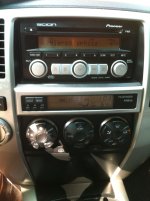
Scion T1808 installed

krupnation

New member
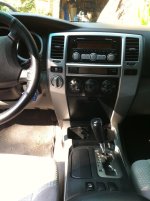
I know it's been done before but just thought I'd post my recent mod. Installed a Scion T1808 w/ iPod cable yesterday and I can't be happier. It sounds 150% better than the stock runner HU and now I can control my iPod through the stereo (instead of fumbling around with my iPod using the tape deck attachment).

Install went very well, was super easy with only about 6-7 bolts to take off. However, I didn't realize until I did some research that you have to take apart almost the entire dashboard. Total time was only about 40-45 minutes.

Thanks you to member "Overkill" for giving me the idea. Total mod only cost me $102 (T1808 off of eBay = $82 shipped, iPod connector off eBay = $20 shipped). My only gripe is that the iPod connector I purchased (SCION SC12235) doesn't charge my iPod! what the duece? :bash:
 

Attachments

  • stereo1 T1808.jpg
    stereo1 T1808.jpg
    132.6 KB · Views: 1,574
  • stereo2 T1808.jpg
    stereo2 T1808.jpg
    107.6 KB · Views: 1,578
  • stereo3 T1808.jpg
    stereo3 T1808.jpg
    116.7 KB · Views: 1,557
Register to hide this ad
My only gripe is that the iPod connector I purchased (SCION SC12235) doesn't charge my iPod! what the duece? :bash:

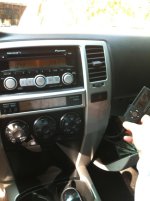
Good deal man! I upgraded mine with a T1809 & I love it! As far as getting your ipod to charge through the ipod cable, get one of these. I got one off of ebay for under $10. With that adapter my ipod touch charges while its connected :bigok:
 
I'm not sure as I have an SR5 (no steering wheel controls). But while I was searching the forum on how the Scion stereo's work, I think the T1809 does work with the steering wheel controls. I'll try and find out for you...

It's such a cheap and easy mod that I highly recommend it. Leaps and bounds better sound than the stock HU.
 
I'd bet that the cable you purchased would work on older ipods. Apple made a switch ~3rd generation on the charging from firewire to USB. Only way to fix it is to get a compatible ipod cable, if it exists.
 
I'd bet that the cable you purchased would work on older ipods. Apple made a switch ~3rd generation on the charging from firewire to USB. Only way to fix it is to get a compatible ipod cable, if it exists.

I have a 4th gen iPod Nano but it says on it that "the accessory does not support charging". Either way, I just bought the attachment so it should be all set ($15 shipped on Amazon)
 
Nice!!! I wanna do this to my wife's 03 4Runner.

Does the new unit work with the steering wheel controls?

Yes the T1808 works with the steering wheel controls as does the T1809. I had the T1808 for about 2 years and just upgraded to the T1809.

I still have the T1808 if anyone wants it for cheep. The only chtch is the knob on the right broke off and toyota can not replace it. :ybrick: It was brand new when I got it. Original Toyota box, instructions and all. PM me if intrested.
 
Very tempting, but with that broken knob, the wife would never let me live that down.

Plus im not 100% sure the hook-ups in the back of the T1808 will match the 2003's cables. Can anyone verify this?
 
You might want to search a little more but almost positive the T1808 will match up with the '03 wire harness. It should match all 4th gens.
 
Thanks Krup.

Im already searching Ebay and other threads.

Is there a link somewhere that'll show me how to take the dash apart to remove/install?
 
Thanks again Krup!

Question on the Ipod cable: Did you have to drill/cut a hole to have it go to the glove box? I would (if possible) send it to the storage compartment located under the HVAC controls.
 
I didnt have to drill or cut anything, just fed it through a space already in the glove box. You could definitely run it to the compartment below the AC controls. Probably would have to make a cut to get it in there.
 
Thanks again for the info, Krup.

Ive been browsing the threads on the Scion HU switch, and im reading about some people with issues like:

- 2 antenna cables, which one to use?
- Messing with some of the pins in order for the AUX button to work
- Having to cut/bend some metal or trim to get the Scion HU in

Was yours THAT EASY that you just plugged in, ran the IPOD cable to the glove box, put the trim back on and BAM! You were good to go?
 
Thanks again for the info, Krup.

Ive been browsing the threads on the Scion HU switch, and im reading about some people with issues like:

- 2 antenna cables, which one to use?
- Messing with some of the pins in order for the AUX button to work
- Having to cut/bend some metal or trim to get the Scion HU in

Was yours THAT EASY that you just plugged in, ran the IPOD cable to the glove box, put the trim back on and BAM! You were good to go?

Yup, it literally was that easy. I took apart all the necessary pieces, took out stock T4R stereo, took off the mounting brackets, put brackets on Scion HU, and put it all back together. To answer your questions:

- plug in the main antenna cable (big one). I taped back the other antenna plug with electrical tape
- I don't have an aux output in my rig. The iPod plug goes in the back of the stereo and you use the "aux" button on the stereo to use it.
- no need to trim, cut, or bend anything. It fit perfect.

Hope that helps. It seriously is an easy mod.
 
Thats cool.

Any idea what the "other antenna cable" goes to? Any prob. with reception on AM or FM frequencies?

Also, i read that the cable you ordered did NOT allow the Ipod to get charged. Is that due to the cable you bought? Is there one you "wish" you had gotten instead that WOULD charge it?
 
Last edited:
Don't know if this may help but just installed the Alpine Scion HU.

-As for the antenna cables, rather than taping up the smaller antenna, I bought a Y adapter through Amazon (Metra - 40-UV43 male to two female antenna adapter cable) and a Micro Tip Adapter (Scosche Mda-B Micro/Delco Antenna Adapter Tip) to upsize the smaller antenna cable in order to fit into the Y adapter and reception has been just as good as the stock HU.

-The AUX still works.
 
Last edited:

Members online

Forum statistics

Threads
278,306
Messages
3,554,046
Members
248,016
Latest member
Advally Service

Trending content

Back
Top