SIRIUS voltage problem

jacal

New member
I have the starmate 3. This unit uses the new 'universal' mounting system.

I wanted to wire it direct and get rid of the clunky DC adapter.

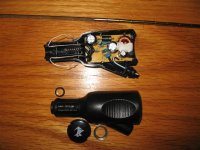
I did the "add-a-circuit". I found a really good ground. I had 12V at the tip of the plug...BUT THE PROBLEM is that the new units only want 5.2V. I opened up the DV adapter and there is a tiny electronic board and some simply components.

Now what? Either there is some clever way to reduce the 12V to 5V or else I have to literally build in this stupid adapter to function as a reducer.

I'm not strong on the electronics front...so what are the thoughts out there?


J
 
Register to hide this ad
the essential pic:
 

Attachments

  • siriusdc.jpg
    siriusdc.jpg
    62.8 KB · Views: 512
Hmmm, so that's what's inside that thing. What I did was just buy a cig lighter socket, wire it in and plugged the power adapter into it, hiding it all behind the dash.
 
jrs2 said:
Hmmm, so that's what's inside that thing. What I did was just buy a cig lighter socket, wire it in and plugged the power adapter into it, hiding it all behind the dash.

That's probably your best bet.

Otherwise, I'd carefully solder wires to the contact points of that plug and epoxy them in place so they won't pull off.
 
I'm thinking that I just wired my Starmate direct to 12V DC and have had no problems in nearly a year. I'll double check tomorrow. FWIW - I'm no electrician but my business is digital surveillance systems and most our camera equipment is set up to operate on 12V DC. I have noticed that there is always a fairly wide variation allowed in the equipment specifications for the voltage.
 
sbbamafan said:
I'm thinking that I just wired my Starmate direct to 12V DC and have had no problems in nearly a year. I'll double check tomorrow. FWIW - I'm no electrician but my business is digital surveillance systems and most our camera equipment is set up to operate on 12V DC. I have noticed that there is always a fairly wide variation allowed in the equipment specifications for the voltage.

Does your unit use the "universal dock"? All the new units with the docking station must use the same voltage inputs.

This really kinks my install. I wonder what is easiest for me to do now, given I have cut the tail off the DC plug, and wired it to the fuse box & ground.


J
 
I have the Starmate 3 and purchased a two plug 12 volt power port from Canadian Tire and removed the plug, tapping into the power supply from the power plug in the console. I had removed the plastic pieces around the shift to hide the wiring. I have a spare power plug for my GPS, cell phone, whatever. I will take a photo if you would like.

Rick B
 
Ok...heres the dowload on what your going through...

When sirius/xm got sued, they made alot of changes to their products..Sirius decided to also make their units run on ~5V instead of 12 (which i think was just to make the FM transmitter have less power in the grand scheme of things)

Now, with your model Starmate, cutting the plug, and giving it 12V will mean, well, youll have a fried starmate...

They did make them before that accepted 12V, but yours deff is not that.

Now you can either, go to any car-audio place, and ask for a CLA (ciggarette lighter adapter) or wire up the circuit board (if you have a soldering gun, and know how to use it, its pretty simple to do)

No matter which you do, please, for the love of god, fuse the damn thing...

Ok, so if you get the CLA all you need to do is wire the fuse to the +12V (power side / red wire) and run the other side of the fuse to your radio's accessory wire (would need year make and model to give you that info) and hook up the black ground to either the radio ground, OR crimp on a small ring terminal and screw it down to a good metal ground with a lock washer.
Plug the sirus plug into that, and your good to go


Or, if you decide to tackle saving the $ and taking apart the actual plug, what you need to do then, is...

Open up the lighter plug (which you have already done) and look at the back (side with just circuit board and solder, doesnt have all the components on it) youll see where the wires are soldered from the circuit board, to the metal pices that make contact to your cigarette lighter, one leads to the outer metal pieces (negative), and the other to a spring/fuse (positive).

Solder on wire to the solder on the back of the circuit board where the wires FIRST MEET THE BOARD. Fuse the positive wires, and again, run the positive to your accessory wire behind your radio, and ground the ground wire like i previously mentioned...

There you go, installation instructions on wiring up a satellite radio power wire.

-nick
 
Thanks for all the feedback!

OH AND I have a slight alternator whine (direct aux-in). It is like a subtle supercharger. But it is annoying, so I will look for a soln there as well. I will wrap either the power or the signal cable (I'll just have to test) in a trap (magnet) and see which helps the most.

Edit: I did not fry the original unit with the 12V lucky me!

I'm getting allot less enjoyment out of this whole thing at this point!


J
 
Last edited:
jacal said:


I'm getting allot less enjoyment out of this whole thing at this point!


J

That blows... but it'll all be worth it in the end.

Maybe I'm a lucky one for not getting any alternator whine at all with the direct plug-in to the AUX IN of my head unit....?
 
Ok, I'm just sort of posting this as a thought-process to solve the alternator whine.

I think the problem is that the HU is grounded, it connects to the DICE, and the DICE connects via 1/8" aux-in stereo to the 1/8" aux out on the Starmate 3; the starmate is getting power from the cig lighter adapter (for now) which has it's own ground that *is not* (likely) the same as the HU.

Possible solutions:
-get the starmate on the same ground as the HU
-get a differe stereo cable, as short as possible (for now have radio shack 6ft, going to try a monster 7") with the most insulation possible; don't bunch up the cable if possible
-condition the 12V power for the starmate with a transformer before the reduction to 5V.
-try adding traps (done, but did not solve the problem)
-add a ground loop isolator (however, it requires RCA only so converting will be involved, and some say it may change the sound). It would be nice to find one for 1/8"

Much work to do, I wonder which is best to start with.

How can I figure out where the HU is grounded? or should I just ground to a surface/screw on the HU itself as it is all metal?


J
 
I don't get any alternator whine either. Maybe yours is just noisy.

There's often a separate ground wire from the HU, or it might just be in the wiring harness, it's usually (always?) black.

That 6 ft Radio Shack cable sounds suspect. I would try a shorter, better quality one. This may sound stupid, but if you still get the whine, try wrapping the shorter cable in aluminum foil. I once had a problem with my computer speakers picking noise from the monitor. Wrapping the cables in foil stopped it.

Electrical noise problems can be a bitch. Good luck.
 
I replaced my Xact Satellite radio with the Starmate 3 when I changed 4Runners. I have used the same aux-in and same cable. I used to get a whine with my 04 with the single CD HU and Xact radio. I don't have any whine with my Starmate 3 and my 05 with the JBL system:confused:
 
Hi,

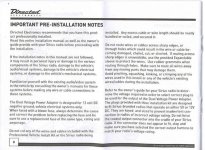
Not sure if this will help - but I am installing a Sirius Sportster for my sister and I purchased the following kit from Circut City to hard-wire it in.

Sirius Car Installation Kit ( SIRPVK1) $35.99

Now I have a problem with static when using an FM station for Sirius and have to use the lighter socket for power.


I am doing the install today and will let you know how it goes.
 
Well after doing the install on my sisters civic today - I am sure this will work for your voltage problem. It will step down the voltage from 12vdc to 5vdc.

The install took about an hour and everything looks and sounds great !! No more static or power cord from the lighter !!

Also the kit comes with a nice mounting bracket.

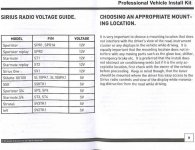
Here are couple of pages from the installation guide.

Hope this helps !!
 

Attachments

  • resize 1.jpg
    resize 1.jpg
    111.8 KB · Views: 227
Here is the second page I scanned -

Sorry no pics of the install **camera died**
 

Attachments

  • instructions 1.jpg
    instructions 1.jpg
    96.8 KB · Views: 249
Alright a little update:

-I grounded to the HU chassis.
-I installed the "guts" of the 12V-5V DC adapter and tucked it up beneath the HU. I used small marretts...hope they hold.
-I selected a "always on"fuse to keep play lists active longer.
-I swapped my stereo cable for a thick monster cable
-I ran power and stereo out beside the glove box and put the sat suction mount under the hazards. I overtightened the swivel part so that it doesn't budge.
-I placed the ipod in the front fold out consol, because the new dice link allows simultaneous use (hu/ipod)
-I put a trap on the power line

-I will put a trap on the stereo cable


Everything is excellent, except I STILL have some alternator whine. Very subtle, but still present.

The sound thru aux-in to dice link is awesome. Great range, and no interference!

OH AND did I mention I added 220V power to my garage and a construction heater just so I could work on this in comfort?! Geezzzz this was more then I bargained for.


J
 
Last edited:
jacal said:

-I installed the "guts" of the 12V-5V DC adapter and tucked it up beneath the HU. I used small marretts...hope they hold.

Solder it
Or atleast crimp them with some good butt-connectors at the least, and then tape the butt-connector

Im sure marretts are like wire nuts correct?

Last thing you wanna use in a car, theyll fall off quick with the vibrations im sure
 
Agreed.
I tape or shrink sleeve all my connections - whether soldered or wire nutted.

Is the "slight" alternator whine annoying? I have a wee bit amount, but it isn't noticable when the stereo is at a normal listening volume anyway, so I just dismiss it.
 

Members online

No members online now.

Forum statistics

Threads
278,306
Messages
3,554,044
Members
248,016
Latest member
Advally Service

Trending content

Back
Top