Stupid question about inserting pics

Sputnik

New member
Ok, so the only way I was able to ad pics was to my album, but I can't figure out how to insert pics into posts.

How do you put pics in when replying or making a post?? Lol
 
Register to hide this ad
I host my pictures on PhotoBucket. It's free, and they let you upload a ton of photos, as well as edit (resize, crop, etc).

To post the T4R.org, I copy the URL on the PhotoBucket site (clicking the link on the right side of the page) and use the link button (the one that looks like a picture of mountains and the sun).

Hope that helps.

-Joel
 
Once your pic is loaded into your album, click on the picture to view it. Once the pic is up copy the file (which is below the pic) and paste into your thread. I usually do this with two windows open.
 
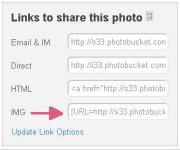
On, say, photobucket, you have link options. Click the IMG option (pic below) to copy it and then paste it into your post. If you write a sentence in your post and then paste the photobucket IMG link right below it, then your pic has a sentence right above it.

You can also attach a pic from your computer using the T4R software available when you click "go advanced" when preparing to post instead of "post quick reply". This, however, has limits and should only be used occasionally with small pics as I did in this post.

 

Attachments

  • photobucket link options.jpg
    photobucket link options.jpg
    12.1 KB · Views: 106

Members online

No members online now.

Forum statistics

Threads
278,306
Messages
3,554,045
Members
248,016
Latest member
Advally Service

Trending content

Back
Top