T4R 2014 SR5 4x4 Premium, Entune app/ Navigation

davester00

New member
I'm getting the run-around from the service department and the toyota 1-800#.
I cannot see my entune apps on my vehicles navigation screen when I press the "Apps" button.
So far 3-4 hours of my personal time, 2 hours at toyota dealer, 1hour w/1-800# and still no straight answer.

On the bottom of my screen around the bezel there is the #57059 maybe it's the navigation unit model.
I have a IP5 and At&t is my carrier.
I have registered online with entune, I have the app on my phone. I have facebook and pandora linked with entune.
I have my bluetooth turned-on , cellular data-on,the entune app-open, my wi-fi is off.
I still cannot see the (entune app suite on my vehicle screen (bing....etc).
I am sent an email to toyota asking them to look up my vin to see if the unit that is installed in my car is the correct unit that will allow you to use the app suite off the vehicles screen.

Anyone with the same model and version please let me know if I"m missing anything.

Thanks in advance,
Dave
 
Register to hide this ad
You may have to use a usb cable to get the full iPhone functionality. A lot of stuff doesn't work through BT. But look up "iPhone with Entune" in the search for this site for specific discussions of that.
 
You may have to use a usb cable to get the full iPhone functionality. A lot of stuff doesn't work through BT. But look up "iPhone with Entune" in the search for this site for specific discussions of that.

I have a 2014 T4R and iPhone5 and mine links up without issue from the first day. Full function on mine.
Actually, my salesperson synced the phone and the Entune together for me. Don't need a USB cable for mine!
 
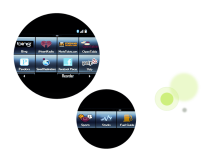
Make sure you are using your the arrows on the bottom of the screen to get to the next screen that was where my bing, facebook, sports, etc are. All do not show up on the main screen.
 

Attachments

  • 2014 entune pic.png
    2014 entune pic.png
    131.2 KB · Views: 1,257
USB connection and second page Apps page

I have the IP5 connected via apple usb cord. In fact I tried 2 cords so that's not the issue unless they are both broken.

As for the second page of apps, I don't get any arrows to choose the app suite (Bing....).

Sorry to say this sucks and I hate wasting my time on something that should have been fixed from the start.

I was trying to run an update and it gets stuck on 57%. I told that to the service manager and he stated "It gets stuck on 57% because there is nothing to update". Meaning I have the latest update. When I do to "update" records there is nothing in the list.

Honestly I think my ish is broken and it super frustrating. Basically I only have a blue tooth connection. Crap I can't even view my text.
 
I have the IP5 connected via apple usb cord. In fact I tried 2 cords so that's not the issue unless they are both broken.

As for the second page of apps, I don't get any arrows to choose the app suite (Bing....).

Sorry to say this sucks and I hate wasting my time on something that should have been fixed from the start.

I was trying to run an update and it gets stuck on 57%. I told that to the service manager and he stated "It gets stuck on 57% because there is nothing to update". Meaning I have the latest update. When I do to "update" records there is nothing in the list.

Honestly I think my ish is broken and it super frustrating. Basically I only have a blue tooth connection. Crap I can't even view my text.

I have exactly the same setup, and it all worked without me reading the manual. Maybe you've got a bad head unit, but I would start by deleting whatever you have set up and then follow the instructions to the letter to get it all hooked back together. I'll noodle around in my set up tomorrow to see if I can help get you going. You appear to be doing everything right.
 
Crap I can't even view my text.

Hopefully this will help you viewing and hearing your text messages. On your phone go into setting, then into bluetooth, find your toyota 4runner device press on the i icon with the circle around it and and make sure your show notifications is turned on.
 
from the Toyota site

Don't know if this link will work:

Toyota Entune - Pair a Phone


  1. If you are using an iPhone® , start here.
  2. Make sure your phone is turned on and paired to your multimedia system. For instructions on how to pair, visit the Toyota Connect site.
  3. Check the battery life on your phone. To maximize the capabilities of the phone, not Entune™, your phone must have a minimum of a 50% battery charge. If your phone's battery is below 50%, please plug it into the 12v outlet before launching Entune™.
  4. Launch Entune™ app on phone and sign in. Note: The first time you launch Entune™ on your phone, sign in by entering the email address and password you created when you registered at myentune.com. If you have not registered your Entune™ account yet, please click here.
  5. Within the Entune™ app on your iPhone® 10 , touch bottom right (gear/screw icon) > Connect to Vehicle
  6. The app displays a lockout screen
  7. Your vehicle's screen displays a request to connect an Internet device and confirmation that data plan will incur on your phone
  8. Touch OK
  9. On the vehicle screen, touch Yes to connect the iPhone® 10
  10. A message displays, stating the device is now connected for Internet services
  11. On the head unit, press APPS
  12. Entune™ displays the APPS main page
  13. The phone app displays a lockout screen with the Entune™ logo and a button to disconnect from Entune™.
  14. Your vehicle's screen displays a request to connect an Internet device and confirmation that data plan will incur on your phone
  15. Touch OK

Not trying to insult your intelligence, but sometimes it's best to start over. If I remember correctly, once my phone was paired and available for internet access, it asked me if I wanted to download the apps (or an update).
 
Tried deleting and uploading Entune = didn't work.

I went into bluetooth and changed the "show notifications" and I got 1 test text from my
wife but didn't get the other 2. So at least something worked , once.

As far as pairing a phone, I got thru steps 1-4 with my pandora account linked but when I try to complete #5 the "connect to vehicle" is the color grey meaning I'm not able to activate it. I am still signed "in" to my entune account.

The Vehicle sees the IP5 as an audio device and phone but will not see it as a "internet connection".
 
Tried deleting and uploading Entune = didn't work.

I went into bluetooth and changed the "show notifications" and I got 1 test text from my
wife but didn't get the other 2. So at least something worked , once.

As far as pairing a phone, I got thru steps 1-4 with my pandora account linked but when I try to complete #5 the "connect to vehicle" is the color grey meaning I'm not able to activate it. I am still signed "in" to my entune account.

The Vehicle sees the IP5 as an audio device and phone but will not see it as a "internet connection".

Do you have Personal Hotspot enabled when you're doing the pairing?
 
I would also suggest that you delete the phone from the vehicle and the vehicle from the phone. I would also suggest you do this where you have a good wifi connection and enable wifi on your phone. Turn off the vehicle and turn off the phone completely. Restart your phone then try pairing and setting up again. I also had to do this with the ole lady's iphone5.
 
I enabled "hot spot" , deleted phone from car and car from phone and turned off both.
Re-paired phone to car and turned off both and tried.
Still = No.
Still stuck at:
"#5 the "connect to vehicle" is the color grey meaning I'm not able to activate it.
and I under apps I only have once page of buttons showing :Nav,Traffic,Audio,Phone,Messages,Setup,Weather,Main.
I do not see an arrow for the entune apps page.

I'm beginning to think I have a broken unit or which can only update to 57% and getting even more pissed at the service department telling me that my car is not equipped with the unit that can show the entune app suite.

Can anyone confirm the little #s on their unit (bottom center of bezel)? Mine show:57079
 
I enabled "hot spot" , deleted phone from car and car from phone and turned off both.
Re-paired phone to car and turned off both and tried.
Still = No.
Still stuck at:
"#5 the "connect to vehicle" is the color grey meaning I'm not able to activate it.
and I under apps I only have once page of buttons showing :Nav,Traffic,Audio,Phone,Messages,Setup,Weather,Main.
I do not see an arrow for the entune apps page.

I'm beginning to think I have a broken unit or which can only update to 57% and getting even more pissed at the service department telling me that my car is not equipped with the unit that can show the entune app suite.

Can anyone confirm the little #s on their unit (bottom center of bezel)? Mine show:57079

Bummer. Mine's 57079 as well. I'll PM you a link to a video I did. I redid the whole paring deal a couple minutes ago.
 
I have the same thing. When I press the app button on the system, I do not have any of the app icons for things like FB, Bing, Sports or whatever should be there. My 2012 Camry had all that stuff showing when you pressed the app button, but not my new 4Runner.

I do have the second page that I can get to by either touching the arrow button or just swiping my finger to flip to that page, but its just a car settings icon and that's it. I read online somewhere that your phone connection should not matter, that all those icons should be there regardless, and that's how it was with my Carmry. I pretty much gave up on it all but reading this post is making me want to have it there now. : (
 
I should mention this as I don't know if this makes a difference or not. But I have a 2014 Limited with the JBL system. Should this sytem have all the fancy apps or no? According to the booklet that came with the car, it should all be there on the second page, but its not.
 
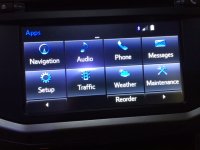
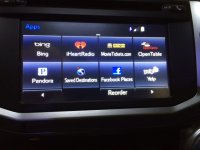
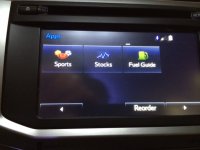
I have a 57079 and here are the screens I see when pressing Apps:
Hope this helps some.
 

Attachments

  • K 57079  3.JPG
    K 57079 3.JPG
    92 KB · Views: 1,339
  • K 57079   1.JPG
    K 57079 1.JPG
    94.1 KB · Views: 1,293
  • K 57079   2.JPG
    K 57079 2.JPG
    88.2 KB · Views: 910

Members online

Forum statistics

Threads
278,316
Messages
3,554,111
Members
248,016
Latest member
Advally Service

Trending content

Back
Top