
You are using an out of date browser. It may not display this or other websites correctly.
You should upgrade or use an alternative browser.
You should upgrade or use an alternative browser.
TOYOTA 2016-2019 4Runner Repair Manual RM27F0U
- Thread starter DougEFresh2
- Start date
DougEFresh2
New member
Hi, I cant seem to be able to get the link to work. When I click on Download it opens a page for 7ZIP but only to download the program. My computer already has 7Zip but it does not go on form that point.
Any tips please.
thanks
Don't try to "download" the file with any programs. When you do that, Google tries to OPEN the file by first downloading the file to a temporary directory, then uses the selected program (7-Zip in this case) to directly open that file.
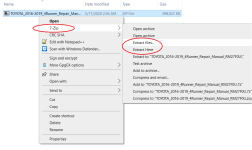
Instead, don't use any program to "download" this file from your browser. Simply download it to your computer locally, then left click on the downloaded file, scroll over "7-Zip" then select either "Extract files..." or "Extract Here". Then, you will be prompted for the password. Enter:
x*x*x*_Do_NOT_Post_This_Link!!!_7ha6S1I6Cs83
Attachments
Thank you!!!t
This is great OP. Thank you so much! It's garbled when I open with BlueBeam, but I'm able to open it with Microsoft Edge and it looks fine. I assume it's a font issue, but I have no idea how to fix that. Beggars can't be choosers . Anyway, just wanted to thank you for your effort in putting this together for everyone here!
This is great OP. Thank you so much! It's garbled when I open with BlueBeam, but I'm able to open it with Microsoft Edge and it looks fine. I assume it's a font issue, but I have no idea how to fix that. Beggars can't be choosers
. Anyway, just wanted to thank you for your effort in putting this together for everyone here!
00Sebby
Senior Member
This is great OP. Thank you so much! It's garbled when I open with BlueBeam, but I'm able to open it with Microsoft Edge and it looks fine. I assume it's a font issue, but I have no idea how to fix that. Beggars can't be choosers
It's a pdf. Did you try Adobe Reader? It opens great in Adobe Acrobat.
It's a pdf. Did you try Adobe Reader? It opens great in Adobe Acrobat.
No. I know it's a pdf, but haven't tried Adobe. Edge opens it just fine interestingly enough. It's just that I use BlueBeam for all my pdf stuff, so was hoping it would work. Either way, it works with Edge, so nbd. Thanks though

DougEFresh2
New member
When you type in the address and go to it, what does the title say?
If you look through the other comments, I put in instructions on how to check, step-by-step how to tell what the problem is. If there are a lot of people downloading this at once, then it can give you an error like that.
I hope this helps.
If you look through the other comments, I put in instructions on how to check, step-by-step how to tell what the problem is. If there are a lot of people downloading this at once, then it can give you an error like that.
I hope this helps.
I appreciate your reply but every time I type the google drive address and hit enter, it says "Sorry, unable to open the file at this time.When you type in the address and go to it, what does the title say?
If you look through the other comments, I put in instructions on how to check, step-by-step how to tell what the problem is. If there are a lot of people downloading this at once, then it can give you an error like that.
I hope this helps.
Please check the address and try again. "
I tried different browsers.
I'll keep trying.
Attachments
DougEFresh2
New member
I appreciate your reply but every time I type the google drive address and hit enter, it says "Sorry, unable to open the file at this time.
Please check the address and try again. "
I tried different browsers.
I'll keep trying.
Capitalization matters. It starts becoming incorrect at "idbuwd".
Capitalization matters. It starts becoming incorrect at "idbuwd".
Oh ok now it worked, thank you very much
DougEFresh2
New member
Does this drive link still work? I can't seem to find the files.
the link is a picture. it's the very last image on the bottom. CAPITALIZATION is very important!


sicnarfone
New member
Thanks! It works for me. This is great!
For mac users, go to 7zip link and select Keka under "Some unofficial p7zip packages for Linux and other systems", download zip archiver, download ZIP from google drive, paste password from first page and PDF file should open fine.
For mac users, go to 7zip link and select Keka under "Some unofficial p7zip packages for Linux and other systems", download zip archiver, download ZIP from google drive, paste password from first page and PDF file should open fine.

Blue 4ever Runner
New member
Wow thank you DougEFresh2 ! I'm a computer moron but I can follow instructions pretty well. I got this to work first shot! Just followed the OP's instructions to the letter and got it. Really great stuff.