
You are using an out of date browser. It may not display this or other websites correctly.
You should upgrade or use an alternative browser.
You should upgrade or use an alternative browser.
TOYOTA 2016-2019 4Runner Repair Manual RM27F0U
- Thread starter DougEFresh2
- Start date

dowling177
New member
text scrambled
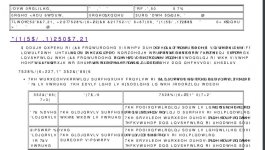
I was able to download the file as well and when I opened it up the text is all scrambled. I have attached the first page to show you what it looks like. I am opening it with Bluebeam. I am excited to figure this out to start working on my 4Runner
I was able to download the file as well and when I opened it up the text is all scrambled. I have attached the first page to show you what it looks like. I am opening it with Bluebeam. I am excited to figure this out to start working on my 4Runner
I'm able to download, unzip and open no problem. Only issue is all the characters are totally scrambled. Bookmarks are fine. Pics are fine. Just the text is jibberish. Any ideas? I downloaded it twice.
BTW this manual is the best thing since sliced bread. Appreciate you putting this together.
Attachments

Dynamo
New member
I was able to download the file as well and when I opened it up the text is all scrambled. I have attached the first page to show you what it looks like. I am opening it with Bluebeam. I am excited to figure this out to start working on my 4Runner
Try opening it with Adobe Acrobat Reader.
Try opening it with Adobe Acrobat Reader.
Or FoxIt reader.
DougEFresh2
New member
I was able to download the file as well and when I opened it up the text is all scrambled. I have attached the first page to show you what it looks like. I am opening it with Bluebeam. I am excited to figure this out to start working on my 4Runner
I only use open source software (unless there's no way to), so I can't confirm that it will work for all PDF viewing software. I use SumatraPDF and whenever I have to digitally sign something I'll resort to using Adobe.
My best advice is to see if you can use SumatraPDF.
Please note, some pages actually DO have scrambled text. This took so long that I wasn't able to individually confirm that all 8,593 pages weren't corrupt.
If someone is crazy enough to remake this, I have all of these pages as individual files if someone really wants to pay the $20, download the pages that are corrupt and then merge them all into one file again......lol. I doubt doing this would be worth anyone's time though.
I tried today to download the file but I was not able to. Is the sharing turned on?
Thanks
You have to manually type in the link exactly, i.e. it is case sensitive. It can be a challenge, but I was eventually able to do it.

TodiN
New member
You have to manually type in the link exactly, i.e. it is case sensitive. It can be a challenge, but I was eventually able to do it.
Got it, I had 2 typos. THANKS

3kushn
Member
Well I'm having trouble too.
I got the Zip file downloaded but when I try to extract with 7Zip I get a password incorrect error.
7Zip goes ahead and places a PDF file in the Folder but its size is 0Kb
I've read to use the "HASH" in this case. Are those "Hash" thingys alternative passwords?
If not how are they used? If they're passwords, I get the same error. Incorrect Password"
Thanks
I got the Zip file downloaded but when I try to extract with 7Zip I get a password incorrect error.
7Zip goes ahead and places a PDF file in the Folder but its size is 0Kb
I've read to use the "HASH" in this case. Are those "Hash" thingys alternative passwords?
If not how are they used? If they're passwords, I get the same error. Incorrect Password"
Thanks
Dynamo
New member
Well I'm having trouble too.
I got the Zip file downloaded but when I try to extract with 7Zip I get a password incorrect error.
7Zip goes ahead and places a PDF file in the Folder but its size is 0Kb
I've read to use the "HASH" in this case. Are those "Hash" thingys alternative passwords?
If not how are they used? If they're passwords, I get the same error. Incorrect Password"
Thanks
IIRC I didn't have to mess with the HASH stuff at all. Are you sure you entered the password correctly? It the whole string, starting with "x*" and ending with "83".
3kushn
Member
IIRC I didn't have to mess with the HASH stuff at all. Are you sure you entered the password correctly? It the whole string, starting with "x*" and ending with "83".
Yes I copied and pasted.
Maybe I have to actually type it in??
Yes I copied and pasted.
Maybe I have to actually type it in??
Copy Paste didn’t work for me, but typing it in gave me no problems.

daytonaviolet
New member
thanks.. i was able to download and view now. i used extract here then pasted password.
Last edited:
3kushn
Member
thanks.. i was able to download and view now. i used extract here then pasted password.
Typing or pasting doesn't work for me.
Extract or Extract Here
Tried it within Explorer/Downloads and my 4Runner Folder and within 7-Zip as well.
Nothing works.
Guess I'm SOL
daytonaviolet
New member
Typing or pasting doesn't work for me.
Extract or Extract Here
Tried it within Explorer/Downloads and my 4Runner Folder and within 7-Zip as well.
Nothing works.
Guess I'm SOL
I did this a few times with errors too. I kept on getting a 0 file size after extracting.
So I deleted the zip and pdf. I downloaded again, extra fed and pasted the password. Then it worked. Strange right
beelzebaba
New member
Thanks for doing this!
My download was successful, but all of the text is scrambled.
Is this file corrupt, or is there another method to obtain the uncorrupted version?
My download was successful, but all of the text is scrambled.
Is this file corrupt, or is there another method to obtain the uncorrupted version?
DougEFresh2
New member
Thanks for doing this!
My download was successful, but all of the text is scrambled.
Is this file corrupt, or is there another method to obtain the uncorrupted version?
try using the HASH to verify that your downloaded copy of this file isn't corrupted, that's why I included it.
See below for HASH information:
Compare Checksums on Windows:
Types of hash algorithms: md2, md4, md5, sha1, sha256, sha384, sha512
Command: certutil -hashfile location\file hash_algorithm
Example: certutil -hashfile C:\game.exe sha256
Compare Checksums on Linux:
Types of hash algorithms: md5sum, sha1sum, sha224sum, sha256sum, sha384sum, sha512sum, sharesec
Command: hash_algorithm location/file
Example: sha256sum /home/game.iso
Alternatives: Download the latest and past versions of QuickHash here (replaces the former hosting page of sourceforge.net/projects/quickhash | QuickHash GUI
Source: GitHub - tedsmith/quickhash: Graphical cross platform data hashing tool for Linux, Windows and Mac