TPMS Reader

Richard72648

New member
Has anyone found a Bluetooth OBD2 reader for a IOS phone app that reads the actual tire pressure to compensate the lack of fn Yota from giving this to us? I’ve searched high and low but no dice so far. I know it’s a requirement for it to be read from the diag port but can find jack that is made to. There are valve stem caps that allow you to read it with their companion app but that requires the cap to hold the pressure because it keeps the valve stem open to read pressure and having to remove them several times per year to add air over the course of time doesn’t sound like a good mix to me.

Damn Yota, another hour or so of coding and they could have shown them on the info screen in the instrument cluster!
 
Register to hide this ad
I have a scan gauge ii but on my other vehicle might send it in for update.

Looking for something more standalone/single purpose.

Before I reached out to scanguage i was heavily conisdering this option https://www.amazon.com/HUAHAT-HuaHat-Monitoring-Customized-Temperature/dp/B072FGZDTL?ref_=Oct_TopRatedC_2201765011_7&pf_rd_p=3c51811c-a850-5a15-9cc2-e11f693a6d25&pf_rd_s=merchandised-search-6&pf_rd_t=101&pf_rd_i=2201765011&pf_rd_m=ATVPDKIKX0DER&pf_rd_r=Q8F6NJNPNHX0RZS1R655&pf_rd_r=Q8F6NJNPNHX0RZS1R655&pf_rd_p=3c51811c-a850-5a15-9cc2-e11f693a6d25#customerReviews theres a few other options out there like this one, this just happened to be the first I pulled up. I personally didn't want a bluetooth OBDII reader just for the fact I use my phone for GPS all the time and prefered not to have the OBD app open all the time. Unless itll send you notifications about low psi, I could be wrong
 
OBD Fusion with Add on

I use a KIWI-3 Bluetooth OBD 2 (pricey, but fast easy connection) but any would work as long as it can pair with the OBD fusion software. Once you download OBD Fusion (free) there is an additional 9 dollar add on "Toyota" package. Once the bluetooth connects you can select which PID network you want to connect to (General, Network A, etc....) there is one labeled "Tire Pressure". IF you select that one and make a new dashboard screen that has the tire pressures for each of the wheels on it you can now access the tire pressures of all 4 wheels. Its accurate as I have deflated each wheel to 20 psi one at a time and checked it. The only issue with this is that when you are in the "Tire Pressure" PID network the only accurate readings are tire pressure and you don't see any of the others (RPMs, Speed, Boost, Oil temp, etc...). You have to log out of that and go into Network A for those to be accurate. So other than that hiccup it seems to work fine. I'll post a few pictures later this evening once I have had a chance to take some screen shots.
 
Images

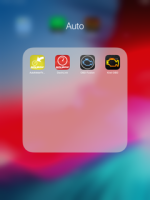
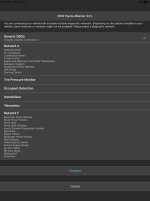
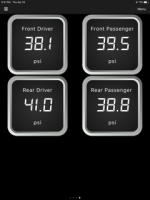
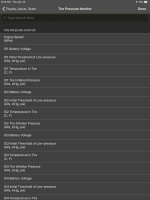
Here is the pics showing the process and what it looks like:
1 - App
2 - Choosing "Tire pressure monitor" connection
3 - How I have the gauges set up on the dashboard
4 - Toyota/Lexus/Scion added PIDs (9.00 Dollars)
5 - ID1 Tire inflation pressure/ID2/ID3/ID4 corresponds to one of the four tires. I don't remember off the top of my head which one went to which. I just deflated a tire to 20 PSI, looks at the app as to which tire was at 20 and labeled the gauge that way.

Hope this helps, and shows you can use this particular app to monitor these pressures. Oh, and the app initially had the pressure in hg rather than PSI, that can easily be changed in preferences on the home screen.
 

Attachments

  • IMG_0001.PNG
    IMG_0001.PNG
    66.9 KB · Views: 3,126
  • IMG_0002.jpg
    IMG_0002.jpg
    109.3 KB · Views: 3,122
  • IMG_0003.PNG
    IMG_0003.PNG
    41.4 KB · Views: 3,123
  • IMG_0010.jpg
    IMG_0010.jpg
    111.2 KB · Views: 3,131
Here is the pics showing the process and what it looks like:
1 - App
2 - Choosing "Tire pressure monitor" connection
3 - How I have the gauges set up on the dashboard
4 - Toyota/Lexus/Scion added PIDs (9.00 Dollars)
5 - ID1 Tire inflation pressure/ID2/ID3/ID4 corresponds to one of the four tires. I don't remember off the top of my head which one went to which. I just deflated a tire to 20 PSI, looks at the app as to which tire was at 20 and labeled the gauge that way.

Hope this helps, and shows you can use this particular app to monitor these pressures. Oh, and the app initially had the pressure in hg rather than PSI, that can easily be changed in preferences on the home screen.

Did you actually get working tire pressures in OBD Fusion? I bought it and the Toyota add-on, no matter what I did it wouldn't give me TPMS data.
 
Did you actually get working tire pressures in OBD Fusion? I bought it and the Toyota add-on, no matter what I did it wouldn't give me TPMS data.

With my 2018 TRD ORP, KIWI 3 OBD Bluetooth reader and the OBD fusion app, as listed above I certainly have working TPMS data. I have deflated one tire to 20 PSI at a time, checked the app and it read 20 PSI while the other 3 read around 38-40 where I run my tires on the daily. Rinse and repeat with the next wheel. Seems accurate to a gauge.
 
There are a bunch of threads and info out there about it. Basically your obd reader has to support some certain protocol, and the ones that support it seem to be quite a bit more expensive. Here's one thread about it, but there are lots more if you go looking.

Yes, thanks a lot guys. Just spent 30 minutes reading fine print and specs that I neglected to catch, hamstrung myself despite it being on OBD Software's list (albeit not supporting "advanced diagnostics"). Maybe I'll get a VeePeak BLE 4.0 or a Kiwi 3 and try again someday... Story of my life, dumb is hard. Cheers
 
Yes, thanks a lot guys. Just spent 30 minutes reading fine print and specs that I neglected to catch, hamstrung myself despite it being on OBD Software's list (albeit not supporting "advanced diagnostics"). Maybe I'll get a VeePeak BLE 4.0 or a Kiwi 3 and try again someday... Story of my life, dumb is hard. Cheers

Well I can save you a little bit of time and money. I have the VeePeak and haven't been able to get it to read the TPMS.
 
This is where my trust for this stuff evaporates, there isn't any real clarity of what is supported, what PIDs you can depend on accessing, etc. TPMS data and Transmission Oil Temp (for instance) isn't even listed as a supported PID on OBS Softwares list. Yet it's in the software. How many dongles does one have to buy before they get lucky, if ever, know what I mean? This software can allegedly tell you how many old snickers wrappers your kid stuffed behind the rear seat but can't give you what in my opinion is basic data unless you have the magic dongle? It would be nice if there was a short list of fully supported dongles for our vehicles so we didn't have to spend $100+ to learn the hard way. Sounds like the Kiwi 3 might be one of them, OBDLink MX(+) might be another but now I'm just ready to give-up on this crap altogether.

By the way, I'm using iOS which apparently adds another crippling layer of complexity and potential lack of compatibility into the equation.

If you don't mind me asking, are you going to persue this further and what dongle do you plan to go with?

Cheers
 
Last edited:
This is where my trust for this stuff evaporates, there isn't any real clarity of what is supported, what PIDs you can depend on accessing, etc. TPMS data and Transmission Oil Temp (for instance) isn't even listed as a supported PID on OBS Softwares list. Yet it's in the software. How many dongles does one have to buy before they get lucky, if ever, know what I mean? This software can allegedly tell you how many old snickers wrappers your kid stuffed behind the rear seat but can't give you what in my opinion is basic data unless you have the magic dongle? It would be nice if there was a short list of fully supported dongles for our vehicles so we didn't have to spend $100+ to learn the hard way. Sounds like the Kiwi 3 might be one of them, OBDLink MX(+) might be another but now I'm just ready to give-up on this crap altogether.

By the way, I'm using iOS which apparently adds another crippling layer of complexity and potential lack of compatibility into the equation.

If you don't mind me asking, are you going to persue this further and what dongle do you plan to go with?

Cheers

I spent close to $300 in different dongles (Auto meter, Veepeak, Carista, LELink, Cheap Chinese versions) to find this information. The KIWI 3 (although not perfect since you can only monitor tire pressure in that particular network and have to disconnect and reconnect to get all the other information) has, in my experience, been able to access the most PIDs and give the most information. Apparently "blue driver" can also access some of these secondary PIDs but I have not tried that one yet.

iOS does through another wrench in this whole puzzle because apparently the torque app has this information but requires android. So far, I am happy with the information provided by OBD Fusion and the Kiwi 3. After going through some of the other apps and dongles above this is what I have settled on. Not perfect, but best in my opinion for this information.
 
I spent close to $300 in different dongles (Auto meter, Veepeak, Carista, LELink, Cheap Chinese versions) to find this information. The KIWI 3 (although not perfect since you can only monitor tire pressure in that particular network and have to disconnect and reconnect to get all the other information) has, in my experience, been able to access the most PIDs and give the most information. Apparently "blue driver" can also access some of these secondary PIDs but I have not tried that one yet.

iOS does through another wrench in this whole puzzle because apparently the torque app has this information but requires android. So far, I am happy with the information provided by OBD Fusion and the Kiwi 3. After going through some of the other apps and dongles above this is what I have settled on. Not perfect, but best in my opinion for this information.

No go on the Carista then, for TPMS with OBD Fusion?
 
I spent close to $300 in different dongles (Auto meter, Veepeak, Carista, LELink, Cheap Chinese versions) ...

iOS does through another wrench in this whole puzzle because apparently the torque app has this information but requires android. So far, I am happy with the information provided by OBD Fusion and the Kiwi 3. After going through some of the other apps and dongles above this is what I have settled on. Not perfect, but best in my opinion for this information.

Thanks a lot sincerely for your sacrifices and the information you've provided to us all here. You've done more to clarify the entire OBD Fusion/iOS situation than OC Tech themselves. Maybe they're in for a cut of the greater dongle market as people try to figure this stuff out by trial and error? ;) Anyway, cheers for being here and hopefully people wanting to use this stuff can find this thread and have some trouble saved for them thanks to you.
 
Here is the pics showing the process and what it looks like:
1 - App
2 - Choosing "Tire pressure monitor" connection
3 - How I have the gauges set up on the dashboard
4 - Toyota/Lexus/Scion added PIDs (9.00 Dollars)
5 - ID1 Tire inflation pressure/ID2/ID3/ID4 corresponds to one of the four tires. I don't remember off the top of my head which one went to which. I just deflated a tire to 20 PSI, looks at the app as to which tire was at 20 and labeled the gauge that way.

Hope this helps, and shows you can use this particular app to monitor these pressures. Oh, and the app initially had the pressure in hg rather than PSI, that can easily be changed in preferences on the home screen.

Thanks for the post. Worked just as described.

For what it’s worth, here we’re how the IDs were laid out on mine.

ID1 - driver front
ID2 - driver rear
ID3 - pass rear
ID4 - pass front
(counterclockwise)
 
No go on the Carista then, for TPMS with OBD Fusion?

I haven’t been able to get it to work. I have OBDFusion and the Toyota 2013 extension, when I try to connect it tells me I need an elm327 v2.0 compatible device. I asked Prizmos a question on amazon while back, their answer was that their ODBII was only compatible up to v1.5.
 
I just purchased OBDLINK MX+. Reads tire PSI and temps and much more. Software looks exactly the same as the pics posted by Surgical precision and has the same issue, can’t get TPMS and tire temps at the same time as HP, fuel usage, rpm, speed, etc. Nice to just plug it in and leave it with no cords. Has it’s own software at no cost and no charge for advance networks. Using with iPhone 6s and have a 2015 Trail.
 

Members online

Forum statistics

Threads
278,304
Messages
3,554,041
Members
248,016
Latest member
Advally Service

Trending content

Back
Top