Trying to turn off auto door lock

Register to hide this ad
Ran across a thread about turning off the auto door lock and it said something about requiring a "hand held tester" ... has anyone done this on their own and where would I get said tester???

Here is the original thread ...

http://www.toyota-4runner.org/maintenance-detailing/546-03-changing-settings.html

It's probably talking about a device that only the dealer has, and is required to change certain options. You can change the auto lock functions yourself though, instructions are in your manual.
 
Thanks!!!!

:heh:

Thanks! Thanks! Thanks!!! a million times over! You don't know how frustrated I was with the auto door lock feature. I do maintenance and am CONSTANTLY getting in and out of my truck! I was ready to rip the door locks out of the truck SO many days it's not EVEN funny!!! =D
 
Last edited:
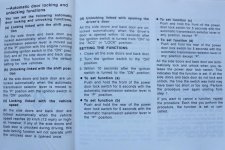
AUTOMATIC DOOR UNLOCKING

You can select the following functions:

Unlocking linked with the shift position - All doors are automatically unlocked when the selector lever is moved to “P” position.

You can set or cancel the automatic door unlocking functions:

Be sure to apply the parking brake when performing the following operations.

To select the unlocking linked with the shift position:

1. Close all doors and turn the ignition switch to the “ON” position.

2. Shift the selector lever to the “P” position.

3. Within 10 seconds of turning the ignition switch to the “ON” position, press
and hold the driver’s side power door lock switch in the unlock position for
5 seconds and then release. The doors will be locked and unlocked
to indicate that the function is set.

To cancel the function, do the above operation again.
 
AUTOMATIC DOOR UNLOCKING

You can select the following functions:

Unlocking linked with the shift position - All doors are automatically unlocked when the selector lever is moved to “P” position.

You can set or cancel the automatic door unlocking functions:

Be sure to apply the parking brake when performing the following operations.

To select the unlocking linked with the shift position:

1. Close all doors and turn the ignition switch to the “ON” position.

2. Shift the selector lever to the “P” position.

3. Within 10 seconds of turning the ignition switch to the “ON” position, press
and hold the driver’s side power door lock switch in the unlock position for
5 seconds and then release. The doors will be locked and unlocked
to indicate that the function is set.

To cancel the function, do the above operation again.

So the same procedure just toggles the functionality on and off?
 
I've given one example of the instructions found in the owner's manual under doors/locks.

There are subtle differences in the gear shift positioning as you follow the instruction steps, depending on what you want to do.

1. select auto door locking linked with shift position - gear shift in P.

2. select auto door locking linked with vehicle speed - gear shift in N.

3. select unlocking linked with shift position - gear shift in P.

4. select unlocking linked with the ignition switch - gear shift in N.
 
Help. I'm really struggling with the autolock feature. I just want it off, no automatic locks tied to shifting. I have read the manual I have tried but it keeps locking doors as soon as I shift from park, and unlocks in park. I want it OFF - ENTIRELY (04 4runner limited) can anyone please give me instructions
 
2004 owners manual
page 18 and 19
 

Attachments

  • DoorLocks.jpg
    DoorLocks.jpg
    121.5 KB · Views: 1,928
2004 owners manual
page 18 and 19

I can't tell you how amazing this post is to me, lol. For 9 months now I have been struggling with my car not unlocking while going into park and I was under the impression (from my misguided earlier searches) that I need to stop in to see a dealer with their scanner to change this.

Literally 2 minutes at lunch and I now have my car only locking at speed, and unlocking all doors when going into park. It was really easy to do and actually works.

Thanks a bunch.
 

Members online

Forum statistics

Threads
278,311
Messages
3,554,082
Members
248,016
Latest member
Advally Service

Trending content

Back
Top