Updating Gracenote?

Register to hide this ad
I thought it was an online database.....I'm pretty sure it's constantly being updated. But I could be wrong.
 
I found an updated Gracenote.up file but was unable to get my Entune system to see the update. Posting to see if others may have better luck.

https://s3.amazonaws.com/visteon/public-gracenote/Gracenote_NA_June2018.up
It is possible that your USB devise may not be formatted to the FAT32 and/or the volume label doesn't have the 14A. I had to format my USB to see the files and then I had to figure out the process of how it needed to be inserted. Most videos said to insert the USB and a pop-up would ask if I wanted to update it but I didn't get that.
 
It is possible that your USB devise may not be formatted to the FAT32 and/or the volume label doesn't have the 14A. I had to format my USB to see the files and then I had to figure out the process of how it needed to be inserted. Most videos said to insert the USB and a pop-up would ask if I wanted to update it but I didn't get that.


Did you get the linked June2018 update to work? If so:
1. What do you mean "14A" in volume label (I know what volume label is for drive)?

2. What was volume label you used on USB stick?

3. What was process of inserting the drive, etc. to get it to work if your install didn't follow the instructions?
 
Has anyone had any luck getting the gracenote update to work? I have called a couple dealership and neither was able to give me any information on this. If you call Toyota they will just tell you to call a dealer...
 
There was an update that showed up on my screen a few weeks back. When I looked under the setup section for updates it didn't show anything having been updated.

They could make this process so easy if they would just push content whenever your phone is connected or at least tell you there's an update and for what..the fact that we need two entune apps and the app linking options within are so limited..on the other hand if it really bothered me I get one of those slick alpine head units..
 
Playing audio through bluetooth from an iPhone X and the mismatched album covers drives me absolutely bonkers. USB works fine but I'd rather not use the cable...
 
My 15 SR5 Pre keeps dropping my bluetooth conxn or completely resetting itself several times...I'd updated the software per Toyota's Customer Service Instructions....to no avail...

I don't want to have to replace the head unit, if I don't have to....

Any ideas?
 
Playing audio through bluetooth from an iPhone X and the mismatched album covers drives me absolutely bonkers. USB works fine but I'd rather not use the cable...

I use Bluetooth and I get the same issue about the album covers. I would rather just kill Gracenote, and there isn't an option to shut it off.

Does anyone know if the supplied SD card in the head unit carries the info/folder, and if yes, which is it?

BTW, I have a 2019.
 
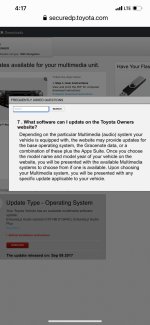
Gracenote updates only available if presented on download page.
 

Attachments

  • 866FA654-A4CC-46BD-85FB-13B0D6D56514.jpg
    866FA654-A4CC-46BD-85FB-13B0D6D56514.jpg
    134.1 KB · Views: 3,398

Members online

Forum statistics

Threads
278,307
Messages
3,554,056
Members
248,016
Latest member
Advally Service

Trending content

Back
Top