Watching the backup camera while moving forward

mshrake

New member
Using the instructions for the navigation install, I ran a switch that provides +12 volts to the reverse sensor wire. When traveling forward and I turn the switch on, the backup camera displays on the Nav unit! Now I can keep track of the boat and make sure all the connections are fine. It is also useful to see just how close the car behind you is following.

There is a problem though, and I have since removed the switch. The 4Runner is a little to smart to be fooled by the +12 volt signal. Whenever I would display the backup camera video while in forward motion, the "R" indicator in the dash would light up. I think the computer saw this and did not like it. My VSC lights lit up, and the check engine light came on. I am not sure how to get around this. Anyone have an idea? It was great to have, but not worth VSC and check engine lights.

After removing the switch, the check engine and VSC lights did not go away. It took two days, but now they are gone.

Mike
 
Register to hide this ad
I would definately be interested in having the ability to use my camera in foward motion. If anyone figures this out it would be great.
 
I don't have factory navigation, but if you could cut the wire from the reverse circuit to the nav unit, not just tap into it, and connect it to a 12v switch, you wouldn't be supplying 12v to the entire circuit. You would not get the backup camera simply by selecting reverse, you would have to flip the switch every time.
 
if u apply the 12v to the reverse wire at the wrong time, ur whole dashboard lights up and beeps . thats wat someone posted when they did it to their's. I suggest that u just get a eclipse unit and backup cam, u can view the cam in any motion
 
well i was thinking of this last night and in theory i think i have something figured out. The check engine light is coming on because the 12 volts you are feeding to the nav is feeding back into the truck and telling the computer that the truck is in reverse. The solution would be to cut the reverse sensor wire that goes to the back of the nav and then use a 3 way switch and connect the end of the reverse wire on one end and 12 volt wire on the other end with the nav wire in the middle. That way when the switch is in the 1st position all is normal the truck functions as stock. When the switch it put in the 3rd position (middle on the switch would actaully be off) the reverse sensor wire connected to the truck would now be disconnected from the nav and more importantly from the 12 volts you are now feeding to it allowing the truck to function as normal but be able to send 12 volts to the nav to tell it to switch to the camera. When i do this i will take pics if anyone is interested.
 
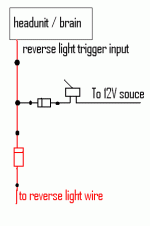
Use 2 diodes! The stripe side (cathode) of the diode blocks 12V from entering, but allows it to pass through if entering from the anode. 12V can go from anode to cathode but not cathode to anode. It is the opposite if you wanted to send ground through.
 

Attachments

  • simplediode.gif
    simplediode.gif
    4.5 KB · Views: 3,939
hmmmm..... that would be great because then i could use a factory style switch. What EXACTY would i need when you talk about the two diodes? Is there a certain amp that i would need? Here is a search at radio shack i did. what one should i pick?

http://www.radioshack.com/search/in...SK/2032058&categoryId=2032058&kwCatId=2032058


BTW i was thinking you could almost use this like a dvd player. just add a video switcher. The only thing i am wondering about is does it always say "check your surroundings for saftey" on the bottom of the screen or do you think that is in the camera portion.
 
You'll be fine with these....


http://www.radioshack.com/product/i...8&kwCatId=2032058&kw=diodes&parentPage=search

If you are doing this to aftermarket unit such as a flip out or double din, most of the time you can go in and make the camera accessible at all times. If it isn't possible with your unit then you can always just feed it to the video 1 input on your unit. The only problem with that is if your camera is also getting power to turn on with the reverse light rather than with the car, you'd have to go back and give it a different source for 12V.

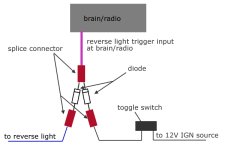
Here is a more detailed drawing with connections and what not...
 

Attachments

  • diode2.jpg
    diode2.jpg
    41.5 KB · Views: 5,529
Does anyone know what color this wire is and where the easiest place to pick it up from is.. I think the three way switch idea is perfect.......

Aron
 
yea but what if you have the 3-way switch positioned to off and you put it in reverse? ... that = no interruption on the screen. The way I mentioned is the only way to do it and do exactly what you want.
 
Backup camera switch

You'll be fine with these....


RadioShack.com Official Site - America's Technology Store

If you are doing this to aftermarket unit such as a flip out or double din, most of the time you can go in and make the camera accessible at all times. If it isn't possible with your unit then you can always just feed it to the video 1 input on your unit. The only problem with that is if your camera is also getting power to turn on with the reverse light rather than with the car, you'd have to go back and give it a different source for 12V.

Here is a more detailed drawing with connections and what not...


—I know this is an old thread but hopefully you remember… I am looking to complete this same setup using 2 diodes for a backup camera switch but cannot find the reference to what size diodes I need and the link you posted originally is not bringing them up- what size diodes did you recommend for tapping the reverse wire and 12v switch?
This is for a 2013 T4R aftermarket backup camera.

Thanks in advance.
 
—I know this is an old thread but hopefully you remember… I am looking to complete this same setup using 2 diodes for a backup camera switch but cannot find the reference to what size diodes I need and the link you posted originally is not bringing them up- what size diodes did you recommend for tapping the reverse wire and 12v switch?
This is for a 2013 T4R aftermarket backup camera.

Thanks in advance.

Unfortunately the member you quoted hasn't been on the forum since 2010, that's 12 years ago, so you won't get a reply from him, maybe someone else will see this and know the answer.
 

Members online

Forum statistics

Threads
278,305
Messages
3,554,042
Members
248,016
Latest member
Advally Service

Trending content

Back
Top