
Weather Map not fully loading - 2014 EnTune

alexb

New member
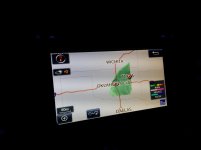
Anyone else have issues with their weather map not fully loading? I've always noticed it but it's never bothered me enough to worry about it. Maybe there is a software update I need to do?

Here's what it looks like most the time I pull up the radar map. If you zoom in the most it fills the screen, but zoomed out wide it does this most the time.
 

Attachments
  • IMG_20150313_174010 (Copy).jpg
    IMG_20150313_174010 (Copy).jpg
    53.8 KB · Views: 1,990
Last edited:
Register to hide this ad
I use mine all the time and when you zoom all the way out it is similar to mine. It is not connecting to a local radar for accuracy. You want to know immediate conditions not what the weather is seven hours away. Pretty sure that is the logic.
 
Same here. 2015 TE. I noticed it just the other day. When in OKC, it's not that I'm concerned about the weather '7 hours away' it's more about getting an idea of what's coming, how the storm is developing, etc.

It's kind of annoying but really not that big of an issue in the big scheme of things I guess. The radar is a neat feature but it's not real high res and no animation so there's limited value.

I suppose that's what our smartphones are for.
 
No animation? I drove 200 miles last week from 50 degree weather into a big snowstorm. I had the radar on watching the heavier snow bands. It shows you moving on the road just like the navigation screen and the radar image updates every few minutes. That's animation to me.
 
Haha...okay okay. That's what I would call 'patient animation'. I was referring more to the feature on most smartphone apps where you can replay the last hour or so in the span of about 3 seconds.
 
Haha...okay okay. That's what I would call 'patient animation'. I was referring more to the feature on most smartphone apps where you can replay the last hour or so in the span of about 3 seconds.

It's pretty much real time when you are zoomed up I think. Drive 70 mph and in a few minutes the radar will change as you are moving into the weather. Use it all the time.
 
I use mine all the time and when you zoom all the way out it is similar to mine. It is not connecting to a local radar for accuracy. You want to know immediate conditions not what the weather is seven hours away. Pretty sure that is the logic.

I would think, but I've seen it load the whole map when zoomed out before. It just doesn't do it most if the time. I imagine it just pulls the map from The Weather Channel servers.

Same here. 2015 TE. I noticed it just the other day. When in OKC, it's not that I'm concerned about the weather '7 hours away' it's more about getting an idea of what's coming, how the storm is developing, etc.

It's kind of annoying but really not that big of an issue in the big scheme of things I guess. The radar is a neat feature but it's not real high res and no animation so there's limited value.

I suppose that's what our smartphones are for.

Yeah I don't really rely on it, its just a neat feature. It could have been executed better though. Full animation like the phonr apps would be nice. Especially spring time in OK when a tornado can pop out of anywhere.

It's pretty much real time when you are zoomed up I think. Drive 70 mph and in a few minutes the radar will change as you are moving into the weather. Use it all the time.

I've never noticed that but I never leave it up long. I'll have to try it next time. It still feels like it should work better when zoomed out. Maybe an Entune update would fix it?
 
I would think, but I've seen it load the whole map when zoomed out before. It just doesn't do it most if the time. I imagine it just pulls the map from The Weather Channel servers.


Yeah I don't really rely on it, its just a neat feature. It could have been executed better though. Full animation like the phonr apps would be nice. Especially spring time in OK when a tornado can pop out of anywhere.


I've never noticed that but I never leave it up long. I'll have to try it next time. It still feels like it should work better when zoomed out. Maybe an Entune update would fix it?

Remember I had this feature on the Entune back on my '12 TE and it is night and day better on the '15.

The "Weather Channel" has no data of its own even though they would want you to believe otherwise. It's a TV show that's all. NOAA and their offspring National Weather Service has all cool toys and who really monitors the weather and makes the forecasts. They provide data to everyone and the weather channel just uses it like everyone else. I quit watching the "Weather Channel" years ago when I determined they were just a bunch of liberal tree hugging who had their own agenda and try to further it through weather forecasts. They are the type of people who hype a storm to near panic just to sell Ad space. NOAA does not.

Even when you have real time weather radar like on a plane it still takes time to make a 360 degree sweep. I understand the value of what you are talking about and I understand the value of of the what Entune offers.
 
A little off topic but is there a nighttime mode for the screen? At night it's super bright. I know you can turn the brightness down but is there an actual night time button feature?
 
I think the radar pulled from the piggy back of HD channels as a default then your smart phone data plan second. Probably uses the NOAA radar and keeps the resolution and updated frequency to a minimum to save data. Same place the traffic data comes from some government server.
 
A little off topic but is there a nighttime mode for the screen? At night it's super bright. I know you can turn the brightness down but is there an actual night time button feature?

Yes, there is a dimmer wheel on the left side of the steering wheel. If it is all the way up, there is a click that leaves it on daytime mode. Click it down and it will switch to auto/night time if the headlights are on.
 
Isn't the Weather thing an App? I never actually played with Entune in terms of customzing it too much; but can't you uninstall/reinstall it?

Worst case I suppose you could try a complete reset of the head unit?
 
Yes, there is a dimmer wheel on the left side of the steering wheel. If it is all the way up, there is a click that leaves it on daytime mode. Click it down and it will switch to auto/night time if the headlights are on.

I see. Thanks.
 

Members online

Forum statistics

Threads
278,307
Messages
3,554,050
Members
248,016
Latest member
Advally Service

Trending content

Back
Top