

txt4r
New member
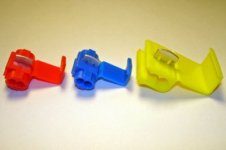
This can be done in 5-10 minutes. All you need is a wire connector that can directly connect two wires. What I used was a Scotchlok wire connector (see the first picture below). Here is how:
Steps (on my '05 4Runner):
Since the TPMS is disabled, be sure to check your tire pressure regularly.
Steps (on my '05 4Runner):
- Disconnect the battery (Although I did not do this)
- Take out the screw that holds the black plastic panel located below the glove box
- Gently pull the black panel and it should just pop out
- Drop the panel and you will see that the TPMS module is right there
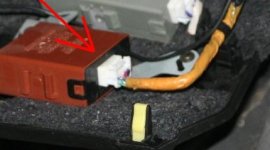
- Unplug the harness (as show in the second picture below)
- Use utility knife or scissors and cut the yellow type open (BE CAREFUL-Not to cut the wires!!!!)
- Inside the yellow type there is another layer of black type, cut that open as well (again, BE CAREFUL Not to cut the wires!!!)
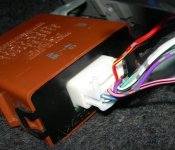
- Now, look for two wires: the Pink-Black one (TPMS) and the White-Black (ground) wire (see below the third picture)
- Use Scotchlok wire connector to connect the Pink-Black wire and the White-Black wire (watch youtube Scotchlok Wiring Demo clip here: ScotchLok Wiring Connector Demonstration - etrailer.com - YouTube) NOTE: Check both channels inside the connector. If one channel is blocked, you need to cut out the plastic block to make adjustment so that the wire can go through just like the other channel).
Since the TPMS is disabled, be sure to check your tire pressure regularly.
Attachments
Last edited:


