Hello, everyone!
Recently I‘ve got myself the MINI VCI cable to play with. As it turned out, with little manual tweaking it is possible, contrary to the popular belief, to get it working under Windows 64-bit. So, I decided to share the instructions, which hopefully will save someone a headache of dealing with dual boot and virtual machines with Windows XP .
.
Equipment:
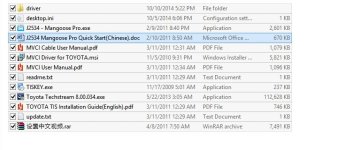
The content of bundled mini-CD:

The Techstream, MVCI drivers and TIS Key all can be found on the Internet as well.
Steps:
The built-in Techstream cable diagnostics shows:

So far, I tested the cable with 2013 4Runner, 2004 Sienna and 1997 Camry LE/4cyl, and it seems to work fine with all of them. Absence of (L) line connection means no support for ECU re-flashing (which is not something I'm comfortable doing myself anyway). Option customization/clearing DTC is possible (already verified).
Overall, not bad for a $30 gadget, in my opinion.
Good luck!
Alex.
Recently I‘ve got myself the MINI VCI cable to play with. As it turned out, with little manual tweaking it is possible, contrary to the popular belief, to get it working under Windows 64-bit. So, I decided to share the instructions, which hopefully will save someone a headache of dealing with dual boot and virtual machines with Windows XP
.Equipment:
- MINI VCI cable for TOYOTA TIS Techstream. I‘ve bought mine from Amazon for around $30. The cable is about 4’ long, with translucent casing and “MINI-VCI J2534 Standard OBDII Communication Interface” sticker:
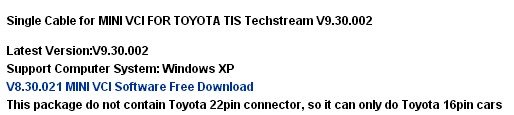
The cable comes with a mini CD with drivers and Toyota Techstream software. Mine was advertised as “Newest V8.00.034 MINI VCI for TOYOTA TIS Techstream Diagnostic Cable & Software”. The “newest” refers to the version of bundled Techstream, rather than the cable firmware, as cable shows serial number “MVCI006000001” and firmware version 1.4.1, which is widely known as “cheap clone of the original XHorse MVCI cable”.
- A laptop running 64-bit version of Windows 7/8. Mine is actually Windows 8 x64, but for Windows 7 the configuration procedure should be identical.
The content of bundled mini-CD:
The Techstream, MVCI drivers and TIS Key all can be found on the Internet as well.
Steps:
- Download and install a trial version of WinRAR
- Using WinRAR Unpack the following files from mini-CD to a temp folder anywhere on your hard drive (e.g. c:\temp).
- Toyota Techstream 8.00.034.rar
- Techstream_Update_V8.10.021.rar
- MVCI Driver for TOYOTA.rar
- TIS KEY.rar
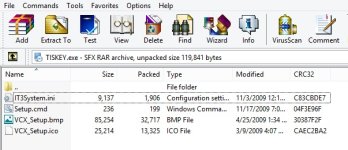
- Now open WinRAR again, navigate to the temp folder with unpacked files and double click the TISKey.exe in WinRAR.
The TISKey.exe is actually a self-extracting (SFX) RAR archive file. Once executed, it simply unpacks and copies the IT3System.ini file to the Techstream folder. Extract that IT3System.ini to the same folder for now.
- Installing MVCI Driver for TOYOTA
This is the step which most people stumble upon as “MVCI Driver for TOYOTA.msi” installer indeed does not work on Windows x64. The workaround is to install it manually, as follows:
- Open Command Prompt in Administrator Mode. Navigate to the c:\temp folder and run the following command line:
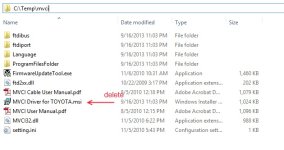
msiexec /a "C:\temp\MVCI Driver for TOYOTA.msi" /qb TARGETDIR=c:\temp\mvci
This will extract the content of the MSI file to the c:\temp\mvci folder:
- Delete the “MVCI Driver for TOYOTA.msi” there and then copy the whole
content of c:\temp\mvci to "C:\Program Files (x86)\XHorse Electronics\MVCI Driver for TOYOTA TIS"
- Plug the MINI VCI cable to the USB port.
- Open the Device Manager and locate two failing devices in the list. Both will appear with yellow icon (usually under “Other”), indicating that Windows failed to install drivers for them. Now, right click each failing device, select Install Driver, then “Browse my Computer…” and point it for "C:\Program Files (x86)\XHorse Electronics\MVCI Driver for TOYOTA TIS" (enable the “include subfolders” flag). Click “Next” and wait until drivers are installed.
You should now see two new devices: “Universal Serial Bus Controllers\USB Serial Converter” and “Ports (COM & LPT)\USB Serial Port (COM5)”.
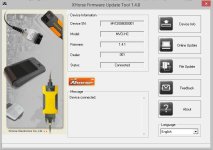
- Run the FirmwareUpdateTool.exe from the "C:\Program Files (x86)\XHorse Electronics\MVCI Driver for TOYOTA TIS". Click “Device Info”. You should see the “device connected” screen like this:
If you see this, it means your MINI VCI is up and running under Windows x64 and can be used by other programs, such as Techstream.
IMPORTANT: Some people have reported that updating firmware on this “cheap clone” cable may render it dead. So, the Firmware Update Tool should not be used for anything, but checking that the device is connected and working properly.
- Open Command Prompt in Administrator Mode. Navigate to the c:\temp folder and run the following command line:
- Now install Techstream software using "Techstream 8.00.034.exe" and then update to 8.10 with "Techstream_Update_V8.10.021.exe". Do not launch it yet.
To activate it, copy the IT3System.ini you extracted before to "C:\Program Files (x86)\Toyota Diagnostics\Techstream\Env\".
Alternatively, you may copy two files from the C:\Program Files (x86)\XHorse Electronics\MVCI Driver for TOYOTA TIS\ProgramFilesFolder\Toyota Diagnostics\Techstream\Env" to "C:\Program Files (x86)\Toyota Diagnostics\Techstream\Env\", which seem to do the trick as well.
- Registry Hack: for Techstream to recognize MINI-VCI under Windows x64, the Registry has to be modified as:
Windows Registry Editor Version 5.00
[HKEY_LOCAL_MACHINE\SOFTWARE\Wow6432Node\PassThruSupport.04.04]
[HKEY_LOCAL_MACHINE\SOFTWARE\Wow6432Node\PassThruSupport.04.04\XHorse - MVCI]
"Name"="XHorse - MVCI"
"Vendor"="XHorse ELECTRONICS Co.,Ltd."
"ConfigApplication"="C:\\Program Files (x86)\\XHorse Electronics\\MVCI Driver for TOYOTA TIS\\FirmwareUpdateTool.exe"
"FunctionLibrary"="C:\\Program Files (x86)\\XHorse Electronics\\MVCI Driver for TOYOTA TIS\\MVCI32.dll"
"APIVersion"="04.04"
"ProductVersion"="1.1.0"
"ProtocolsSupported"="J1850VPW:1, J1850PWM:1, CAN:1, ISO9141:1, ISO14230:1, ISO15765:1"
"J1850VPW"=dword:00000001
"J1850PWM"=dword:00000001
"ISO9141"=dword:00000001
"ISO14230"=dword:00000001
"CAN"=dword:00000001
"ISO15765"=dword:00000001
"SCI_A_ENGINE"=dword:00000000
"SCI_A_TRANS"=dword:00000000
"SCI_B_ENGINE"=dword:00000000
"SCI_B_TRANS"=dword:00000000
The attached "mvci-x64.zip" contains the *.REG file that has to be imported to the Registry (extract, right click, then Merge)
A trick here is the "Wow6432Node" in key path, which is the location the 32-bit applications running on 64-bit OS get redirected to when accessing Registry. The "PassThruSupport.04.04" seems to be the place Techstream looks into for available VIMs (sub-keys appear in the "VIM Select" menu in Techstream).
- Run Techstream. Go to Setup | VIM Select menu and select the “XHorse - MVCI”
- Connect MVCI cable to your car’s OBDII interface, turn ignition on, then click “Connect to Vehicle” in Techstream. Wait. Then wait again (by the way, you'll be doing that a lot with this cable ). If everything works, you will be prompted to confirm car year/model after which you'll get to the diagnostic interface.
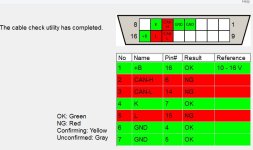
The built-in Techstream cable diagnostics shows:
So far, I tested the cable with 2013 4Runner, 2004 Sienna and 1997 Camry LE/4cyl, and it seems to work fine with all of them. Absence of (L) line connection means no support for ECU re-flashing (which is not something I'm comfortable doing myself anyway). Option customization/clearing DTC is possible (already verified).
Overall, not bad for a $30 gadget, in my opinion.
Good luck!
Alex.