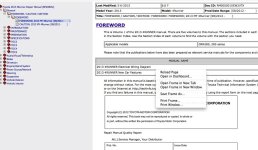
2 day TIS Subscription

I downloaded CutePDF Writer 3.0

In the process I was told I also needed PS2PDF Converter and selected it as well. This requirement was also listed on CutePDFs front page.

My Antivirus popped and and blocked a few things, then the fireworks started. All sorts of products not related to CutePDF began to install.

Afterwards I wholesale removed everything; then ran MalwareBytes - a product that finds and removes infections AV software does not.

A total of 41 infections as a result of this CutePDF download.

To date, I've yet to find a "free" PDF software product that is not inundated with spyware/malware/adware/junk.

Chrome has print to PDF built into the browser.
 
I'm going to try this too. $35 is worth a go.
I was curious why you can't copy and paste into a Word Doc. You can then create PDFs right from Word if needed.
 
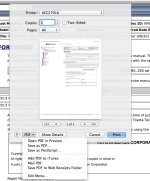
yep, Safari may have it built in also. Here's a screenshot.
 

Attachments

  • Screen Shot 2015-05-08 at 1.01.45 PM.jpg
    Screen Shot 2015-05-08 at 1.01.45 PM.jpg
    97.3 KB · Views: 697
That looks promising, if you right click any of the blue page links (like the page you opened) can you select properties? If so can you copy the address and post it here or screenshot it?

No properties when right clicking.
 

Attachments

  • Screen Shot 2015-05-08 at 1.06.06 PM.jpg
    Screen Shot 2015-05-08 at 1.06.06 PM.jpg
    118 KB · Views: 691
I'm going to try this too. $35 is worth a go.
I was curious why you can't copy and paste into a Word Doc. You can then create PDFs right from Word if needed.

The problem with copying and pasting is that you're going to have to do that for every file which involves more keystrokes, more time, more headaches and more problems....
 
That looks promising, if you right click any of the blue page links (like the page you opened) can you select properties? If so can you copy the address and post it here or screenshot it?

This link?

https://techinfo.toyota.com/t3Porta...00010EW2VTX.html?locale=en&pcdChangeBack=null

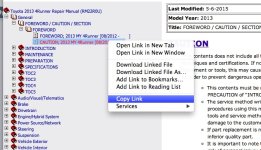
I right-clock the blue link and this popped up. Im on a mac so...it may be different...
here's the link (i doubt its what you were looking for)

https://techinfo.toyota.com/t3Porta...00010EW2VTX.html?locale=en&pcdChangeBack=null
 

Attachments

  • Screen Shot 2015-05-08 at 1.15.27 PM.jpg
    Screen Shot 2015-05-08 at 1.15.27 PM.jpg
    120 KB · Views: 687
This link?

https://techinfo.toyota.com/t3Porta...00010EW2VTX.html?locale=en&pcdChangeBack=null

I right-clock the blue link and this popped up. Im on a mac so...it may be different...
here's the link (i doubt its what you were looking for)

https://techinfo.toyota.com/t3Porta...00010EW2VTX.html?locale=en&pcdChangeBack=null

Here are two sample URLS from the Audio Visual portion of the Repair manual:
Repair Manual > Audio Visual Telematics> Audio_Video> Amplifier Antenna > Components.pdf
https://techinfo.toyota.com/t3Porta...html?sisuffix=ff&locale=en&siid=1428803872103


Repair Manual > Audio Visual Telematics> Audio_Video> Amplifier Antenna >removal.pdf
https://techinfo.toyota.com/t3Porta...html?sisuffix=ff&locale=en&siid=1428803893563
 
Chrome has print to PDF built into the browser.
Not really built in - you go to Google Apps and download PDF Converter. No problem with this.

But...then you begin to use it and learn you are limited to converting 10 files a day. Also - the Google PDF converter is VERY slow.

The search for a free PDF converter that does not contain limitations like this and is not full of spyware/malware continues.
 
Guys, I uploaded the repair manual to google drive. If you want access just send me your email address and I'll share the files with you.
Thanks,
J
 

Members online

Forum statistics

Threads
278,307
Messages
3,554,056
Members
248,016
Latest member
Advally Service

Trending content

Back
Top