2014 Limited Navigation

Araj82

New member
Hi everyone

I have a quick question and am hoping someone can provide some insight.

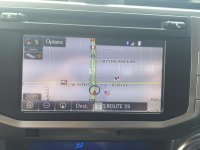
My father in law just got a 2015 SR5 premium and when he's driving his navigation screen has "Street name and speed limit" on bottom right corner. I have a 2014 Limited but I don't have those two items listed. My understanding is that both of these systems are exactly the same. So mine should have it also.

Any insight? Do I have to turn something on?
 
Register to hide this ad
Hi everyone

I have a quick question and am hoping someone can provide some insight.

My father in law just got a 2015 SR5 premium and when he's driving his navigation screen has "Street name and speed limit" on bottom right corner. I have a 2014 Limited but I don't have those two items listed. My understanding is that both of these systems are exactly the same. So mine should have it also.

Any insight? Do I have to turn something on?

You have to be navigating somewhere to get this on your 14. You have a choice of miles/time to destination or this I believe. It is in the owners manual.
 
[MENTION=103105]Araj82[/MENTION] Checked out the Nav on my '14 today. The (i) shows up in Nav display even when I have no destination programmed.

Caveat emptor: Your GPS Location in Nav is real time. However, the Nav map and the speed limit display are static - from a database stored in your system. Most of the time my speed limit displays are accurate, I've run across areas where the displayed speed limits are out of date. Bummer.
 
Last edited:
If you figure out a way to get the speed limit without navigating somewhere let me know. I have not been able to get it to work this way.

Went to the dealership this morning. They worked their magic and it now works! There is no "i" icon. But the street name and speed limit is there all the time.
 

Attachments

  • IMG_5700.jpg
    IMG_5700.jpg
    125.3 KB · Views: 512
I need to have mine updated, I have that option on but I have yet to see it displayed. That and it locks up or reboots itself more often than I would like.
 
Went to the dealership this morning. They worked their magic and it now works! There is no "i" icon. But the street name and speed limit is there all the time.

I will have to stop by the dealer. Did they charge you for this? Do you know what they did?
 
It seemed like the dealer was somewhat familiar with the issue. There was no charge. Here's what the paper work says.

"Durning inspection test drove vehicle and dupilcated customers concern, replaced SD Card, test drove vehicle a second time, but still would not display on major roads. Updated entune system, test drove vehicle a third time and now road information will display on major roads"
 
It seemed like the dealer was somewhat familiar with the issue. There was no charge. Here's what the paper work says.

"Durning inspection test drove vehicle and dupilcated customers concern, replaced SD Card, test drove vehicle a second time, but still would not display on major roads. Updated entune system, test drove vehicle a third time and now road information will display on major roads"

Thank you. I may have the same problem. I have the speed limit set to on on the map info but it only comes up when navigating.
 
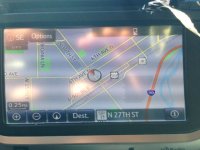
The first photo shows my Nav with Street Name, Speed Limit, and the (i) symbol, all without a Nav destination set. By the way, when these are not being displayed on the Nav, I have to touch the (i) symbol twice. The first time, I do not see any changes on the screen.

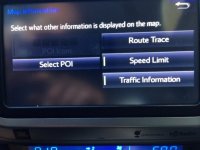
The second photo shows the Nav Information dialog screen. This is accessed from the Options button at the upper left of the screen. You can specify which pieces of info to display from this screen. Maybe that was your problem.

BTW, I have the same stack build as Araj82 (57085).

NavMap11.JPG

NavMap12.JPG
 

Attachments

  • NavMap11.JPG
    NavMap11.JPG
    65.1 KB · Views: 573
  • NavMap12.JPG
    NavMap12.JPG
    56.6 KB · Views: 565
The first photo shows my Nav with Street Name, Speed Limit, and the (i) symbol, all without a Nav destination set. By the way, when these are not being displayed on the Nav, I have to touch the (i) symbol twice. The first time, I do not see any changes on the screen.

The second photo shows the Nav Information dialog screen. This is accessed from the Options button at the upper left of the screen. You can specify which pieces of info to display from this screen. Maybe that was your problem.

BTW, I have the same stack build as Araj82 (57085).

View attachment 164875

View attachment 164876
That is the screen I have selected speed limit from. I will have to play with it some more. I do not get the I symbol unless navigating some where.
 
I had the same issue before. I had everything turned on but didn't get the street/speed limit or the "i" icon.

I only got the "i" icon when I was navigating. I did figure out one thing before I went to the dealer. With the truck running, if you take out the SD Card and put it back in, I would get the "i" icon and the street/speed limit, but as soon as I would restart the truck it wouldn't come back. Very odd!
 
so, was there any consensus on this?
My software is up to date, but I don't see a way to turn this on :(
 

Members online

Forum statistics

Threads
278,307
Messages
3,554,056
Members
248,016
Latest member
Advally Service

Trending content

Back
Top