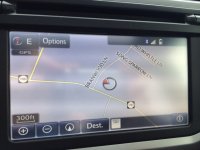
2014 Navigation Help/Pictured Needed

Araj82

New member
2014 Navigation Help/Pictures Needed

Hello

I need some help. When I first got mine 2014 Limited on the main navigation screen there used to be a "i" button on the bottom right corner of the screen. If you pressed the button it showed current street you are on and the speed limit. I took it to the dealer for some other work, they did an update and now that icon is gone. Dealer is telling me it was never there. I looked in the manual and it shows the icon in the pictures. Can someone please take a picture? Does your nav have the icon? Thanks!
 
Last edited:
Register to hide this ad
Not sure why the street name is not displayed but it does put it next to the speed limit. Hope this helps.
 

Attachments

  • image.jpg
    image.jpg
    78 KB · Views: 1,243
Does anyone know if there is an option for the screen to darken/invert colors when the lights are on/night time?

Or an option to automatically attenuate the music volume when the voice guidance gives a direction?

These are two things every other nav unit I've had has always done.
 
Thank you! I called the dealer and they are waiting for tech support to call them back.

So I heard back from the dealer and am being told that "i" icon shouldn't be there. Toyota tech team confirmed that with them. Dealer also had another 4runner on the lot, same issue there no icon. I know it used to be there. Any suggestions??
 
actually the "i" icon is shown in the owners manual and referenced in several places. only reason i know is the other day i was looking for a way to turn off voice guidance since it interrupts the wardens phone call since the volume is not tied to the volume knob. can only set the volume in the settings menu.
 
I thought there was an option in the nav settings to turn this off/on?
OP... did you ever figure this out? I was thinking about this and playing with mine earlier today, trying to see if I could get it to turn off, then back on. No luck. What kind of 'update' did your dealer do? From what I can tell, the Nav system is very dependent on receiving an "HD" signal in order for it's advanced features to work. In the process of doing this update, I'm wondering if the dealer somehow disabled your Nav systems use of an HD signal? Just wondering out loud...

I spent some quality time with the Nav system manual, and all I can say is that this thing is only slightly less complicated than a nuclear particle accelerator...
 
Dealer said there was an update for the system. I am not sure what it exactly was. All I know is that the icon is gone. Now Toyota is telling me that the icon is not supposed to be there. Well its in the manual. Doesn't make any sense. I did figure out that if I take the sd card out and put it back in the icon comes back. But if I turn the car on/off it goes away. My guess is that update has a glitch in it.
 

Members online

Forum statistics

Threads
278,305
Messages
3,554,041
Members
248,016
Latest member
Advally Service

Trending content

Back
Top