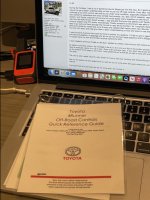
4Runner Off-Road Controls Quick Reference Guide Final Version

Oh sweet!!! This is awesome! I was up last night dealing with some new found insomnia and actually started reading my manuals to get a better understanding of all the offroad controls in my ORP. I am new to Toyota, and new to offroading/overlanding in general. I am not completely oblivious to how things work (been in the car business over 10yrs now) but I would be lying if I said that I was not intimidated at all. Freaking love that you put the time into this and gave us all a handbook. I will surely be printing a copy to have in my vehicle. Although... I never knew that the spot under the center console lid was made for tissue. It has served a different purpose for myself.

Many thanks!!!
 
Oh sweet!!! This is awesome! I was up last night dealing with some new found insomnia and actually started reading my manuals to get a better understanding of all the offroad controls in my ORP. I am new to Toyota, and new to offroading/overlanding in general. I am not completely oblivious to how things work (been in the car business over 10yrs now) but I would be lying if I said that I was not intimidated at all. Freaking love that you put the time into this and gave us all a handbook. I will surely be printing a copy to have in my vehicle. Although... I never knew that the spot under the center console lid was made for tissue. It has served a different purpose for myself.

Many thanks!!!
You’re very welcome. I made this so others wouldn’t have the frustration of trying to understand all of this like I did. Later on I will make a new one that explains in greater detail on how they actually work mechanically. Once I understood this the functions and purpose of A-TRAC and Multi Terrain Select became clear to me. For now A-TRAC and Crawl Control are intended to be used for the most difficult situation but only for a short while. MTS is designed to be used for longer drives.

I plan to make some updates and corrections tonight. So wait until tomorrow to download.
 
As an absolute newbie - this is greatly appreciated!!! I have watched lots of videos talking about the options. They all talk about how each option works and what it does but I wasn't finding how to determine what options go together or what about the conditions determined the choice of function. This cheat sheet made a lot of pieces fit together! Thanks!
 
Hi All

I updated the 4Runner Quick Reference Guide today to fix some spelling errors and make minor modifications such as increase font size for easier reading and clarify that this is primarily for part time 4WD. There are now two PDF file. The "e" file is 4-1/2 x 6 inches and the "x" file is slightly larger at 5.5 x 7.5 inches
 
Thank you! I copied, reduced and laminated the guide. I'll keep in my side door pocket for quick reference!
 

Attachments

  • 8E2B2946-D3E1-4540-8A34-287934822728_1_201_a.jpg
    8E2B2946-D3E1-4540-8A34-287934822728_1_201_a.jpg
    130.9 KB · Views: 733
Hi All

I updated the 4Runner Quick Reference Guide today to fix some spelling errors and make minor modifications such as increase font size for easier reading and clarify that this is primarily for part time 4WD. There are now two PDF file. The "e" file is 4-1/2 x 6 inches and the "x" file is slightly larger at 5.5 x 7.5 inches

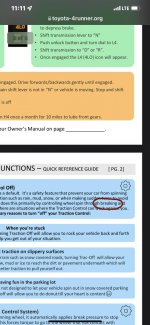
Still need to run a spell check. “Break pressuer”
 

Attachments

  • 55583CE9-0FD8-4454-BE72-7C6EE83EFC53.jpeg
    55583CE9-0FD8-4454-BE72-7C6EE83EFC53.jpeg
    99.5 KB · Views: 729
Still need to run a spell check. “Break pressuer”

Someone else had already reported it and I already made the correction but it looks like I uploaded the wrong file by mistake. Sorry about that. I’ll fix this later today. Thanks for letting me know.
 
Thank you! I copied, reduced and laminated the guide. I'll keep in my side door pocket for quick reference!

I’m glad you liked it. The PDF files are much smaller if you want it to fit your center console or glove compartment. Many printers by default will automatically adjust the size to fit a 8-1/2 x 11 paper. You may have to manually uncheck that in your printer preview setting to print the original size. I put the actual size description in the original links. There are two sizes. The one that is 4.8 x 6.5 is designed to fit the tissue holder slot in the center console or the case for for your manuals that are in the glove compartment. I figured this size would be more handy to keep in your car.

I’m also currently working on working on a expanded version that explains in detail how each control works mechanically. This was extremely helpful to me. I had a hard time understanding the difference A-Tracs and MTS. Once I understood the mechanics it because very clear. However I couldn’t add this to the current format.

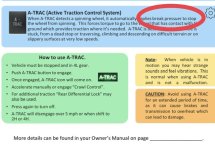
The main difference between the two is A-Tracs heavily uses the computer breaking system to lock a free spinning wheel to transfer torque to the opposite wheel that has contact to the ground. You can consider it a faux differential lock but it done electronically and not mechanically. It is more aggressive than MTS in providing traction. The draw back is it puts a lot of stress on the brakes and the torque converter and can cause both to overheat if used too long and potentially can cause damage to both if abused.

The MTS controls traction by controlling the throttle control with minor braking and allows for wheel slipping if desired. It’s less taxing on the transmission and brakes and therefore can be used for a long period of time.
 
Last edited:
Someone else had already reported it and I already made the correction but it looks like I uploaded the wrong file by mistake. Sorry about that. I’ll fix this later today. Thanks for letting me know.

Also look for “breaks”. Should be “brakes”. Otherwise, good job. :thumb:
 
Someone else had already reported it and I already made the correction but it looks like I uploaded the wrong file by mistake. Sorry about that. I’ll fix this later today. Thanks for letting me know.

Perfect is the enemy of good. ;). Nicely done! You put alot of effort into this.
 
I see what I did. I updated the PDF but not the pictures. Anyway I made a slight revision to the Trac-Off. Everything should be good now. Let me know if you find anything else.

The 2 versions posted as of about 1030 EST 10 Feb have breaking in the TRAC section. Should be braking.

Great job on this��
 
Question:

MTS has 4 levels of traction control, getting more intrusive with each level. Let's call them levels 1 through 4.

Where is ATRAC on this scale? Is it level 5? More intrusive than any of the MTS levels?

Same question for the basic traction control that you get by default, before you turn MTS on (this is the traction control you can turn off with the VSC button). Would this be level 0? Or is it somewhere in the middle, say 2 or 3, so that you can have less traction control if you use MTS level 1?
 
Question:

MTS has 4 levels of traction control, getting more intrusive with each level. Let's call them levels 1 through 4.

Where is ATRAC on this scale? Is it level 5? More intrusive than any of the MTS levels?

Same question for the basic traction control that you get by default, before you turn MTS on (this is the traction control you can turn off with the VSC button). Would this be level 0? Or is it somewhere in the middle, say 2 or 3, so that you can have less traction control if you use MTS level 1?

If you’re talking about level of aggressiveness in traction I guess you can look at it that way.
-1 - VSC off
0 - Trac-Off
1 - MTS Mud, Sand, Dirt, snow
2 - MTS Loose Rock
3 - MTS Mogul
4 - MTS Rock
5 - A-Trac
6 - Crawl Control

There may not be a whole lot of difference between 4 & 5 but I give the A-Trac & Crawl Controls higher ratings because it does put more stress on the brakes and he torque converter.
 

Members online

Forum statistics

Threads
278,304
Messages
3,554,041
Members
248,016
Latest member
Advally Service

Trending content

Back
Top