4Runner Startup/Display Off Images

NoDak

Senior Member
well since no one has thought to start a thread to track, trade or share your StartupImage or DisplayOffImage

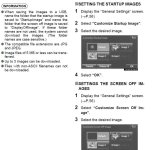
here are the instructions for those that want to make yours unique

.
 

Attachments

  • 2014 4runner Startup Instructions.jpg
    2014 4runner Startup Instructions.jpg
    85.6 KB · Views: 36,716
Register to hide this ad
the 1st and 2nd are credited to [MENTION=101056]VolksDragon[/MENTION] since he posted them in another thread.

the rest are from various places.

.
 

Attachments

  • TRD1.jpg
    TRD1.jpg
    9.4 KB · Views: 51,996
  • TRD2.jpg
    TRD2.jpg
    57.8 KB · Views: 58,134
  • TRD-03.jpg
    TRD-03.jpg
    47.1 KB · Views: 36,194
  • TRD-04.jpg
    TRD-04.jpg
    17.1 KB · Views: 33,481
  • Toyota-01.jpg
    Toyota-01.jpg
    69.9 KB · Views: 56,082
Last edited:
the 1st and 2nd are credited to [MENTION=101056]VolksDragon[/MENTION] since he posted them in another thread.

the rest are from various places.

.


I wonder if this works on the 5th Gen 4runners?
 
Last edited:
Good idea, NoDak.

Here's a few tips that aren't very clear or aren't mentioned in the user manual, and here's how I got this function to finally work every time.


1. I used an empty flash drive formatted in FAT32. Make sure to enable "view hidden files folders" on your computer, and delete everything except for a the folders named "StartupImage" and "DisplayOffImage"

2. In those folders, store whatever images you want, as long as their named with ANSI characters. Make sure you use capital letters in the file extensions, either .JPG or .JPEG are acceptable. You may need to change your view options to show file extensions in order to do this.

3. Plug it in, then turn on the vehicle. Go to Settings, General, Startup Image. At first it didn't connect, so I just kept tapping "transfer", and eventually it connected and allowed me to upload the images. It took a couple minutes, be patient. Approve the overwrite, and you'll be good to go.

4. The native resolution of the screen is 800x480. I sized each image accordingly, and they scaled perfectly.

 
Not resized, but a cool one...someone with better photoshop skills might be able to add a black background.
 

Attachments

  • TRDhomescreen1.jpg
    TRDhomescreen1.jpg
    138.1 KB · Views: 35,243
for units outside of the 4runner, you had to have the upgraded entune units, ie 7.1 inch screen units to have this ability. the standard units couldnt.

looking at the 2013 owner's manual, there is no mention of this feature.
 
I could've sworn [MENTION=87226]NorthWest 4R[/MENTION] had posted instructions on how to do this on our older entune headunits too...but I can't seem to find it right now :(

i've got the regular nav screen unit so i guess the entune way wouldn't work either
 
another pics to add, for those icon guys :)

you will have to clean up the pic if you want a black background with a different vehicle color.

.
 

Attachments

  • Toyota-02.jpg
    Toyota-02.jpg
    30.2 KB · Views: 33,272
by the way, whenever I press the power button to turn off the radio, it just goes to the main selection showing AM, FM, CD, etc.... Is this the default off ? or is there a way to turn the nav off where the whole screen is just pitch black off
thanks
 
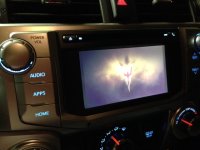
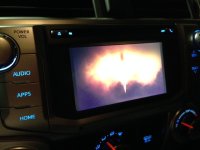
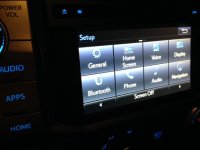
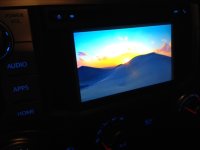
Pictures show my new start up image. I was able to change my start up screen, no problem.
Started with a brand new, empty flash drive, put picture in folder titled "StartupImage", followed directions and worked great.
No so much for the display off screen........
I got the image transferred in. I know it is in there, but not seeing it. When is this image supposed to be displayed? When you shut off truck? When you turn off radio? Thanks for help. It's gotta be a lame step I am missing.....
 

Attachments

  • photo 1.JPG
    photo 1.JPG
    94.3 KB · Views: 32,431
  • photo 2.JPG
    photo 2.JPG
    77.1 KB · Views: 32,226
that is the default. you actually have to go into the settings I think to actually turn off the display. there is a button somewhere in there that says "display off"
 
Thanks! I will give that a try. So the display off image doesn't display every time you turn the truck off like the start up image does?........right?
 
Correct. It just goes black when you cut the ignition. But you can turn the screen off (displaying the image you selected) while driving and still play your music, use phone etc. instead of having to look at silly album art (especially the bad default art on XM radio).
Just be sure, when setting up, to name the folder correctly - it's case sensitive.
 

Attachments

  • DSC_0163.jpg
    DSC_0163.jpg
    125 KB · Views: 9,550
  • DSC_0168.jpg
    DSC_0168.jpg
    135.5 KB · Views: 9,515
Thanks for help.
Finally figured out how to turn the screen off. Duh, it was right in front of me, I did not see it, maybe the same happened to someone out there and this will help you! "Screen off" is right there plain as day on the bottom of screen. Then, there it is, your display off image. Neeeeeet :)
 

Attachments

  • photo 1.JPG
    photo 1.JPG
    76.2 KB · Views: 9,365
  • photo 2.JPG
    photo 2.JPG
    57.8 KB · Views: 9,253

Members online

No members online now.

Forum statistics

Threads
278,309
Messages
3,554,071
Members
248,016
Latest member
Advally Service

Trending content

Back
Top