Am I missing the point of scangauge?

I sent the scangauge back, I decided it's not ideal for me.

Based on the inputs from you guys, I'm leaning towards the Android head unit, since it'd allow me to run Torque Pro, Navigation, and my podcasts (that I currently run through an FM Bluetooth adapter).

I'm not knowledgeable about these head units - do they work like my phone? So when I turn the car on and the head unit comes on, I'd select which app to run, be it Nav, Torque, etc? That seems straightforward enough, where I'm not clear is how this would all function if I want to have navigation and Torque Pro running at the same time - is that where the widgets come into play? Maybe I need to find some Youtube videos that explain this.

Tony, since you already have the Pioneer, why do you run the scangauge instead of running Torque Pro on the head unit?

Leon, I believe Torque Pro is not IOS compatible. If that changed, I might indeed go that route, for the alerts primarily. I'd put the gauges on the Pioneer screen at times, but often on our trips we use if for navigation.

I'll check later on Torque Pro to see if there is an IOS version.
 
Leon, I believe Torque Pro is not IOS compatible. If that changed, I might indeed go that route, for the alerts primarily. I'd put the gauges on the Pioneer screen at times, but often on our trips we use if for navigation.

I'll check later on Torque Pro to see if there is an IOS version.

Tony, thanks - so your Pioneer is set up for Apple CarPlay, which is why you can't run Torque Pro? I'd be getting an Android head unit, so that would not be a problem. Or am I being dense? :)
 
If you search those radios you’ll get plenty of forums. I haven’t herd a bad thing about them yet.


Sent from my iPhone using Tapatalk
 
Tony, thanks - so your Pioneer is set up for Apple CarPlay, which is why you can't run Torque Pro? I'd be getting an Android head unit, so that would not be a problem. Or am I being dense? :)

First, I consider myself ignorant on such stuff Leon. The Pioneer unit I have is both Apple CarPlay and Android Auto compatible. I have one USB cable for each connected to the back of the unit. The blue USB is Apple (IOS), the black one could be used for Android (none in the family), but my wife connects her iPhone to the black one to manage our tunes. I'm connected to the blue one, often for navigation purposes...

If I purchased an Android-based device and purchased the Torque Pro app I'd be able to interface with the Pioneer unit with Torque Pro. But, I'd need to use the proper input, the black USB cable, which my wife uses.

If Torque Pro had an IOS app, I'd be ok. If I'm missing something, that would be great.
 
There seems to be some mixing of info going on here. While I'm FAR from knowing even a majority of this info, I've done enough research to cover this bit.

There's talk of 2 different types of headunits that are kinda being mushed into one. You have the Apple Carplay and Android Auto options, which basically mirror what's on the phone ~ but REQURIES the phone. For Android Auto, I think it's all wired connections (no clue about Apple, they ran me off 2 decades ago), but I get fuzzy there. Anyway, no Real benefit in my eyes over just using the phone. The one car I have with this setup (OEM Mazda) locks the phone down, so it's not like you can get 2 screens with different info.

And the second type is an actual Android headunit. This is more-or-less like integrating a tablet into your dash. Completely stand-alone, though if you want it to stream music then you'll either be tethering it to your phone or setting up another account for that device. These headunits are most unknown name brands, or rather they're making their Own names.... you won't be buying a Pioneer/Sony/JVC/Alpine/etc... branded unit. 'Joying' is the one name I can pull from memory.

The Android HU's are still in the enthusiast realm. I don't think they're quite to the level of plug-n-play that a traditional HU maintains, meaning that you need to be comfortable working within the android system via computer. But I don't actually know because all I've done is troll the XDA Android Headunit forums and look at different options on Aliexpress. The one negative that drove me off was that these types of HU's take about 30 seconds to boot up when you turn them on. Just like if you were to start your phone from fully off.

So, trade-offs no matter which way you go. I can see why the Scangauge and Ultragauge exist in the market now. For someone who wants a dedicated info display without using a smartphone and is unwilling to venture into the Android HU option.
 
Tony, Brian, thanks for the overview, that's very helpful. Now I understand why Tony is not using Torque Pro on the Pioneer (it requires an actual Android phone to tether to the head unit).

I also understand the Android head unit concept - sort of like a built-in phone. The 30 sec boot-up and the potential quirks/"enthusiast" issues are a bit of a downer - I'm not sure I'm ready to make a project out of this :).

So some advantages of the scangauge and the ultragauge do become more clear - work out of the box, and no need to fiddle with anything.

I think I'll try out the Ultragauge, and see how I like it for the everyday driving. I'll still have Torque Pro on my phone if I want to get fancy. And I'll ponder the Android head unit idea some more.

Thanks guys!
 
Tony, Brian, thanks for the overview, that's very helpful. Now I understand why Tony is not using Torque Pro on the Pioneer (it requires an actual Android phone to tether to the head unit).

I also understand the Android head unit concept - sort of like a built-in phone. The 30 sec boot-up and the potential quirks/"enthusiast" issues are a bit of a downer - I'm not sure I'm ready to make a project out of this :).

So some advantages of the scangauge and the ultragauge do become more clear - work out of the box, and no need to fiddle with anything.

I think I'll try out the Ultragauge, and see how I like it for the everyday driving. I'll still have Torque Pro on my phone if I want to get fancy. And I'll ponder the Android head unit idea some more.

Thanks guys!

Leon, please do update this thread or elsewhere on the UG. I am so close to getting one too. Would you order the one with the included display, or the "Blue" that makes use of one's device?

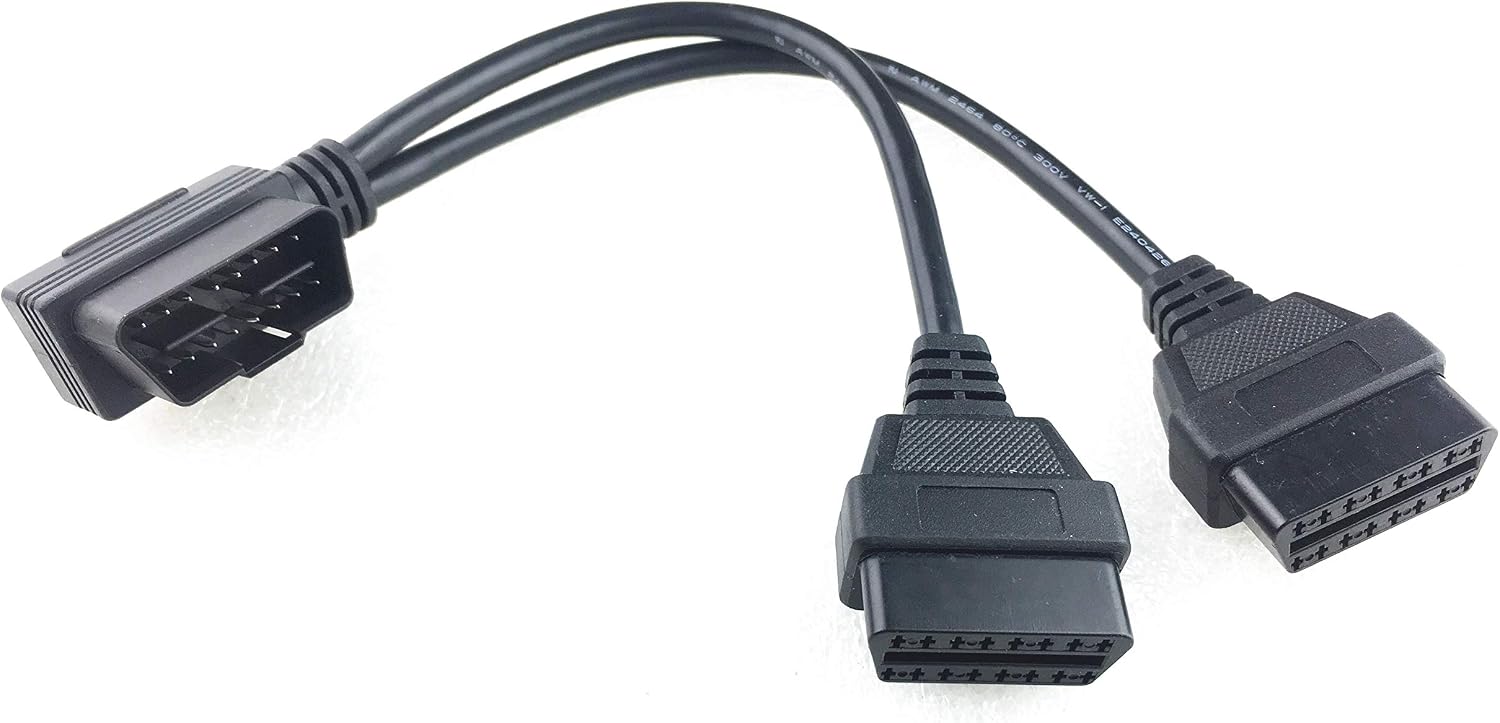
I'm thinking of either using the port in the engine bay or a Y-like device or splitter on the cabin one. SC2 and the UG on something like this.

71sIH1%2BHGzL._AC_SL1500_.jpg


https://smile.amazon.com/Right-Angl...=gateway&sprefix=obd2+splitter,aps,203&sr=8-3
 
Tony, sure thing, I'll update this once I figure out a plan! If I got the Ultragauge, I'd get the self contained unit/display.

I don't see the advantage of the "Blue" approach over my Torque Pro app, they both tie up my phone, but I already have the Torque Pro, so why would I spend the money on the UG adapter?
 
Tony, sure thing, I'll update this once I figure out a plan! If I got the Ultragauge, I'd get the self contained unit/display.

I don't see the advantage of the "Blue" approach over my Torque Pro app, they both tie up my phone, but I already have the Torque Pro, so why would I spend the money on the UG adapter?

Indeed, for your application, agreed.

UG does not recommend Y cables or splitters. I was wondering if that might be problematic... Having their Bluetooth adaptor in the engine bay with those temps, not a good idea. Warranty is voided above 160F, so either an extension is needed, with a large hole in the firewall, or run the SG2 from that spot...

So, I will try connecting my SG2 to the OBD2 port in the engine bay later today. If it works, I'll likely order the Blue. I'm a bit concerned about each pulling this data at the same time, and the potential for conflict. Hoping that with each on different ports, all will be good...

EDIT/ADD: Well, silly me, the diagnostic port in the engine bay is not an OBD2 one with the same interface. I imagine it's a proprietary Toyota one, possibly allowing for greater access. Regardless, it won't be an option for me to run the UG...

So, I really need to re-think my approach. I might put the SG2 back into my MINI Cooper S and consider the UG dedicated unit. I really like the idea of customizable alerts. I suppose for 10 bucks I can try the Y-cable/splitter first though.
 
Last edited:
Tony, looks like there are conflicting reviews on Amazon as to whether the splitter can handle two separate monitor devices; probably best thing to do is try it out.

I'm about to order the ultra gauge, and mount it somewhere on the A pillar. I suspect I'll be fabricating a custom mount, so it may be a while before I report back.
 
Tony, looks like there are conflicting reviews on Amazon as to whether the splitter can handle two separate monitor devices; probably best thing to do is try it out.

I'm about to order the ultra gauge, and mount it somewhere on the A pillar. I suspect I'll be fabricating a custom mount, so it may be a while before I report back.

Read quite a bit Leon, and I'm convinced there will be problems with two such units pulling the same data. I read of several accounts, and someone even got with back me on Amazon for one of those cables, and he also had issues. One works only, basically.

If you want tranny temps, make sure you get the MX for 10 bucks more. It seems that some MX versions might not include some features found on the standard (EM Plus) one though... I was checking-out possible mounting locations earlier and will upload a couple photos to this post later

Down low.

NO900nW.jpg


In the spot of the SG2 (ashtray removed).

omuh0Oy.jpg


Dimensions are just under 3.5" x 2.25"
 
Last edited:
Thanks Tony, good to know about the splitter. I'll probably mount my UG on the A-pillar, just above the dash, just need to figure out how.

jEmYUV0.jpg


I don't need/want the trans temp scangauge, since my '97 can't read those anyway. I installed a Glowshift trans gauge right below the dash bezel, exactly where you you are showing your UG template. It's a convenient location, but I find it hard to see over my knee when I'm driving, so it's not ideal for important gauges.

99nIc0S.jpg
 
Pardon the extreme closeup which makes the resolution look really bad, but here's my new UG setup.

pjHz3Bv.jpg


It's not as easy going through menus as with the Torque Pro app, but it's the tradeoff between a dedicated "always on" device and tying up my phone. I definitely prefer the UG over the Scangauge - I can read 6 gauges instead of 4 (can bump it up to 8 even), and the alarms give me a piece of mind.

Next is the mounting, I'll have to look at some options once it gets a bit cooler outside.
 
Here's a more respectable mounting scheme I came up with, making use of the grab handle mounting screws, so no new holes to drill.

I like the UG better than the scangauge, though I'd like to shoot the designer who thought it'd be a good idea to have all the menu buttons on the back of the gauge - really??

fcuLUou.jpg


aG9XW4e.jpg


TNY9ZPX.jpg
 
Leon, well-conceived! Kudos to you.

The menu buttons on the back... I was wondering about that alright. There's enough real estate in the frame's perimeter I would think for such.

Looks really nice.
 
Thanks Tony - I was inspired by your post using the RAM mount for the phone, so I sort of stole the idea, minus the adjustability.

I actually bought the components needed for the RAM system like you have (stud mounted ball, arm, and bracket with ball), but since I don't need adjustability or easy removal for the ultragauge, I'll just keep my bracket - the RAM system is a bit more massive than what I need. But it's a good system, I have to give it that!
 

Members online

Forum statistics

Threads
278,317
Messages
3,554,129
Members
248,016
Latest member
Advally Service

Trending content

Back
Top