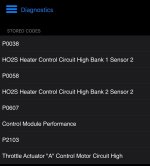
Anyone get 4 trouble codes at once??? P0038, P0058, P0607 and P2103

Ron_Mexico

New member
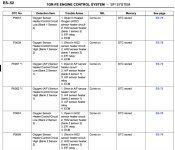
I have a 2006 V6 4WD Sport $runner. Here is a screen shot of my OBD2 results. Did anyone diagnose these codes, my check engine light came on today and this is what my OBD2 reader brings up. The P0038 and P0058 are after the first set of catalytic converters showing voltage transients. I don't know where to start, with the other two. The P2103 sounds serious.


I think I have to bite the bullet and go into the dealer for this round. It's too damn cold outside to work on the 4Runner.

If anyone has any words of encouragement it would be much appreciated.

Thank You.
 

Attachments

  • Trouble Codes_B.jpeg
    Trouble Codes_B.jpeg
    105.3 KB · Views: 314
Register to hide this ad
I would look those up in the factory service manual. In the trouble shooting section it gives probable causes and solutions for each code. At least you would have a little more info before walking into the stealership. Or find a decent Toy mechanic ( that's probably a good idea anyway)
 
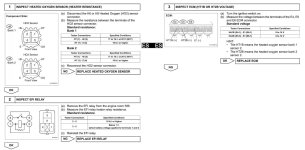
So for the V6 here is a screen shot of the factory service manual that shows some DTCs that you have displayed. On the right in blue is the page that will give you the procedure to trouble shoot that particular code. Frequently it will give as an example, resistance values for components (like your bank 1 sensor 2). This is easy and quick to determine if the sensor is bad, a couple of minutes under the truck with a multimeter. Since you have DTCs for both bank 1 and bank2 sensor 2 I would be looking upstream of those sensors to see what is supplying voltage to both. Also the trouble shooting guide will give other values that are necessary like voltage values at certain ECU pins (*like the power source to run the heaters of the sensors*). If current or voltage are not correct going to the sensor then the DTC is generated. If you don't have basic tools like a multimeter then you are definitely going to have to get someone else to look at this issue for you. Bon chance! (Good Luck)
 

Attachments

  • Screenshot 2025-01-19 at 11.03.42 AM.jpg
    Screenshot 2025-01-19 at 11.03.42 AM.jpg
    123 KB · Views: 228
Here are some of the other pages. This is good stuff and cheap.
 

Attachments

  • Screenshot 2025-01-19 at 11.42.15 AM.jpg
    Screenshot 2025-01-19 at 11.42.15 AM.jpg
    136.4 KB · Views: 223
Just thought I’d give you guys an update on these trouble codes. I ended up disconnecting the battery and cleaning the terminals/connection points. I cleared the codes and it has been almost a month and the trouble codes didn’t come back. Perhaps the computer wasn’t getting good voltage from the battery/sensors from the dirty connections and it wasn’t giving good readings?

Thank you all for your reply’s in helping me diagnose these issues!!
 

Members online

Forum statistics

Threads
278,317
Messages
3,554,129
Members
248,016
Latest member
Advally Service

Trending content

Back
Top