
Anyone install Maestro RR in aftermarket head unit?

loarmistead

New member
Thinking about installing the Maestro RR in my 2006 SR5 with a Kenwood head unit. I don't have a JBL system or steering wheel controls - planning to possibly upgrade the wheel in the future to add controls if I can find a good deal - but outside of that, is there any benefit to having the Maestro RR? I'd keep it if I could get good OBDII readouts with it, e.g. tire pressure, fuel readings, etc., but I've heard mixed reviews on whether the computer on the 2006 would actually send tire pressure info to the Maestro.

Curious if anyone has installed this in their 4th gen, and what OBDII info they were able to get?

Sent from my SM-G935V using Tapatalk
 
Register to hide this ad
I just installed one with my Kenwood. 2007 Limited and Kenwood deck

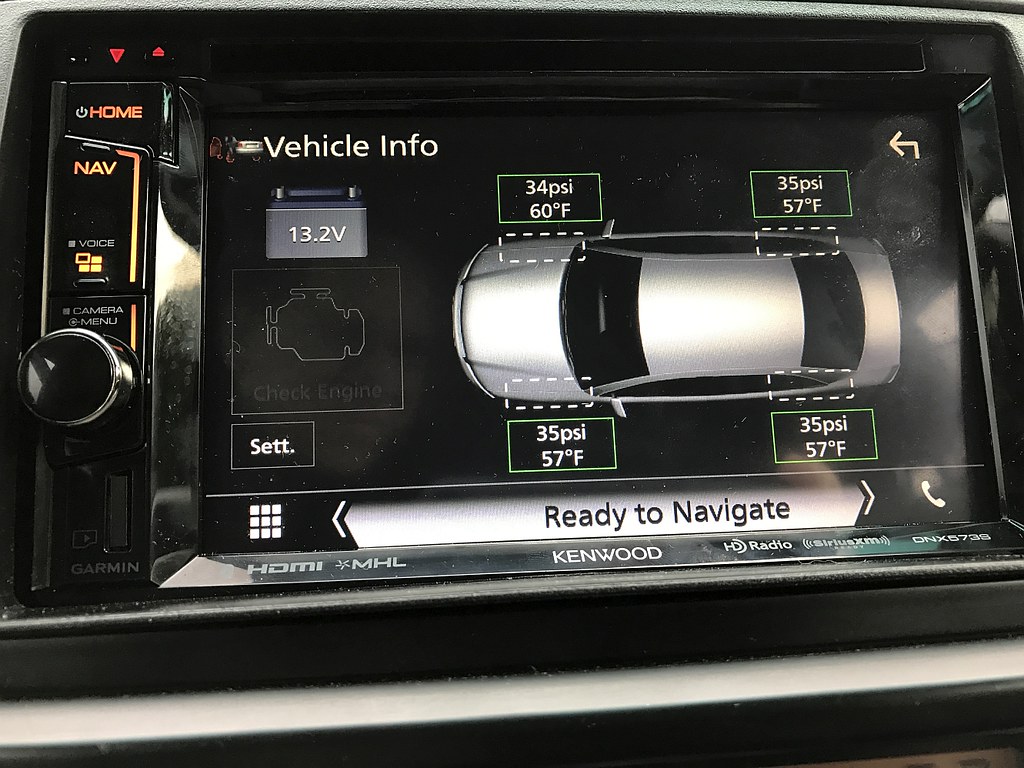
Was able to get a bunch of readings including tire pressure and tire temp, coolant temp, intake temp etc... Will post some photos tomoroow


Sent from my iPhone using Tapatalk Pro
 
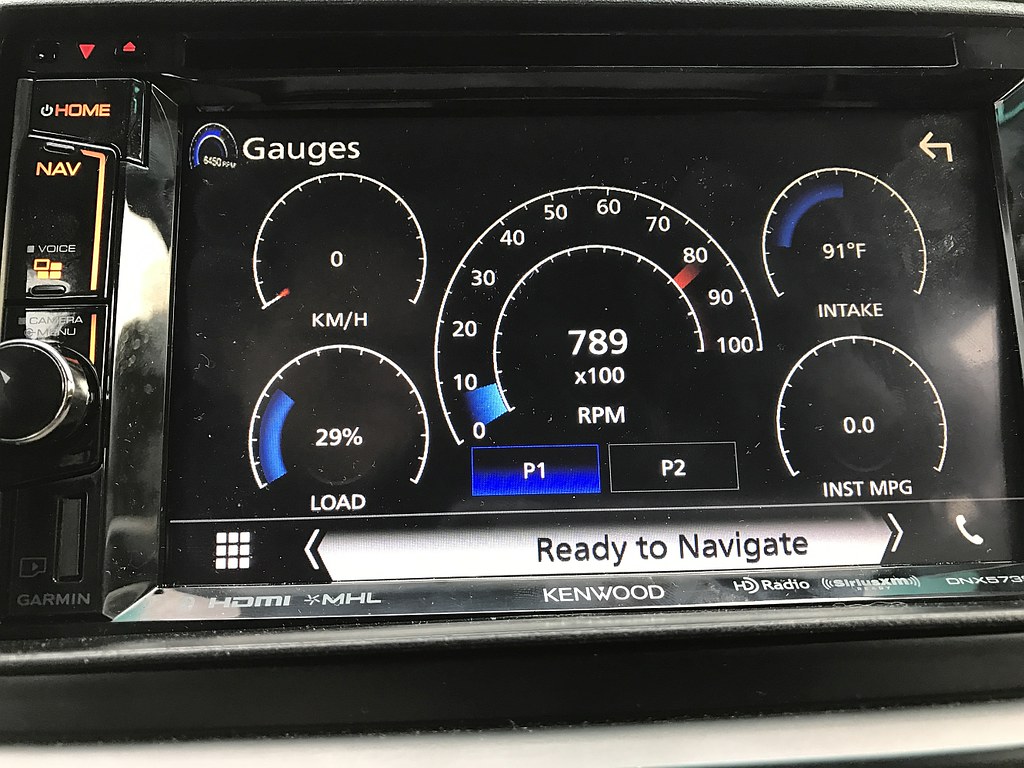
I installed one last fall in my '07. Like sr3tlaw said, I get a whole collection of info - a couple of pics, below.

You'll need a radio that supports iDatalink to get the info. If you walk through the steps on their website, you can choose the radio you're thinking about, and it'll tell you what capabilities you'll get.
iDatalink - Maestro - Maestro RR

33903821070_05ee67e800_b.jpg


34156724671_7e5b6b092c_b.jpg
 
Thinking about installing the Maestro RR in my 2006 SR5 with a Kenwood head unit. I don't have a JBL system or steering wheel controls - planning to possibly upgrade the wheel in the future to add controls if I can find a good deal - but outside of that, is there any benefit to having the Maestro RR? I'd keep it if I could get good OBDII readouts with it, e.g. tire pressure, fuel readings, etc., but I've heard mixed reviews on whether the computer on the 2006 would actually send tire pressure info to the Maestro.

Curious if anyone has installed this in their 4th gen, and what OBDII info they were able to get?

Sent from my SM-G935V using Tapatalk
I have the 06 Sport and installed the Kenwood DNX 893s with Maestro a few months ago. Sends tire pressure and every other possible bit of info you could think of. I have the steering wheel controls and had the ability to program the controls the way I wanted. Loving the system.

Oh! I don't know if it's a problem with my system or not, but the only thing I don't have is fuel readings. The fuel economy and level dome come through. But my OEM fuel gauge and economy calc works just fine for me!

edit: I also put in a backup camera and the steering wheel movement comes through on the camera because of maestro. Great system
 
Last edited:
For you guys that have installed the Maestro unit, do you have the part numbers for the items you bought? I already have a compatible Kenwood head unit.

Edit: Just to throw a wrench in the works, my truck has the Urban Runner package so the factory radio harness is a bit different than other trucks that didn't have the Tom Tom nav unit.
 
Last edited:
Great information, thanks.

I am in the process of upgrading my steering wheel and column from a standard no telescoping, no control button wheel, to a telescoping column with control buttons.

The wheel with control buttons is being sourced from a salvage T4R. Question is, is there a wiring harness running from the wheel to the radio that I need to be concerned with? Can't tell by looking at the parts diagram.

Sent from my SM-G935V using Tapatalk
 
I have the Maestro kit for my steering wheel controls. I have a Pioneer AVH-X391BHS head unit. Any chance I can get this on my screen?
 
Looks like my cheap Axxerra (Dual) head unit can run it, per Maestro.

Now to consider if it's worth the extra $150.00 and rewiring/install.

Question tho .. how does one initiate the gauges so they come up on the screen?
 
For you guys that have installed the Maestro unit, do you have the part numbers for the items you bought? I already have a compatible Kenwood head unit.

Edit: Just to throw a wrench in the works, my truck has the Urban Runner package so the factory radio harness is a bit different than other trucks that didn't have the Tom Tom nav unit.


I just did this on my new-to-me '08 Urban Runner and contemplated a thread but I don't have enough posts to start a new thread yet.

With the Urban Runner you can't use one of the Maestro quick install harnesses, you have to use the basic wiring that comes with the RR. The good news is that will save you $50. All you need to purchase is the Maestro RR unit itself. Use the 08 Landcruiser firmware.

I have all the wiring documented at home but I am on travel for work so it will be next week before I can post it, but I documented everything.
 
I just did this on my new-to-me '08 Urban Runner and contemplated a thread but I don't have enough posts to start a new thread yet.

With the Urban Runner you can't use one of the Maestro quick install harnesses, you have to use the basic wiring that comes with the RR. The good news is that will save you $50. All you need to purchase is the Maestro RR unit itself. Use the 08 Landcruiser firmware.

I have all the wiring documented at home but I am on travel for work so it will be next week before I can post it, but I documented everything.

Saving money is always a plus in my book! It will probably be a while before I buy one of these so anything you can send my way on the wiring would certainly be appreciated. :thumb:
 
I would love to get one but it says hat it won't work on a 2003 Runner. My Kenwood HU is compatabel with it. Any ideas on why it will not work with the 2003 model that I have?
 
I installed one last fall in my '07. Like sr3tlaw said, I get a whole collection of info - a couple of pics, below.

You'll need a radio that supports iDatalink to get the info. If you walk through the steps on their website, you can choose the radio you're thinking about, and it'll tell you what capabilities you'll get.
iDatalink - Maestro - Maestro RR

33903821070_05ee67e800_b.jpg


34156724671_7e5b6b092c_b.jpg

I have the 06 Sport and installed the Kenwood DNX 893s with Maestro a few months ago. Sends tire pressure and every other possible bit of info you could think of. I have the steering wheel controls and had the ability to program the controls the way I wanted. Loving the system.

Oh! I don't know if it's a problem with my system or not, but the only thing I don't have is fuel readings. The fuel economy and level dome come through. But my OEM fuel gauge and economy calc works just fine for me!

edit: I also put in a backup camera and the steering wheel movement comes through on the camera because of maestro. Great system


Does the maestro display transmission temperature?
 
Got the Maestro RR unit in yesterday. Waiting for the Toyota harnesses and should begin the install alongside the new head unit next weekend.

Flashing the Maestro was a tad bit cumbersome, as the website is finicky with plug-ins, and it can be a pain with the default locked-down security settings of most web browsers. On A windows 8 laptop I couldn't get the flash plugin to work at all on Chrome, and through repeatedly trying the same thing finally got it working on Internet Explorer. Once the plug in works the process of configuring the unit to work with the desired vehicle/trim is pretty easy. It will even let you know whether you need to update the firmware on your head unit.

Sent from my SM-G935V using Tapatalk
 
flashing idatalink products should only be done on internet explorer.
too bad i dont have a double din with data feature, i think it might be time for an upgrade, still using single din.
 
Okay, so I took a quick look - here's the list of options it gives me for the guages. (Note that there are more options listed, but the others are greyed out, so I assume not available for our vehicles)
Acceleration
Air fuel ratio
Average fuel economy
Battery voltage
Engine coolant temp
Engine load
Exaust gas temp
Instantaneous fuel economy
Intake air temp
Mass air flow
RPM
Throttle plate position
Timing advance
Vehicle speed

Of course, I just noticed that there's quite a few new firmware updates available for the Maestro since I installed it, so they may have expanded the available options.
 
I installed new Kenwood head unit and Maestro RR today. Everything went smoothly except... The head unit doesn't automatically turn off when I turn the ignition off.

Looking over the wiring diagram, the only continuous power wire is the yellow battery wire, which has to be connected for the unit to power on. Best I can tell is the Maestro is keeping the head unit powered up after I turn the truck off. Anyone else encounter this issue?

Sent from my SM-G935V using Tapatalk
 
I installed new Kenwood head unit and Maestro RR today. Everything went smoothly except... The head unit doesn't automatically turn off when I turn the ignition off.

Looking over the wiring diagram, the only continuous power wire is the yellow battery wire, which has to be connected for the unit to power on. Best I can tell is the Maestro is keeping the head unit powered up after I turn the truck off. Anyone else encounter this issue?

Sent from my SM-G935V using Tapatalk

got a picture of the harness that was used? yellow is constant and red is switched.
 

Members online

Forum statistics

Threads
278,316
Messages
3,554,120
Members
248,016
Latest member
Advally Service

Trending content

Back
Top