Anyone using this ProClip?

philsey

New member
Curious if it works well? Looking for a mount for my Nuvi 3550.

I have the suction cup mount and the vent mount, looking for other options. Prefer it to be up close.

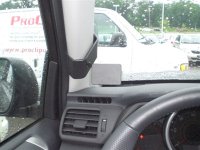
Looking at this:

proclip 1.jpg
.
.
 

Attachments

  • proclip 1.jpg
    proclip 1.jpg
    74.9 KB · Views: 4,197
Register to hide this ad
I have my clipped to the vent above the radio, rather than the A pillar. It was expensive, but rock solid even on the trails.
 
Will that interfere with the side curtain air bag?

Excellent question.

From Proclip CS:

"Hello Phil, Thank you for contacting us. The Left Mounts should not have an effect on the side-curtain air bags. The curtain air bags deploy higher up on the pillar, away from the mounting location. As long as the mount is installed per the instructions, you should be good to go [.....]
Ruben
Customer Service / Inside Sales Support"

.
.
 
I have my clipped to the vent above the radio, rather than the A pillar. It was expensive, but rock solid even on the trails.

Ditto. I have it pushed all the way to the right. From there I hardwired my GPS through vent and into plug inside glove box.


:usa2:
 
Excellent question.

From Proclip CS:

"Hello Phil, Thank you for contacting us. The Left Mounts should not have an effect on the side-curtain air bags. The curtain air bags deploy higher up on the pillar, away from the mounting location. As long as the mount is installed per the instructions, you should be good to go [.....]
Ruben
Customer Service / Inside Sales Support"

.
.
This sounds very non-comital to me. I don't doubt that they deploy higher up, but exactly how high I have no clue, and it sounds like Ruben doesn't either.
 
This sounds very non-comital to me. I don't doubt that they deploy higher up, but exactly how high I have no clue, and it sounds like Ruben doesn't either.

Do you really think that little clip is capable of interfering w/ an air bag? (Serious question, not intentionally being smart...)

David
 
. . . Looking for a mount for my Nuvi 3550.

I have the suction cup mount and the vent mount, looking for other options. Prefer it to be up close.

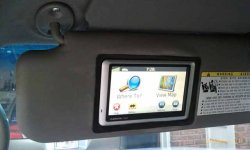
I don't know if this setup would work for you, but have you considered the sun visor GPS mod? It requires some fabrication and finding a used sun visor on eBay or the junk yard to rip up. It seems to me that driving with the visor down will block your view of the road. But since I usually just follow the audio prompts from my GPS, I guess you could leave the visor flipped up into the windshield.

One thing I do like about this mod is that you can just flip the sun visor closed when you park, concealing the GPS from would be thieves. The Pro-Clip A-pillar mount, the vent mount, the suction-cup mount, and even the ring that the suction-cup leaves behind on your windshield are all tell tale signs for thieves that there is a GPS or radar detector in the glove compartment or armrest.

http://www.toyota-4runner.org/4th-gen-t4rs/66453-sunvisor-gps-mod.html
 

Attachments

  • visormount.jpg
    visormount.jpg
    12.5 KB · Views: 2,995
I don't know if this setup would work for you, but have you considered the sun visor GPS mod?

That's very cool, right [MENTION=65614]Antman[/MENTION] ? Way more trouble than I'll go to for occasional use tho. I had my suction cup mount up in that corner, and didn't like how much it blocked my vision. My Garmin's pretty big.

I want to try that clip, but it plus the mounting plate would cost $60.00 !!!

Then after I find where to mount it, I'll have to learn how to use the damned thing.
 
Ditto. I have it pushed all the way to the right. From there I hardwired my GPS through vent and into plug inside glove box.


:usa2:

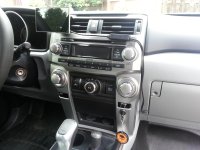
Hey Sundog ... I just bought the same Pro Clip setup and would like to run it through the vent and into the glovebox as well for a little cleaner look instead of through the glovebox door (see pic). I know it's too late for pictures, but can you walk me through how you did it so I know where to start? Thanks
 

Attachments

  • IMG_20131012_135043.jpg
    IMG_20131012_135043.jpg
    132.7 KB · Views: 3,833
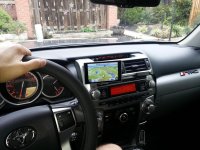
and for those that might be curious about the Pro Clip, here's what it looks like from my vantage point while driving. I can still see all the readouts, it doesn't interfere at all with the steering wheel, and it limits any distraction by being at very close reach and view. Great set up and rock solid! As others have mentioned, it's a bit pricey, but if you want to keep your windshield clear and bring the GPS a bit closer to you while driving, I'd highly recommend it! I have the Garmin 3597 5" unit.
 

Attachments

  • IMG_20131012_140312.jpg
    IMG_20131012_140312.jpg
    134.9 KB · Views: 3,383
and for those that might be curious about the Pro Clip, here's what it looks like from my vantage point while driving. I can still see all the readouts, it doesn't interfere at all with the steering wheel, and it limits any distraction by being at very close reach and view. Great set up and rock solid! As others have mentioned, it's a bit pricey, but if you want to keep your windshield clear and bring the GPS a bit closer to you while driving, I'd highly recommend it! I have the Garmin 3597 5" unit.

That's a really awesome setup. I'm gonna check them out right now. How does the clip actually mount to the vent?
 
That's a really awesome setup. I'm gonna check them out right now. How does the clip actually mount to the vent?

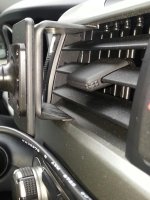
Here's a picture ... but basically it clips to the upper and lower lips in front of the vent. As you can see ... plenty of room to still keep the vent functional. There are two thin strips of double sided tape that keep it solid and avoids any scratching. You sort of just pinch it into place and the pressure keeps it very solid.
 

Attachments

  • IMG_20131012_153747-1.jpg
    IMG_20131012_153747-1.jpg
    126.8 KB · Views: 1,370
Here's a picture ... but basically it clips to the upper and lower lips in front of the vent. As you can see ... plenty of room to still keep the vent functional. There are two thin strips of double sided tape that keep it solid and avoids any scratching. You sort of just pinch it into place and the pressure keeps it very solid.

Thanks for the pic! I was worried that there might be drilling or something involved. This looks like what I am looking for. They are a little expensive, but I'm sick of dealing with cheapo mounts that fall off and bounce around all the time. I was also considering a cup holder mount, but this setup looks much safer. Constantly having to look down towards the cup holders could lead to problems.
 
Hey Sundog ... I just bought the same Pro Clip setup and would like to run it through the vent and into the glovebox as well for a little cleaner look instead of through the glovebox door (see pic). I know it's too late for pictures, but can you walk me through how you did it so I know where to start? Thanks


I used this thread to get my head unit out. http://www.toyota-4runner.org/5th-gen-t4rs/90970-removing-stock-head-unit-5th-gen-4runner-2.html

To get the to panels off the sides (the first step) I used these tools http://www.matcotools.com/catalog/product/MST4489A/5-PIECE-AUTOMOTIVE-FASTENER-REMOVAL-TOOL-SET/?source=igodigital Such tools are available in other brands on-line.

My first plan was to hot wire my GPS to the USB plug below the head unit. DON'T DO IT unless you take into consideration that there is a voltage difference. I found out the hard way.

With new GPS in hand, and after head unit was removed, I drilled a hole about 3/8" (big enough to get the end of the charge cord through) in right wall of right side vent (closest to the glove box). Plugged the cigarette lighter end of the GPS charge cord into glove box, ran the wire out through the removable cover next to it, then ran the USB end of GPS charge cord through the hole and through vent.

GPSchargecord_zps0fc4dc21.jpg~original
 
Last edited:
I used this thread to get my head unit out. http://www.toyota-4runner.org/5th-gen-t4rs/90970-removing-stock-head-unit-5th-gen-4runner-2.html

To get the to panels off the sides (the first step) I used these tools 5 PIECE AUTOMOTIVE FASTENER REMOVAL TOOL SET MST4489A | Matco Tools Such tools are available in other brands on-line.

My first plan was to hot wire my GPS to the USB plug below the head unit. DON'T DO IT unless you take into consideration that there is a voltage difference. I found out the hard way.

With new GPS in hand, and after head unit was removed, I drilled a hole about 3/8" (big enough to get the end of the charge cord through) in right wall of right side vent (closest to the glove box). Plugged the cigarette lighter end of the GPS charge cord into glove box, ran the wire out through the removable cover next to it, then ran the USB end of GPS charge cord through the hole and through vent.
GPSchargecord_zps0fc4dc21.jpg~original

Thanks man!! Dang ... I was hoping it could somehow be done without removing the head unit. It wouldn't be pretty if I attempted that! Guess I'll live with it through the door!
 
Thanks man!! Dang ... I was hoping it could somehow be done without removing the head unit. It wouldn't be pretty if I attempted that! Guess I'll live with it through the door!

Head unit really isn't that hard when following the directions in the thread. I felt same as you do when I started. Took deep breath, did it, and it went back together without a hitch. Go for it, I say! You'll be glad that you did!!

:rockon: :lalala: :thumb3:
 

Members online

Forum statistics

Threads
278,307
Messages
3,554,055
Members
248,016
Latest member
Advally Service

Trending content

Back
Top