
• If you plan to post to Classified forums, you must follow these rules, or your post will be deleted.

    1. Thread title must include at a minimum: FS or FT, Item(1st, 2nd, 3rd, 4th or 5th gen), Price and Location. For Example: FS: 4th GEN Carpet Floor Mats - Tan, $50 Denver, CO.
    2. All Threads must contain the following information
      • What is for sale/trade (model, specs, etc.)
      • Condition
      • Price/What you want to trade for
      • Location of item
      • At least one picture of the item for sale or for trade
    3. No "Feeler" Threads - Its either for sale or it isn't.
    4. Moderators lock Classified Threads that have not had any activity in 90 days or when the part is announced SOLD.
    5. Threads not complying with the rules will be deleted without notice.

Anytime Backup Camera/Front Camera Group Buy ***CLOSED***

This is the response I received:

"It can be left on all the time but we advise using a switch because when overridden your gps position on the map will not smoothly update so that is why we recommend the switch."

Hope this helps.

Dang it. I left the two wires disconnected and taped off the ends and didn't use the switch because I didn't think I would ever need to turn the override off. Oh well. I don't feel like taking the radio out again to route the override switch wires. I'll see how bad the gps update is and if it bothers me, I'll redo the override wires and add the switch.
 
Dang it. I left the two wires disconnected and taped off the ends and didn't use the switch because I didn't think I would ever need to turn the override off. Oh well. I don't feel like taking the radio out again to route the override switch wires. I'll see how bad the gps update is and if it bothers me, I'll redo the override wires and add the switch.

Since you have this installed and working, does the gps override also let you got into the other menus while in motion?
Can you get into the bluetooth menu while in motion for example.
 
Since you have this installed and working, does the gps override also let you got into the other menus while in motion?
Can you get into the bluetooth menu while in motion for example.

I haven't driven the t4r since the install. I've only checked that the front and rear cameras work after the install while parked in my garage. I'll check tomorrow and let you know if there are any hiccups. Keeping my fingers crossed.
 
Since you have this installed and working, does the gps override also let you got into the other menus while in motion?
Can you get into the bluetooth menu while in motion for example.

Ok. The GPS definitely does NOT update without the switch installed. Drove around for 5 minutes and it never updated my position. Good news is that I was able to access all the menus while driving. I tested it on a slow roll in a large parking lot. If you purchased the Nav override, make sure you install the switch. I'll be installing the switch today and will test everything afterward.
 
My front camera usually shows a rolling split screen and occasionally shows the full screen as it should. Ground issues or? Any ideas..thanks
 
My front camera usually shows a rolling split screen and occasionally shows the full screen as it should. Ground issues or? Any ideas..thanks

I'm now having issues as well. Installed the switch for the nav override and now the rear backup camera is a black screen with both the switch and in reverse. Only the front camera works.
 
What is everyone using to ground the “Black” wire off the switch?
Maybe this is the common issue?
 
What is everyone using to ground the “Black” wire off the switch?
Maybe this is the common issue?

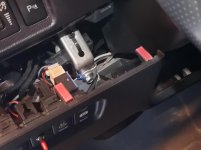
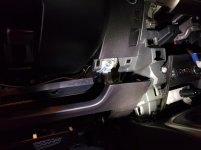
I grounded the switch ground and the relay ground to the following bolts pictured below. The front camera ground was connected to bolt connected to the body in the engine bay (not pictured). I'm no electrician or mechanic so let me know if these are not proper grounds.
 

Attachments

  • ground1.jpg
    ground1.jpg
    132.7 KB · Views: 196
  • ground2.jpg
    ground2.jpg
    116.2 KB · Views: 200
Dang it. I left the two wires disconnected and taped off the ends and didn't use the switch because I didn't think I would ever need to turn the override off. Oh well. I don't feel like taking the radio out again to route the override switch wires. I'll see how bad the gps update is and if it bothers me, I'll redo the override wires and add the switch.

Dam, I did this same exact thing and didn't bother with the switch. It kinda defeats the purpose for an override if it doesn't update GPS, and I would hate to take up a blank spot just for an override switch :\
 
Dam, I did this same exact thing and didn't bother with the switch. It kinda defeats the purpose for an override if it doesn't update GPS, and I would hate to take up a blank spot just for an override switch :\

Yeah. GPS didn't update on my 2016 so had to install the switch. Drilled into one of the blanks, broke off the inner plastic pieces with needle nose pliers and shoved the supplied switch in.

But now my backup camera doesn't work...:moping:
 
Anyone else having the issue of both lights on the switch lighting up when you switch it to front camera?

When switch is clicked to rear, only the rear light is illuminated. Which I'm assuming is the correct way.

I've seen a few install videos, and their switch lights up the same way.

Other than that, no issues.

Sent from my SM-G975U using Tapatalk

On their FAQ page, it shows that this is normal.
 
Update, worked through troubleshooting.

Brian sent out a new a relay harness (awaiting its arrival). There was a bad RCA connection unfortunately.

I can take apart my dash in about 2 mins now tho so there's that! And I have a much better concept of the circuit that makes everything work lol.

Can't wait to get the front hooked up.

What email address did you contact him with? I went to the website and requested contact by filling out the form on the website. How long did it take for him to respond?
 
What email address did you contact him with? I went to the website and requested contact by filling out the form on the website. How long did it take for him to respond?

I tried emailing him before my order shipped using the contact form on the website...that was 2 weeks ago and still never got a response.
 
74911500_10157314221279713_6035240348727377920_o.jpg


Nice spot, but I hope you didn’t have to get rid of “Party Mode”
Best feature of these trucks!

Lol
 
I'm a little frustrated. My rear camera doesn't work and communication is horrible right now. No resolution in sight.
 
Plan on installing mine this weekend but after reading all the post I’m pretty worried has anybody’s Kit successfully worked?
 
Plan on installing mine this weekend but after reading all the post I’m pretty worried has anybody’s Kit successfully worked?

I have full function, and had great communication in resolving the issue I had.

There was a faulty rca (female) and Brian sent one of the relay harnesses out immediately (after spending the course of 2 days troubleshooting - only had limited time at night for me to work on it).

I'm sure others have had success installing without any problems. Mine just happened to be a faulty connector.
 
Plan on installing mine this weekend but after reading all the post I’m pretty worried has anybody’s Kit successfully worked?

Make sure you wire everything up and test it before you start tucking and routing thru firewall. I recommend using wire loom to protect the wires in the engine bay. Also, I routed the RCA cable thru the large grommet (directly below the hood release cable) and had no issues there.

The only issue I had was the front camera not turning on. I was scratching my head for hours, only to find out I had a bad ground the entire time lol.
 

Members online

Forum statistics

Threads
278,312
Messages
3,554,083
Members
248,016
Latest member
Advally Service

Trending content

Back
Top