Avital 5303L Alarm install issue with Remote start triggering alarm.

Update: Solution:
I tapped into the remote start ribbon harness #7 blue wire and sent that to PKALL white/blue.
DO NOT use H3/5 Blue/white as a while running status.

I am having an issue where the stock alarm is being triggered when the Avital attempts to remote start. Pressing the stock remote's unlock button will deactivate the stock alarm and will allow remote start to work without triggering the alarm. Obviously having to carry around both remotes and be limited to the stock remote's range is not ideal. I know that it is the stock alarm going off because I did not hook up the horn to the Avital (I was in a rush and just wanted to get it working when I finished at 2am).

Since this is my sister's car 2005 4runner Limited and she's lives in Palm Springs, where its at least a gazillion degrees outside right now, I am trying to plan out my trouble shooting so I can avoid being outside for too long.

I had assumed that the PKALL would trigger the stock alarm disarm command by hitting the keysense when using remote start. This obviously is not the case, though I am wondering if it's triggering the keysense just a fraction of a second too late to keep the stock alarm from triggering. Could I run a 2nd wire from the Avital RS to the keysense wire? Would I need a diode? on both connections? I am thinking using the Auxilary harness H2/6 (light green/black, - Factory Alarm Disarm) from the Avital.

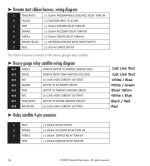
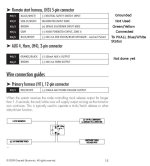
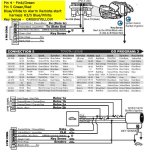
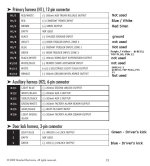
I have included what wires I used for what in the jpegs of the instructions.
 

Attachments
  • RemoteStart1.jpg
    RemoteStart1.jpg
    75.9 KB · Views: 10,223
  • RemoteStart2.jpg
    RemoteStart2.jpg
    70.1 KB · Views: 8,140
  • RemoteStart3.jpg
    RemoteStart3.jpg
    60.6 KB · Views: 3,483
  • pkall.jpg
    pkall.jpg
    104.8 KB · Views: 7,402
Last edited:
Register to hide this ad
I used multiple sources for the wiring, including 12volt. My understanding is that there are 2 ways to disarm the stock alarm, the unlock green wire, and the keysense wire. Both of which are being used. So that is part of the reason for my uncertainty.

It is a 2005 4runner limited. Also I didn't do any alarm programming other than getting the PKALL functional. Perhaps I need to set it to double pulse on the door unlocks for the stock alarm to disarm. The remote for the avital does unlock the drivers door correctly on a single press, though it does not do a full unlock on the 2nd press (though spamming unlock a bunch of times will randomly trigger full unlock).
 
Last edited:
It's been a while since I have installed one of these on a 4th gen but I will try to help.

First off, did you wire the PKALL using Connection 4 or 5? They are both on the same page which makes it confusing to some. Double check with a DVM that you are on the correct wire (You should see change by inserting the key) and secondly, see if the pkall is sending a disarm signal to the keysense wire. You may have to add a relay to get a proper ground on this wire. If it's not sending the signal or it's delayed, try hooking up the Factory Alarm Disarm wire. I think it's just enough of a delay to cause your issue. Also, change the setting to double pulse unlock in the menu so all the doors unlock.
 
Connection 4. Yeah, I agree that is confusing, it's just the way the online manual was. Everything below connection 5 on that page was not done.

I located a couple of posts on the tundra board that PKALL is delaying the keysense wire just enough that it can trigger the alarm. These guys at commando alarm seem to use a disarm pulse on that keysense wire with a diode and are using a pkall. I hadn't noticed that before.
 
Not yet, I will be down in the desert next week, so I will try to work on it then.

The H1/10 says this "This input comes from the factory set to 1 activation pulse. This means that it is necessary to have a single pulse on the white/blue wire for the remote start to activate or to deactivate. The same holds true for the remote control activation it is necessary to press the button once for the remote start to activate or deactivate."

So this should be an input wire as opposed to an output going to the pkall.

I have also read somewhere that the pkall doesn't touch keysense once the unit is programed, and since I have already programmed it I am considering just removing that wire from the pkall, but since I have it all soldered up I will probably just leave it.
 
Last edited:
yea, just try the h1 10 to the pkall , aslong you did the pkall install correct. key sense to key sense. and the other to other. should be a 3 wire hook up to the ignition, and the other 3 should be positive and ground, and that trigger wire to the h1 10.
I look at the idatalink install guide so it should be similar. they are more detailed and easy to follow.
 
Not yet, I will be down in the desert next week, so I will try to work on it then.

The H1/10 says this "This input comes from the factory set to 1 activation pulse. This means that it is necessary to have a single pulse on the white/blue wire for the remote start to activate or to deactivate. The same holds true for the remote control activation it is necessary to press the button once for the remote start to activate or deactivate."

So this should be an input wire as opposed to an output going to the pkall.

I have also read somewhere that the pkall doesn't touch keysense once the unit is programed, and since I have already programmed it I am considering just removing that wire from the pkall, but since I have it all soldered up I will probably just leave it.

u know what, i think im wrong, use the relay satellite harness blue wire pin 7 to pkall. unless u are using the d2d connection. i think at video around 6:20
<iframe width="960" height="720" src="https://www.youtube.com/embed/X1hF3YlYBy4?rel=0" frameborder="0" allowfullscreen></iframe>
 
Last edited:
change unlock output to double pulse. so that it unlocks the whole truck. single pulse will only unlock the driver door.
 
I haven't had time to mess with my sisters alarm until today.

I realized at one point the reason why the factory alarm was going off was due to the PKALL not sending keysense after starting. I started wondering if how I had hooked the pkall to the 5303L might be the problem, and if the 5303L might not continuing a signal after starting. Today I switch the blue/white going to pkall from 5303K and used a different circuit. I tapped into the remote start ribbon harness #7 blue wire and sent that to PKALL white/blue.

Success!!!

PKall now continues to send a continous signal and the factory alarm does not go off.

So DO NOT use H3/5 Blue/white as a while running status.
 
I haven't had time to mess with my sisters alarm until today.

I realized at one point the reason why the factory alarm was going off was due to the PKALL not sending keysense after starting. I started wondering if how I had hooked the pkall to the 5303L might be the problem, and if the 5303L might not continuing a signal after starting. Today I switch the blue/white going to pkall from 5303K and used a different circuit. I tapped into the remote start ribbon harness #7 blue wire and sent that to PKALL white/blue.

Success!!!

PKall now continues to send a continous signal and the factory alarm does not go off.

So DO NOT use H3/5 Blue/white as a while running status.

all good, did you change the unlock to double pulse?
 
I have not. My sister doesn't want the entire thing to unlock with one button, so at some point I will be hooking up H2/1 LIGHT BLUE (-) 200mA SECOND UNLOCK OUTPUT to complete the install. It's about 107 outside today, so I am going to wait until it's cooler to finish it.
 

Members online

Forum statistics

Threads
278,316
Messages
3,554,120
Members
248,016
Latest member
Advally Service

Trending content

Back
Top