Best "CarPlay" Implementation for 4th Gen?

LinuxHack3r

New member
First, let me state that I'm a huge Apple fan.

Now, my 4th Gen has the stock CD player. One of the reasons (of many, of course) for choosing a 4Runner (and a 4th Gen at that) was how easy it would be to swap out the head unit for an aftermarket. The previous two Ford vehicles I've owned have been more "complicated" and everything such as heated seats, etc all are controlled via the Ford Sync stuff.

So, I'm really, really wanting a CarPlay enabled head unit. I think I'm currently settled upon the Sony XAV-AX100, but I'm very open to suggestion.

Reasons I like the Sony XAV-AX100:
  • Physical Volume Knob
  • USB Port in Back, not Front
  • Well Recieved
  • Decently Affordable @ Crutchfield w/ Accessories for Installation

Now, optimally, I'd love to do wireless CarPlay but those head units are about $500-$600. If I can foreseeable create a "perfect scenario", I don't mind having wired CarPlay.

I have two current thoughts. I could either take the USB cable "back and down" from where the head unit is, and then pull the cable through that "little shelf" below the climate controls. Or, I could take it a bit further and pull it through the "little cubby" where the 12v Aux power is next the the shifter.

Either would likely require drilling a hole but that's about it. Anyone done anything like this?

I don't have steering controls and I don't have JBL speakers. I wouldn't mind at some point later down the road maybe upgrading my speakers, but for now I'm going to keep them stock.

Basically, I'm seeing $329.99 and I can have CarPlay in my 4Runner! But I'm really hoping for some input from people that have done similar things.
 
Register to hide this ad
I did exactly what you're thinking of. Only difference is that I have steering wheel controls. However, due to a previous owner doing a hack job on a previous headunit install, and cutting some of the stock wiring harness, my steering wheel controls don't work.

I installed the same headunit, primarily because I wanted carplay. Its a simple, great headunit. I've been happy.

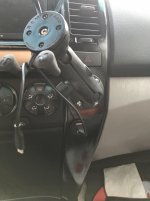
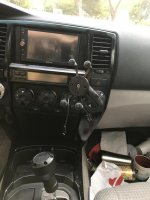
I had the USB wire running to the center console for a long time, before I finally routed a permanent USB port directly under my permanently installed Ram mount. I like my ending solution better than the routed USB wire, but if you're concerned about drilling holes, any of the options you mentioned would work well.

link for the USB port:
https://www.amazon.com/gp/product/B072KGMJ5N/ref=oh_aui_search_detailpage?ie=UTF8&psc=1

And some bad pics of my final install attached below.
 

Attachments

  • IMG_1671.jpg
    IMG_1671.jpg
    129.5 KB · Views: 9,050
  • IMG_1670.jpg
    IMG_1670.jpg
    128.2 KB · Views: 7,595
I had a xav200 and really liked it, but got a kenwood as a gift and really like that too. The volume knob and OEM look is awesome, but the interface and bigger screen on the kenwood is hard to beat. For CarPlay, my usb cable goes underneat my center console and I have an OEM USB port that I modded to fit in the slot next to the DAC button. And I love that there.

I ended up using an OEM USB plug that I’ve used in the past. But if you don’t have all the wires already, you can get a nice USB port that fits in that slot with no modification on amazon.
VQUtks4_d.jpg

For my phone, I use an iottie phone mount that’s mounted underneat the 4WD selector knob that works great for me. And I have a little 8” coiled cord that works perfectly from the center console to my phone mount. Super clean.
 
Last edited:
I did exactly what you're thinking of. Only difference is that I have steering wheel controls. However, due to a previous owner doing a hack job on a previous headunit install, and cutting some of the stock wiring harness, my steering wheel controls don't work.

I installed the same headunit, primarily because I wanted carplay. Its a simple, great headunit. I've been happy.

I had the USB wire running to the center console for a long time, before I finally routed a permanent USB port directly under my permanently installed Ram mount. I like my ending solution better than the routed USB wire, but if you're concerned about drilling holes, any of the options you mentioned would work well.

link for the USB port:
https://www.amazon.com/gp/product/B072KGMJ5N/ref=oh_aui_search_detailpage?ie=UTF8&psc=1

And some bad pics of my final install attached below.
I'm ready to do the RAM mount setup like this, but need to find the USB port that has inputs for USB.

I tried this:

https://www.amazon.com/Blue-Sea-Sys...8&qid=1545769763&sr=8-5&keywords=blue+sea+usb

Problem was the inputs seem to just be power, and I'm not sure how to word what I'm looking for other than it needs to be a USB in on the back and a USB out on the front.

Which USB port did you use?
 
I'm ready to do the RAM mount setup like this, but need to find the USB port that has inputs for USB.

I tried this:

https://www.amazon.com/Blue-Sea-Sys...8&qid=1545769763&sr=8-5&keywords=blue+sea+usb

Problem was the inputs seem to just be power, and I'm not sure how to word what I'm looking for other than it needs to be a USB in on the back and a USB out on the front.

Which USB port did you use?


you could use something like THIS

or.. THIS

may take some more searching if you want a dual round one that charges as well as audio. Reliability on some of these is spotty from what I've read.
 
I installed the Sony unit in my '07 T4R and it works well. The previous owner had installed a Kenwood unit so the steering wheel SWC unit was already there.

I wish Sony had put a USB port on the rear of the unit as I plan to replace one the plugs near the center console glove box with a USB plug. I still will - but I'll have the USB plugged into the face of the Sony unit.

The CarPlay works well - finally have Waze on the screen.
The existing back up camera and microphone (by windshield) work well.

Here's some links to what I bought

https://www.crutchfield.com/p_158XAV1000/Sony-XAV-AX1000.html

The Crutchfield guys were very helpful

https://www.amazon.com/gp/product/B071G3D8QD/ref=oh_aui_detailpage_o05_s00?ie=UTF8&psc=1

This guy takes you step by step thru the process. Worked EXACTLY as he shows. Kudo's - great job.

https://www.youtube.com/watch?v=2WDQcwDixDs

The steering wheel controls were the biggest challenge.

AF1QipOzmVWRkut2otH7T_AC2x4xkFRuWqnEGAd31Utr


AF1QipNZmZXm1UAZp8PC23wmqsITh37kBtNSXyHLBSxO


AF1QipPB_gj5oWcE7wxZ53YtBiHQuBN23KYPIz4N6UL5
 
Last edited:
I'm ready to do the RAM mount setup like this, but need to find the USB port that has inputs for USB.

I tried this:

https://www.amazon.com/Blue-Sea-Sys...8&qid=1545769763&sr=8-5&keywords=blue+sea+usb

Problem was the inputs seem to just be power, and I'm not sure how to word what I'm looking for other than it needs to be a USB in on the back and a USB out on the front.

Which USB port did you use?

The one I used is linked in my original message. I also have a bluesea one that cost about 3x as much, that I never installed, that would also work.

You need to look for a usb "extension" port. that's what pulls up what you are looking for.
 
I really like my Sony XAV-100. It is a great radio. I have been using it for a little over a year now. I tried the kenwood DMX-7704S before I got the sony radio. I did not like it. It was slow and had a defect with the screen, crutchfield let me swap it for the Sony. They do also have the XAV-200. I think it is the same but with CD player and Satellite radio capable.

I thought I would hate wired carplay and having to always plug my phone in but I have grown to like it. I never have to worry about a dead phone battery.

I bought mine from crutchfield and used the kit they recommended for steering wheel controls. It works great with the radio.
 
Last edited:
I had a xav200 and really liked it, but got a kenwood as a gift and really like that too. The volume knob and OEM look is awesome, but the interface and bigger screen on the kenwood is hard to beat. For CarPlay, my usb cable goes underneat my center console and I have an OEM USB port that I modded to fit in the slot next to the DAC button. And I love that there.

I ended up using an OEM USB plug that I’ve used in the past. But if you don’t have all the wires already, you can get a nice USB port that fits in that slot with no modification on amazon.
VQUtks4_d.jpg

For my phone, I use an iottie phone mount that’s mounted underneat the 4WD selector knob that works great for me. And I have a little 8” coiled cord that works perfectly from the center console to my phone mount. Super clean.

I know this os an old post but I have tried tirelessly to find the oem plug you used to no avail. Any details on part or from what toyota that is from? Love the stock look.
 
I know this os an old post but I have tried tirelessly to find the oem plug you used to no avail. Any details on part or from what toyota that is from? Love the stock look.

Glad to help. I didn’t really explain my USB port very well which is probably confusing. They’re all over on eBay and I’ve gotten multiple at junk yards at well.

To my knowledge, there is no OEM USB port that fits in that slot. I ended up cutting a sliver off of on the blanks with a razor and filling in the gap. In the past I attached it with some JB weld, but on my current set up, it’s just wedged in there. I also had to cut off a little bit of the sides on USB port to fit the slot. The side rails don’t line up with the console, so it had to be thinned up. I also used a razor for that, but am sure you could do it easier with a dremel or something. Mine is pretty snug.
 

Members online

Forum statistics

Threads
278,309
Messages
3,554,075
Members
248,016
Latest member
Advally Service

Trending content

Back
Top