CarTrimHome Android 9” Audio Replacement?

Got it, thanks. I usually just play music from a USB but wanted a larger screen that will work with Google Maps, so hopefully I'll be good. Enjoy that Raptor if you pull the trigger.


Like I've been saying from day one.. it's a good unit for some people and it may not work out for other people. Overall I'd give it a 6/10 from my personal experience. The price is great for what you get. I just didn't find myself using the apps as much as I thought I would use them.
 
Nah dude it's not bad it's just not for me. It just takes too long to load up apps for me. I only listen to stitcher and Spotify. For whatever reason it wouldn't load my stations... I rarely used Waze. I just found myself streaming off Bluetooth more than using the apps. At that point I was like wtf am I doing? It's not bad it's just not for me.


I literally jump in my truck and go. I don't wanna have to remember to put on my hotspot .... Everytime. So to me it wasn't practical

This is pretty spot on. I have an older android unit in my car and I pretty much only use it for radio because iPhones don’t automatically hotspot so you have to take time to connect. Also after a few years google maps won’t even load anymore so it’s pretty much useless. Although, the live background of a koi pond entertains my passenger.
 
So pardon my ignorance but we have iPhones. What does a main stream head unit have to offer that this one doesn't? I'm asking because I really don't know. If I buy the dongle for carplay, other than having to plug my phone in everytime I get in the car, what's the advantage/disadvantage? Guess I'm just too old to understand all this. If the unit will accurately mirror my phone, I guess that would be good enough.


Yes, I actually had a Ford Philco 8 track HiFi home stereo if any of you even know what that was...
 
Last edited:
So pardon my ignorance but we have iPhones. What does a main stream head unit have to offer that this one doesn't? I'm asking because I really don't know. If I buy the dongle for carplay, other than having to plug my phone in everytime I get in the car, what's the advantage/disadvantage? Guess I'm just too old to understand all this. If the unit will accurately mirror my phone, I guess that would be good enough.


Yes, I actually had a Ford Philco 8 track HiFi home stereo if any of you even know what that was...


If you have an iphone, Buy the dongle, on both cases. You need a usb for it to function, if you have an android, then as mentioned above, you will have a better experience for it to connect. I too said it since day one, this is the best unit out there, for ITS PRICE that you can get, for what it does. Will I change it down the path? In 1-2 years of Toyota doesn’t come out with a good unit, absolutely ...


Sent from my iPhone using Tapatalk
 
It says it's compatible with 10-19 4runners. I have an 11 SR5 with just the standard radio. No factory touch screen anything. Is this unit compatible? Plug and play?
 
It says it's compatible with 10-19 4runners. I have an 11 SR5 with just the standard radio. No factory touch screen anything. Is this unit compatible? Plug and play?


f18c5c017ce81d435813520cd563ec4a.jpg


Here is my OEM, compatible 100% please compare . I can’t tell you if it works , since I don’t know the 2011, if yours looks like this. Then yes, it is.’


Sent from my iPhone using Tapatalk
 
It says it's compatible with 10-19 4runners. I have an 11 SR5 with just the standard radio. No factory touch screen anything. Is this unit compatible? Plug and play?

Here is my OEM, compatible 100% please compare . I can’t tell you if it works , since I don’t know the 2011, if yours looks like this. Then yes, it is.’

Sent from my iPhone using Tapatalk

Early 5th gens were a bit confusing. There were, if I'm not mistaken, 5 head units available. This post has the back of the radios of some of the early (10-13) 5th gens radios. (There are 3 photos in the post. If only one is is showing refresh your browser.)
https://www.toyota-4runner.org/1359653-post20.html


I'm pretty sure you can make this aftermarket head unit work with any of the early 5th gens. Whether it is is going to be plug-and-play is a different story - you may have to splice/tap a few cables. Not sure what connectors come with the CarTrimHome aftermarket radio. Maybe those that have gotten it can post more detailed pictures of the included connectors.
You can also go to Metra Online | Welcome to Metra Auto Parts Online Warehouse and input your vehicle information. Check what connectors they say will fit your truck and compare them with the back of the radio.
 
Wanted to let folks know about some installation notes before I forget. I just finished most of my installation, although I'll go back later to install the new camera that came with the kit. A few things to share while they're still fresh in my mind:
1. The best place I've found to start your install is Android Head Unit Upgrade on 5th Gen 4Runner, Complete Dash Upgrade
The author is on the forum, I don't remember his handle (it's just some numbers I think). It's a great place to start, although I wouldn't call it comprehensive, and some of the things I encountered were different. For reference, I have a 2016 Trail with NAV but not JBL.
2. I had to remove a bracket from the side of my existing head unit to remove the wiring for the hazard light button. No big deal, just not mentioned in the other instructions. May not have been applicable for his year/model.
3. My OEM assembly had a plastic trim piece that basically creates the shelf that exists under the clock. I needed a #0 phillips screwdriver to remove this piece and transfer it to the new unit.
4. My hazard light button did not have a screw that needed to be removed prior to relocation.
5. I found it helpful to connect the wiring harness to the back of the new unit before installing the vents.
6. Next to each vent on the front side, there is a small vertically oriented trim piece with icons that show air flow/no air flow along the adjustment wheel. Mine were separate pieces that also required a #0 phillips to remove and reinstall. This would've been a lot easier if I figured it out while the vents were still loose. Removing the vents was kind of a pain, but eventually they popped loose without too much force. Most things worked themselves free without too much maneuvering. Happily, the new unit had holes in place to install these trim pieces.
7. The GPS tile has adhesive on the back. There is a good spot underneath the dash to adhere it behind the clock. The space isn't huge, but it's there.
8. There are 2 USB cables wired directly out the back of the new unit. I think this is a recent addition. I disassembled my USB jack next to the cig lighter and tried to get it to neatly mount there, but the cable is just a bit too large. It works well, but I am going to have to clean up the mounting method.


Quick first impressions are:
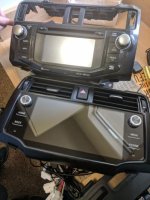
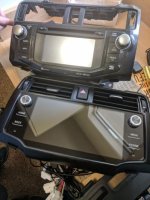
1. Holy cow this screen is nice and bright and big. In the attached picture you can see it seems like it's double OEM size.
2. I've booted it up twice so far and it was way faster than I thought it would be. I have had old Android units before, and this doesn't feel like one. My guess is that if you don't put too many apps on it, performance will probably hold up pretty well for a while (obviously it won't last forever).
3. The black color is not bad at all. I was worried it would have that super cheap faded ABS look, but it doesn't.
4. Sound quality from one minute of play is also better than I expected.
5. I am the Forrest Gump of my household and I was able to do this install without breaking any tabs or even scratching a knuckle in less than 90 minutes.
6. The OEM backup camera picture is not as crisp as before. I have not tried their camera yet.
7. I am putting a Verizon Jetpack in my glove box with the hope that it will automatically connect every time I start the car without having to worry about the phone. Fingers crossed.


As you can probably tell, I had pretty low expectations. $429 is not a lot of money for something like this. So far, I'm extremely happy. I'm about to make a 9 hour drive, so we'll see if it melts. I'll follow up again after I go through more of the functions.

 

Attachments

  • radio_resized.jpg
    radio_resized.jpg
    34.3 KB · Views: 1
Quick first impressions are:

Question if you don't mind. Is it possible to bluetooth connect a phone to the HU, play any audio on the phone from any app, and the audio will come through the HU speakers without having to do anything special on the HU? With entune, once we select bluetooth audio input then that's it, no repeat actions required each time entune boots up. I'm hoping this HU is the same.
 
I just want to bring to attention the heat that this unit makes. I believe there's not enough cool air to cool the unit. I can be completely wrong but it makes me feel uncomfortable. Please keep an eye on that
 
Wanted to let folks know about some installation notes before I forget. I just finished most of my installation, although I'll go back later to install the new camera that came with the kit. A few things to share while they're still fresh in my mind:
1. The best place I've found to start your install is Android Head Unit Upgrade on 5th Gen 4Runner, Complete Dash Upgrade
The author is on the forum, I don't remember his handle (it's just some numbers I think). It's a great place to start, although I wouldn't call it comprehensive, and some of the things I encountered were different. For reference, I have a 2016 Trail with NAV but not JBL.
2. I had to remove a bracket from the side of my existing head unit to remove the wiring for the hazard light button. No big deal, just not mentioned in the other instructions. May not have been applicable for his year/model.
3. My OEM assembly had a plastic trim piece that basically creates the shelf that exists under the clock. I needed a #0 phillips screwdriver to remove this piece and transfer it to the new unit.
4. My hazard light button did not have a screw that needed to be removed prior to relocation.
5. I found it helpful to connect the wiring harness to the back of the new unit before installing the vents.
6. Next to each vent on the front side, there is a small vertically oriented trim piece with icons that show air flow/no air flow along the adjustment wheel. Mine were separate pieces that also required a #0 phillips to remove and reinstall. This would've been a lot easier if I figured it out while the vents were still loose. Removing the vents was kind of a pain, but eventually they popped loose without too much force. Most things worked themselves free without too much maneuvering. Happily, the new unit had holes in place to install these trim pieces.
7. The GPS tile has adhesive on the back. There is a good spot underneath the dash to adhere it behind the clock. The space isn't huge, but it's there.
8. There are 2 USB cables wired directly out the back of the new unit. I think this is a recent addition. I disassembled my USB jack next to the cig lighter and tried to get it to neatly mount there, but the cable is just a bit too large. It works well, but I am going to have to clean up the mounting method.


Quick first impressions are:
1. Holy cow this screen is nice and bright and big. In the attached picture you can see it seems like it's double OEM size.
2. I've booted it up twice so far and it was way faster than I thought it would be. I have had old Android units before, and this doesn't feel like one. My guess is that if you don't put too many apps on it, performance will probably hold up pretty well for a while (obviously it won't last forever).
3. The black color is not bad at all. I was worried it would have that super cheap faded ABS look, but it doesn't.
4. Sound quality from one minute of play is also better than I expected.
5. I am the Forrest Gump of my household and I was able to do this install without breaking any tabs or even scratching a knuckle in less than 90 minutes.
6. The OEM backup camera picture is not as crisp as before. I have not tried their camera yet.
7. I am putting a Verizon Jetpack in my glove box with the hope that it will automatically connect every time I start the car without having to worry about the phone. Fingers crossed.


As you can probably tell, I had pretty low expectations. $429 is not a lot of money for something like this. So far, I'm extremely happy. I'm about to make a 9 hour drive, so we'll see if it melts. I'll follow up again after I go through more of the functions.

I can't view your picture, but would love to see a side by side of the old screen vs the new if anyone has one
 
I just want to bring to attention the heat that this unit makes. I believe there's not enough cool air to cool the unit. I can be completely wrong but it makes me feel uncomfortable. Please keep an eye on that


Has a fan inside and you can control that.. there is an option


Sent from my iPhone using Tapatalk
 
Question if you don't mind. Is it possible to bluetooth connect a phone to the HU, play any audio on the phone from any app, and the audio will come through the HU speakers without having to do anything special on the HU? With entune, once we select bluetooth audio input then that's it, no repeat actions required each time entune boots up. I'm hoping this HU is the same.
I didn't do it today, but it looks like yes, that should absolutely be possible. You can also download music to the head unit if you want, so you never have to connect anything.

I just want to bring to attention the heat that this unit makes. I believe there's not enough cool air to cool the unit. I can be completely wrong but it makes me feel uncomfortable. Please keep an eye on that
Will do. Just used it for 10 hours straight over 600+ miles without issue, so I figure that's a good start.

I can't view your picture, but would love to see a side by side of the old screen vs the new if anyone has one
Darn it, I'll try again.
 

Attachments

  • radio_resized.jpg
    radio_resized.jpg
    34.3 KB · Views: 2
Last edited:

Members online

Forum statistics

Threads
278,312
Messages
3,554,085
Members
248,016
Latest member
Advally Service

Trending content

Back
Top