SAC-CA-Runner
New member
I hope someone can help and confirm what I may have done or NOT done correct on my CB (Cobra 19DXIV) installation. I mounted it in the ashtray location and came out great. I used one 90 from the back of the unit to a 18' Antenna cable run along the drivers side. I ran it thru the vent in the back to another 90 and connected it to the Firestik 4' Tuneable Antenna.
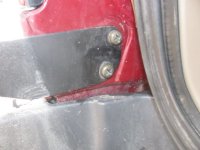
Now at the back (and this is where I need some clarification), I bought t4r4life's mount. I painted it silver (like my 4R), but I sanded it on the underneath portion of the mount where the antenna connector goes thru and where the bolt holes are near the hatch. I also sanded the car paint a little to get some good contact (Measured .003 with ohmmeter if I remember correctly). When I mounted the antenna I went Medium Spring then Quick Disconnect. Now underneath the mount it is metal on metal there. The plastic ring is ON TOP of the mount where the spring is.
One other thing...when I installed the radio and put power to it I hooked the Mic up and hit the transmit button. It states NOT to do that. Well...I read that a bit too late. I guess it can fry components in the radio? I didn't have an antenna or antenna cable hooked up at the time.
I bought an SWR meter and attempted to tune my antenna. ON ALL the channels 1/19/40 I was well in the red zone when I tuned it and then when I switched it from FWD/REF.
So my questions are:
1. Did I screw up my CB by hitting the transmit button with no cable/antenna attached?
2. Do I have it grounded improperly at the mount in the back?
I can't imagine my antenna wire is screwed up. It's fairly straightforward to run. And I've put in MANY stereos in my day. So I'm kinda stumped on this. And I know it's easy!!!!
Any help or pics of your rear mount would be appreciated. Or if someone in CO (Denver proper) would want to help it would be appreciated. I'd like to have it working before my drive out to CA on the 25th. Thanks and sorry for the long post.
Now at the back (and this is where I need some clarification), I bought t4r4life's mount. I painted it silver (like my 4R), but I sanded it on the underneath portion of the mount where the antenna connector goes thru and where the bolt holes are near the hatch. I also sanded the car paint a little to get some good contact (Measured .003 with ohmmeter if I remember correctly). When I mounted the antenna I went Medium Spring then Quick Disconnect. Now underneath the mount it is metal on metal there. The plastic ring is ON TOP of the mount where the spring is.
One other thing...when I installed the radio and put power to it I hooked the Mic up and hit the transmit button. It states NOT to do that. Well...I read that a bit too late. I guess it can fry components in the radio? I didn't have an antenna or antenna cable hooked up at the time.
I bought an SWR meter and attempted to tune my antenna. ON ALL the channels 1/19/40 I was well in the red zone when I tuned it and then when I switched it from FWD/REF.
So my questions are:
1. Did I screw up my CB by hitting the transmit button with no cable/antenna attached?
2. Do I have it grounded improperly at the mount in the back?
I can't imagine my antenna wire is screwed up. It's fairly straightforward to run. And I've put in MANY stereos in my day. So I'm kinda stumped on this. And I know it's easy!!!!
Any help or pics of your rear mount would be appreciated. Or if someone in CO (Denver proper) would want to help it would be appreciated. I'd like to have it working before my drive out to CA on the 25th. Thanks and sorry for the long post.