Cleaning MAF

Yeah, that's what I've noticed. I'd still like to get more though. I might be too optimistic though. Ha.

I couldn't remember what I was idling at before. Just threw it out there to see if it was more or less than others.

My '00 idles at 650, unless the A/C is on.
 
After cleaning those items I'm idling around 700 in "P". Just filled up today so hopefully I'll see some results soon.

I cleaned my TB and MAF this weekend as well-following JA's writeup. Glad I did too-the TB was filthy and I noticed an immediate change in performance. I too faced higher than usual idling until I went back and read the write up again (see below). This time I reset the ECU as JA recommended-idling seemed to be better on start up the remainder of the weekend. The first start up sounded like rig was gonna blow right through the house :biggrin2:


........To take advantage of the new found power obtained when cleaning the TB, I like to unplug the EFI relay at the start of this project. It is located in the engine compartment fuse box. Plugging it back in at the end of this 1/2 hour project is enough time to let the computer reset. [/I]
 
I cleaned my TB and MAF this weekend as well-following JA's writeup. Glad I did too-the TB was filthy and I noticed an immediate change in performance. I too faced higher than usual idling until I went back and read the write up again (see below). This time I reset the ECU as JA recommended-idling seemed to be better on start up the remainder of the weekend. The first start up sounded like rig was gonna blow right through the house :biggrin2:


........To take advantage of the new found power obtained when cleaning the TB, I like to unplug the EFI relay at the start of this project. It is located in the engine compartment fuse box. Plugging it back in at the end of this 1/2 hour project is enough time to let the computer reset. [/I]

Yeah, mine took longer to start after cleaning. I even let it sit for 10-15 minutes.

What kind of performance increase did you notice? Was your TB really dirty on both sides?

What are you idling at now?
 
I filled up again today. I got 17.5 MPG city after calculating for the bigger tires.

That's fine with me I guess. I don't think it's realistic to get much better.
 
So, did your mileage improve? (Just curious)

And thanks for the pix - I have the 1998 Limited as well and was wondering about the MAF sensor.
 
I took mine all apart and cleaned it back in May and noticed that it idled lower and has ever since. In fact there for a few weeks it would occasionally die and have to be restarted because the idle was low. I think I'm idling around 700 now without AC on...one thing that site says to do is pull the negative battery terminal off while you clean it all up so that the ECU gets fresh readings....not sure that helped at all but I did that anyway as well.

Just my experience with it since we have the same year rig....:beer:
 
I really haven't noticed anything. Maybe a little lower idle, but not quite to the extreme of FoneRunner.

I'm getting pretty low mileage now. Like 15.5-16.5. I might take my rack off and see what happens.

Pulling the negative terminal would probably be good. I didn't because I didn't want to reset all the electronics.
 
Here are some pictures. You can see the blackish bulb in the top right corner. That's about the only thing I see to clean.

DSCN0718.jpg~original


DSCN0714.jpg~original


can i get the part number of the MAF?
 
I cleaned my MAF sensor today and just wanted to add a photo to this thread that shows the actual sensor. It looks like 2 tiny resistors.

4runner-049.jpg
 
96-98 has different style maf sensor

I just cleaned my '99 MAF. It is just a little component between the airbox and resonator. Two screws and it pops out. Sprayed it with CRC brand cleaner and reassembled. The dealer had done it a while ago but now I know it's clean!
 
How did those screws come out for you? The guide said you would strip them no matter what so I'm a little apprehensive


I can't remove mine at all so I take the air box out and shove the MAF cleaner straw into the MAF and spray away. lots of dark crud came out the first time I did this.

the 2 screws were a PITA. one stripped out the other barely made it.
 

I HIGHLY recommend the procedure linked above for cleaning the MAF. Dismounting the air filter box so you can rotate on its side for direct access to the MAF screws is worth the minute it takes to do so. Unfortunately I began trying to remove the screws with the filter box in place using a stubby screwdriver and started stripping out the screw head before I realized how I should be working on it.


TWO RECOMMENDATIONS:

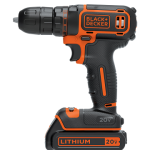
1) Use a adjustable torque drill/screwdriver to break the screws loose. I started with the lowest torque setting and stepped it up after a few seconds counter rotation was applied. I was able to get out the screw that had started to strip, think the ratcheting impulse force from the drill helped free it from being locked in placed. THIS WILL WORK BETTER THAN A HANDHELD SCREWDRIVER!!!

2) You don't need to disconnect the electrical connector from the MAF! Just leave it attached to the wiring harness and clean it under the hood with a towel underneath the sensor. I was struggling to extract the electrical connector and realized that was unnecessary.
 

Attachments

  • drill.png
    drill.png
    115.3 KB · Views: 1,457
Last edited:
I cleaned my MAF sensor today and just wanted to add a photo to this thread that shows the actual sensor. It looks like 2 tiny resistors.

4runner-049.jpg

Yes, that is what my MAF looks like on my 1996 T4R. I was a bit surprised because I was expecting to see one with 2 little wires with bulbs on the end OR one with a screen type. Used CRC MAF cleaner and sprayed the heck out of it.
 

Members online

Forum statistics

Threads
278,307
Messages
3,554,049
Members
248,016
Latest member
Advally Service

Trending content

Back
Top