Custom dash mount for phone, iphone, iPad, or tablet

JMS87

New member
DIY custom iPhone, iPad, phone, or tablet dash mount. Its designed to be easy to slide your phone in and out, in the ideal location for using a navigation app, and to be barley noticeable when not in use.

Purpose was to build a discrete mount for my phone so I could use google maps for navigation, rather than the built in nav.

What about built in nav, is it any good? As any 4runner w/ navi owner will tell you, its absolute rubbish. Using it is awkward, slow, and frustrating, and lets be honest, nothing will ever beat out google maps except for a newer version of google maps.

But James, if you want a mount for iPhone why not just buy one of the hundreds of options available on Amazon for super cheap, like one of those suction cup style ones?

Because I've used a lot of them over the years and never liked any of them. My most recent one was a low profile suction cup mount that could stick on the windshield or on any flat area of the dashboard. It worked great but left much to be desired. As with any mounting device you have to stick it on, or install it or whatever when you want to use it. Then you have the choice of leaving it in place for the next time you need it, or removing it to clean up the look of your car. Personally I hate leaving the suction cup thing on my windshield or dash because it looks cheap, and it makes you look like your someone who gets lost a lot and needs navigation. But its too much of a hassle to take it down every time your done using it, just to put it back the next day.

So I wanted a permanent low profile dash mount in an ideal location for viewing directions while driving. Because this one sits higher than the built in nav you can actually see it easier while driving, you barely have to take your eyes off the road to see it.

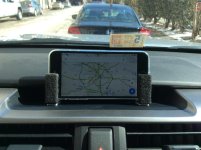
Here is a picture of the final product:
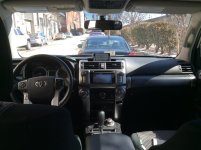

zoom out.jpg

Now for the write up.

Its always nice having a dremmel but you don't need it for this project.
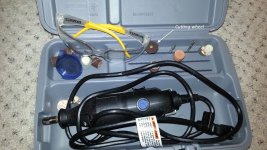
0-1.jpg


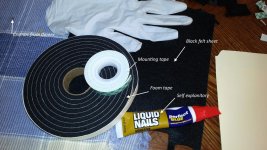
Here are some supplies you need


0.jpg


Start with 4 metal L brackets, cut 2 of them to size, and paint them black.
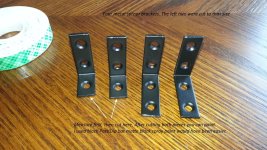
1.jpg


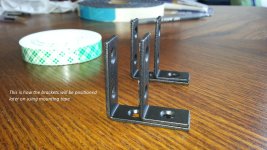
This shows how they will be positioned. Width will depend on your phone.
2.jpg


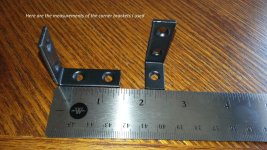
Here is another picture of the bracket measurements. These things are available at home depot and lowes.

3.jpg


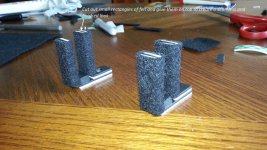
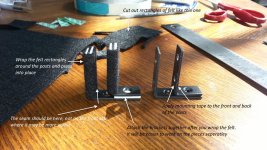
This shows how you put it all together using mounting tape and black felt. Cutting the felt to fit was the hardest part. It takes a few tries to get it right. Just keep cutting and trimming and have some patients.

4.jpg


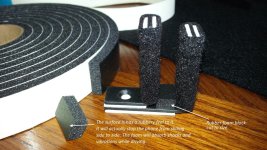
Now cut the rubber foam tape. Just a little block that will fit in between the brackets. This piece is essential because its what provides the shock absorbency while driving. It also provides grip to keep your phone from sliding left to right inside the holder.

5.jpg


Continued.....
 

Attachments

  • 0.jpg
    0.jpg
    140.9 KB · Views: 4,104
  • 1.jpg
    1.jpg
    147 KB · Views: 3,892
  • 2.jpg
    2.jpg
    139.1 KB · Views: 3,825
  • 3.jpg
    3.jpg
    144.2 KB · Views: 3,756
  • 4.jpg
    4.jpg
    145.5 KB · Views: 3,812
  • 5.jpg
    5.jpg
    143.3 KB · Views: 3,877
  • 0-1.jpg
    0-1.jpg
    140.7 KB · Views: 4,243
  • zoom out.jpg
    zoom out.jpg
    132.5 KB · Views: 12,166
Last edited:
Register to hide this ad
Continued...

6.jpg


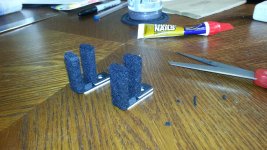
Then cut little pieces of felt to ever the top of the brackets for a cleaner look. Liquid nails is not the best glue for the job but its all I had. Use some kind of weaker glue thats easier to work with.

7.jpg


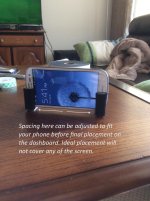
This shows the phone from the front and how it would look.


photo 2.jpg


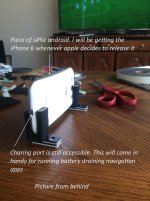
Here it is from behind. Ignore my atrocious spelling and grammatical errors, which are numerous though out this post and in the pictures.


photo 1.jpg
 

Attachments

  • 7.jpg
    7.jpg
    143.8 KB · Views: 3,648
  • photo 2.jpg
    photo 2.jpg
    104 KB · Views: 3,829
  • photo 1.jpg
    photo 1.jpg
    114 KB · Views: 3,729
  • 6.jpg
    6.jpg
    141.4 KB · Views: 3,656
Last edited:
Continued...

Again here is pretty much what it looks like. And remember you can change the dimensions easily to fit any size phone or tablet. When you switch from a iPhone 5 to a iPhone 6 or whatever, you just peel off the mounting tape, adjust, and stick new mounting tape down. I have changed mine out a few times now, and it only takes 5 minutes or so.

The dashboard space is big enough to fit an iPad mini on its side, maybe an iPad, I'm not sure.

zoom out.jpg


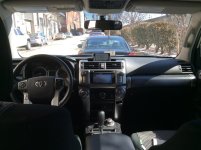
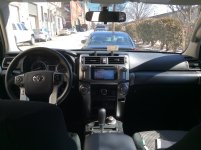
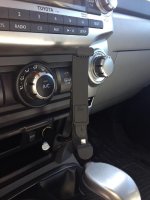
Here is what it looks like when your not using it. Its not that noticeable, which is what I wanted.


zoom out empty.jpg


Close up pic

Close up.jpg
 

Attachments

  • Close up.jpg
    Close up.jpg
    132.9 KB · Views: 10,218
  • zoom out empty.jpg
    zoom out empty.jpg
    134.3 KB · Views: 4,130
  • zoom out.jpg
    zoom out.jpg
    132.5 KB · Views: 6,122
Last edited:
if your going for cheap which I think this why you have this thread, otherwise that reminds me of my ibolt for Samsung S3.

edit: forgot to add, your mount is pushing on the home button, that will get annoying.

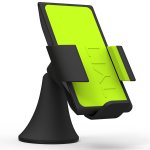
or you could use one of these tylt vu qi :
 

Attachments

  • tylt_vu.jpg
    tylt_vu.jpg
    37.8 KB · Views: 3,559
The replies above were posted before before I actually finished my write up or posted all the pictures. I didn't really expect any to reply within hours to a thread that was 1/8 completed. Kinda caught me off guard.

Now that the write up is finished I would welcome anyone to read and enjoy and use it on their own runner; or to offer suggestions on how to improve the design, use different materials, different ideas, that sort of thing. This was originally meant to be a prototype that I would later improve upon but my creativity has run out.

Honestly I love this iPhone holder and use it all the time to hold my phone, even if Im not running GPS on google maps. It beats putting my phone in the cup holder... which I also still do from time to time.
 
The replies above were posted before before I actually finished my write up or posted all the pictures. I didn't really expect any to reply within hours to a thread that was 1/8 completed. Kinda caught me off guard.

Come on, you know that everyone here is standing by to comment on and criticize everything posted.
 
I just don't get the attack on the on-board Nav. I know it's a complicated system . . . you push the little button on the steering wheel and tell it where you want to go. I think this is one of the best systems Toyota's made to date . . . it actually understands English, navigates around traffic, works with my audio on and displays on a split screen so I can see my artist info. Tells me there's a traffic jam in 1 mile, suggests a great restaurant nearby and displays local fuel prices. :noidea:

Not trying to rain on your parade, however blocking the center data display, trying to navigate using the little 4x2" screen, having to turn my tunes down to hear what it's saying, running the battery down on my phone and trying to push the little buttons on iphone when I want it to pause while I pull off the highway . . . . or push the little button on my steering wheel.:lookout:

Cute little stand though! :hiding:

FYI . . . iphone6 been out since last year! Old post or just copied?
 
Last edited:
I just don't get the attack on the on-board Nav. I know it's a complicated system . . . you push the little button on the steering wheel and tell it where you want to go. I think this is one of the best systems Toyota's made to date . . . it actually understands English, navigates around traffic, works with my audio on and displays on a split screen so I can see my artist info. Tells me there's a traffic jam in 1 mile, suggests a great restaurant nearby and displays local fuel prices. :noidea:

Not trying to rain on your parade, however blocking the center data display, trying to navigate using the little 4x2" screen, having to turn my tunes down to hear what it's saying, running the battery down on my phone and trying to push the little buttons on iphone when I want it to pause while I pull off the highway . . . . or push the little button on my steering wheel.:lookout:

Cute little stand though! :hiding:

FYI . . . iphone6 been out since last year! Old post or just copied?


Haha yeah I made this thing a long time ago but didn't get around to posting it till recently.

And your right (sort of) about the on board nav screen system. I shouldn't say that its "bad" in general. What I mean is its bad when compared to a iPhone, iPad, android, etc. running google maps. Lets put it this way: If you walked into Best Buy to purchase a tablet and they had two choices, an iPad or a Toyota entune tablet (which would be the touch screen thingy as a stand alone tablet product), no one in their right mind would buy a Toyota Entune tablet. Its not a good product when you compare it to other touch screen devices capable of running apps. And if you went in to buy a gps product: you'd probably purchase a garmin before purchasing a Toyota entune nav product. It may be pretty good when compared to other car manufacturers versions of entune though. And I'm sure its better then the older Toyota nav screens.

So on the 2014s the only thing that is in center dash area is the clock. I know on the 10-13s they have time, compass, and other info in that same spot. Blocking the clock is something I can live with.

And you don't have to turn down your radio to hear it. I usually listen to pandora using the entune app with my phone bluetooth turned on. When directions come up the car automatically turns down the music, gives you the directions, then turns the music back up. So you still get turn by turn directions through your car speakers.
 
So on the 2014s the only thing that is in center dash area is the clock. I know on the 10-13s they have time, compass, and other info in that same spot. Blocking the clock is something I can live with.

This may vary by model. My early 14 Trail (bought last January) has time, temp, compass direction, and range or mpg on that display. Mine has the basic Entune system, so I have a Garmin on the dash above there.

What you did is a good solution though. I'm just tall enough I'm a stick it on the top of the dash kind of guy. :wink2:
 
So on the 2014s the only thing that is in center dash area is the clock. I know on the 10-13s they have time, compass, and other info in that same spot. Blocking the clock is something I can live with.
.

My 2014 displays MPG, Range, Temp and clock in that center display . . .I wouldn't block.
 
so how do you get around the right mount pad covering your home button?

does it accidently push on the home button on bumps?

otherwise nice setup.

Good question.
No accidental button push even when off roading. Same thing with the samsung galaxy, no accidental pressing.

When I put my phone in the mount (or any mount) I really don't ever use the home button. I hold it in my hands, find the location I want using both thumbs to type, press go, then slide it in. If you need to make changes on the fly, then pop it out at the next red light and use both hands again to hold it, and type a new destination. No sense poking at it with one index finger when using thumbs and fingers while holding it is far easier.

Another strike against built in nav... you have to poke at it with one finger
 
Should of just bought a cigarette lighter attachment, you can find them for almost every phone, looks sleek and it charges the phone. I think i found mine on eBay for $30.
 

Attachments

  • IMG_0353.jpg
    IMG_0353.jpg
    60 KB · Views: 3,445
proclip mounts for 4runners..

i've used these in the past, you get the custom mount for your vehicle, and attach the proper mount for your phone to that.

the mount you've created won't work in my trail model as its blocking a display, and offroad, my phone would bounce out of that thing in seconds

Toyota*4Runner*2014*Dashboard Mounts*-*ProClip USA
 

Members online

Forum statistics

Threads
278,309
Messages
3,554,070
Members
248,016
Latest member
Advally Service

Trending content

Back
Top